
Vandaag of morgen in huis

Kwaliteit gegarandeerd

Welkomstaanbiedingen ontgrendelen: GRATIS bezorging | Tot 80% korting | Gratis 30 dagen JoyPlus-proefperiode
Download de app
A monitor arm can free up desk space and give you more flexibility when positioning your screen. However, not every monitor mount is suitable for every workspace. A screen that slowly drops, a clamp that does not fit the desktop properly or a missing VESA connection can quickly lead to extra costs.
For home workers, gamers, office professionals, receptionists and IT managers, three pitfalls are particularly important:
An adjustable monitor arm is therefore only a good choice when the screen, load capacity, attachment method and range of movement are all compatible.
First check the size and weight of your monitor. Manufacturers usually provide these figures for each screen or arm. With a dual monitor arm, you must also check whether the load capacity applies per monitor.
Examples from the range:
Take the weight of the screen without its original stand into account. With a curved screen, the weight distribution may be different. So do not just look at the screen size in inches; also check the maximum weight and the stated screen shape.
A VESA monitor arm is attached to the mounting holes on the back of the screen. The standard patterns in this product selection are 75 x 75 mm and 100 x 100 mm. Measure the distance between the horizontal and vertical holes before ordering.
Is there no VESA connection, or does the pattern differ? An adapter plate may then be required. Also check that the supplied screws are suitable for your monitor. Never force a screw; using the wrong length could damage the screen.
A simple monitor stand often offers height adjustment and limited tilting. A monitor arm for a desk generally provides greater freedom of movement, for example:
A gas spring monitor arm generally makes height and depth adjustment easier, but it does require a suitable screen weight. A screen that is too light or too heavy can throw the arm off balance. Also check whether you need a desk clamp, top-fix clamp, grommet mount or wall adapter.
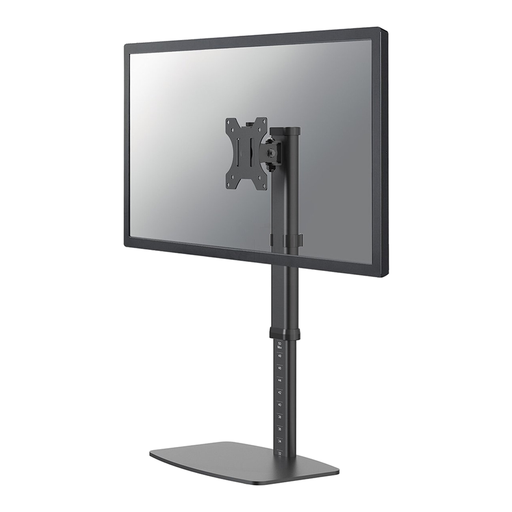
Why this suits the profile: For one standard screen and a tidy workspace, this monitor stand provides a practical starting point without a dual-arm construction.
The product specification clearly states a limit of 30 inches, 6 kg and VESA 75 x 75 or 100 x 100 mm. This makes the key compatibility checks clear before you buy.
Height adjustment, tilting, swivelling and 90° pivot; the manufacturer states a 5-year warranty.

Why this suits the profile: For a larger flat or curved monitor, load capacity, range of movement and an adjustable gas spring are important buying criteria.
The specification explicitly states support for flat and curved screens, up to 35 inches and 9 kg. The 180° stop helps prevent contact with a wall or partition.
Gas spring height adjustment from 21.5 to 49.5 cm, depth adjustment from 7 to 52.5 cm and integrated cable management.
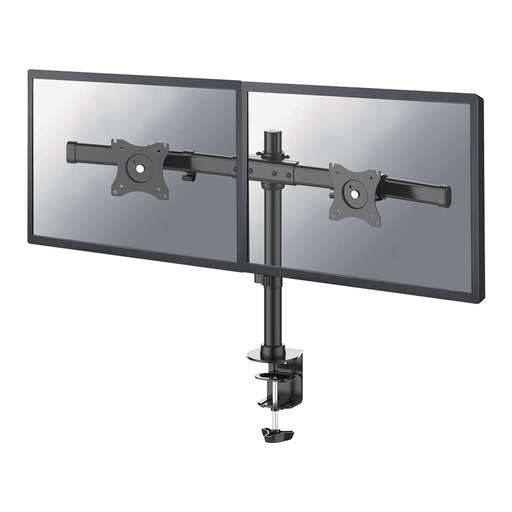
Why this suits the profile: For home workers or office spaces with two similar screens, this dual monitor arm is designed to save space and position both screens together.
The load capacity is specified as 10 kg per screen. The arm supports two screens from 10 to 27 inches and can be attached with a clamp or grommet mount.
Height adjustment from 0 to 45 cm, tilting, rotating and swivelling; cable management keeps the connections neatly arranged along the arm.

Why this suits the profile: For multitaskers, trading setups, video editing or IT workspaces with three screens, a triple monitor arm is a practical choice.
The product specification states three screens, a maximum of 6 kg per screen and VESA 75 x 75 or 100 x 100 mm. According to the product information, a welded base supports the construction.
Quick-release attachment, full movement with tilting, rotating and swivelling, plus cable management.
We have compiled a complete, up-to-date list of products that fully meet these strict selection criteria and the applicable European safety regulations.
Mount the monitor arm on a flat, sturdy desktop. Tighten the clamp or grommet mount securely before attaching the screen. With a gas spring monitor arm, the tension must be adjusted to the screen weight. After installation, check that the screen does not rise or drop on its own.
Leave enough slack in the cables as they run along the arm. A cable that is pulled tight can restrict freedom of movement or put pressure on the connections. Check the screws and attachment points again after a few weeks, particularly if you move the screen frequently.
No. The monitor must have a suitable VESA pattern, usually 75 x 75 or 100 x 100 mm, and fall within the specified size and weight range. Also check that the screws are suitable and that the back of the screen is accessible.
That depends on the product specification. Some models are suitable for both flat and curved screens, such as the Neomounts DS70-250BL1. With an ultrawide or curved monitor, pay particular attention to the maximum weight, screen diagonal and VESA position.
Its service life depends on the materials, load, installation and how often the arm is adjusted. Do not exceed the load capacity and check the attachment points regularly. The stated warranty varies by product; some Neomounts models have a 5-year manufacturer’s warranty, while other products are covered by at least the statutory EU guarantee.
