
Vandaag of morgen in huis

Kwaliteit gegarandeerd

Welkomstaanbiedingen ontgrendelen: GRATIS bezorging | Tot 80% korting | Gratis 30 dagen JoyPlus-proefperiode
Download de app
A monitor arm can free up desk space, position your screens more effectively and keep cables tidy. However, not every monitor arm is suitable for every screen or desk. The wrong combination may wobble, offer insufficient adjustment or simply not fit.
The main pitfalls are clear:
Do not just look at the diagonal measurement in inches. Check the weight of the monitor without its original stand and compare it with the load capacity per arm. With a dual monitor arm, you need to check the maximum weight per screen; the same applies to a monitor arm for 3 screens.
Examples from the range:
A large or curved screen can create additional leverage because of its shape. Always check the individual specifications of the model.
VESA refers to the distance between the screw holes on the back of the screen. Many models in this selection use 75 × 75 mm or 100 × 100 mm. Measure the horizontal and vertical distance between the centres of the holes before ordering.
If your monitor has a different hole pattern, you may need a suitable VESA adapter plate. A VESA monitor arm is therefore not automatically universal for every screen.
A desk monitor arm is usually attached with a desk clamp or a grommet mount. A clamp is convenient if you do not want to drill a hole in the desk. A grommet mount may be a good option when the back of the desk is unobstructed and you want a fixed mounting solution.
Also consider the adjustment range:
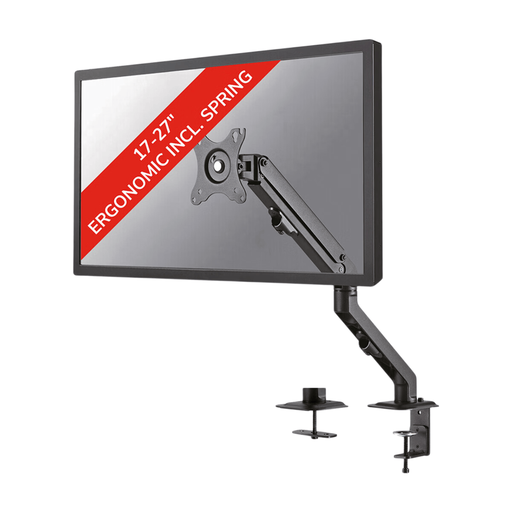
Why it suits this profile: A practical choice for one standard monitor in a home office. The arm comes with a desk clamp and grommet mount, allowing you to choose the mounting method that best suits your desk.
The product specifications clearly state the range of 17 to 27 inches, a maximum of 7 kg, and VESA 75 × 75 and 100 × 100 mm.
Tilts up to 130°, rotates up to 360°, swivels up to 180° and offers spring-assisted height adjustment.

Why it suits this profile: Designed for users with a large curved or ultrawide monitor who need a sturdy adjustment range for work, design or gaming.
The model distinguishes between flat and curved screens: up to 18 kg for flat screens and 14 kg for curved screens.
Gas spring height adjustment from 26,1 to 55 cm, cable management and a 180° stop mechanism for positioning the screen close to a wall.

Why it suits this profile: Suitable for multitaskers, traders, programmers and gamers who want to position three screens side by side.
The load capacity is specified as 6 kg per screen, and the model is designed for three screens from 10 to 27 inches.
Quick-release mounting, manual height and depth adjustment, cable management and a 180° stop.
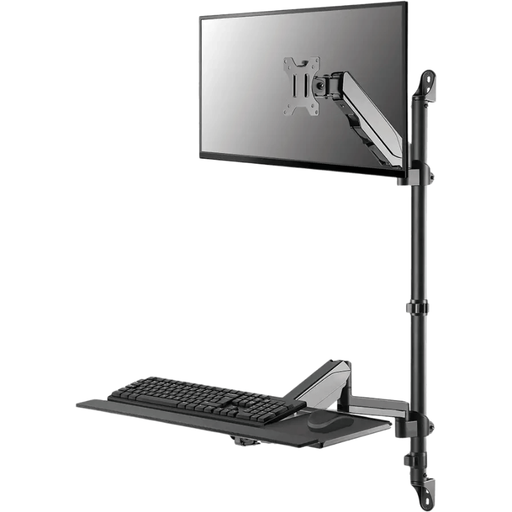
Why it suits this profile: A solution for situations where desk mounting is not wanted or possible, and you want to mount a screen with a keyboard tray on the wall.
The product specifications state a maximum screen load of 9 kg, or 6 kg for curved screens, plus a separate 1 kg limit for the keyboard tray.
Gas spring adjustment from 44 to 95 cm, wall mounting, keyboard tray and support for VESA 75 × 75 and 100 × 100 mm.
Before mounting, check that the desk or wall is suitable for the total load. Do not mount a wall adapter on plasterboard without suitable structural support and fixings. Tighten all screws according to the instructions and check again after a few days to ensure that all connections are secure.
Adjust a gas spring to the actual weight of the screen. Guide cables through the cable clips, but leave enough slack for rotation and swivelling. With three screens, it is sensible to position the middle monitor first and then align the outer screens.
A monitor riser is a simpler alternative if you mainly want extra height. The Neomounts NSMONITOR20 supports up to 10 kg and is adjustable from 4,6 to 16,8 cm. For a higher load capacity, the NSMONITOR40 is an option with four height settings between 7 and 13 cm and a stated maximum load of 25 kg.
We have put together a complete, up-to-date list of products that fully meet these strict selection criteria and the applicable European safety regulations.
No. Check the VESA hole pattern, the screen weight and the arm’s maximum screen size. Without a suitable VESA connection, an adapter plate may be required. A monitor without VESA holes is often better suited to a monitor stand or monitor riser.
It can be, provided the screen falls within the specified weight range and the spring tension is set correctly. Also check that the cables have enough room to move and do not become taut when the screen is rotated.
Its lifespan depends on the load, installation and how often the system is adjusted. Periodically check the clamp, screws, VESA mount and moving parts. Always follow the warranty and maintenance instructions for the specific product.
