
Vandaag of morgen in huis

Kwaliteit gegarandeerd

Welkomstaanbiedingen ontgrendelen: GRATIS bezorging | Tot 80% korting | Gratis 30 dagen JoyPlus-proefperiode
Download de app
A monitor arm can free up space, let you position your screens flexibly and keep cables tidier. But a purchase isn’t automatically the right one just because a product is described as “adjustable” or “ergonomic”. The right choice depends on your screen size, its weight, the mounting method and the space available on your desk.
A monitor arm for a 32-inch screen isn’t necessarily suitable for every 32-inch monitor. The weight of the screen is just as important. A heavy monitor may be within the stated size range but still be too heavy for the arm. So always check the maximum weight capacity per arm, including any stand or accessories.
Weight distribution also matters with ultrawide and curved screens. A monitor arm for a 49-inch screen needs to be specifically suitable for this type of display. Some models have a reinforced VESA head or are described in the product information as being designed for curved screens.
Most monitor arms in this selection use a VESA pattern of 75 × 75 or 100 × 100 mm. Measure the distance between the mounting holes on the back of your monitor before ordering. If your screen has a different pattern, you may need an adapter plate. Also check that the VESA screws are suitable for your monitor.
A monitor arm with a desk clamp concentrates the weight in one place. This can make it less suitable for a thin, fragile or uneven desktop. A grommet mount can be an alternative if your desk has a suitable opening.
Also consider how close your desk is to the wall. An arm with long joints may hit a wall or partition. A 180° stop limits the swivel towards the wall on certain models, but it doesn’t replace a secure installation.
A single monitor arm is all you need for one screen. If you work with several programmes, you could choose a dual monitor arm or a monitor arm for 2 screens. For two screens, always check the maximum weight per arm, not just the total weight capacity.
A monitor arm for 3 screens is useful for dashboards, financial applications and multitasking. A monitor arm for 4 screens calls for extra attention to desk stability: four screens weighing up to 6 kg each add up to 24 kg, not including the arm.
An adjustable monitor arm lets you change the height, depth, swivel and tilt. If you adjust your screen frequently, a gas spring monitor arm is a useful choice. The gas spring supports the weight as you adjust the screen, but the tension needs to suit the actual screen weight.
A model with a coil spring works on the same practical principle. For a fixed workstation, manual height adjustment may be enough. Pay particular attention to the height range and depth: an arm that extends too far forwards can still take up a lot of desk space.
A monitor arm with cable management routes display, power and USB cables along the arm. Check that there’s enough slack when you swivel the screen or pull it forwards. Cables that are too taut can put strain on the connections.
For a desk close to the wall, short upper arms and a stop mechanism are practical features. An ultrawide monitor needs enough depth and a suitable weight capacity.
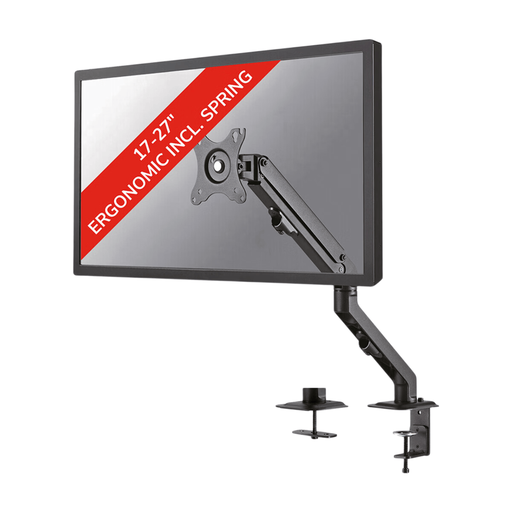
Why it suits this user: For one standard screen and a first home-working setup, this model offers a straightforward solution with a desk clamp and grommet mount.
The specifications list a weight capacity of 7 kg, a screen size range of 17 to 27 inches, and VESA 75 × 75 and 100 × 100 mm. This lets you check the size and weight in advance.
Spring-assisted height adjustment from 11 to 42 cm, 360° rotation and integrated cable clips.

Why it suits this user: This model is designed for a large, curved ultrawide monitor and is a good fit for a fixed workstation used for intensive computing.
The product information gives separate limits: up to 18 kg for a flat screen and 14 kg for a curved screen. This means you won’t be relying on screen size alone as your only criterion.
Gas spring adjustment from 26,1 to 55,5 cm, support for screens up to 49 inches and a 180° stop for positioning close to a wall.
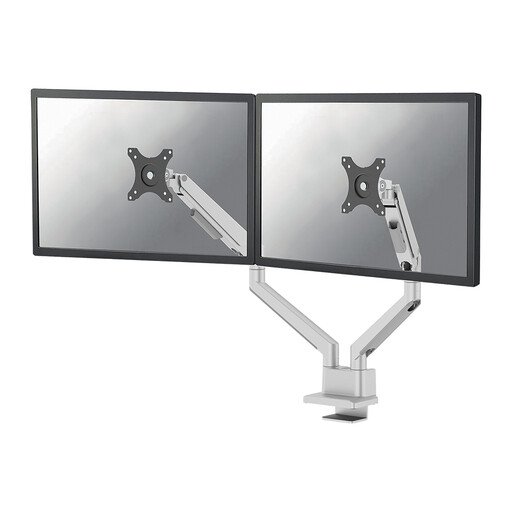
Why it suits this user: For business users, programmers and creative professionals who work with two screens and regularly adjust their viewing angles.
The stated maximum is 9 kg per screen, and the model supports two screens from 17 to 32 inches. The Topfix clamp or grommet mount lets you check the mounting method in advance.
Gas spring height adjustment from 21,5 to 49,5 cm, 360° rotation, cable management and a 180° stop.
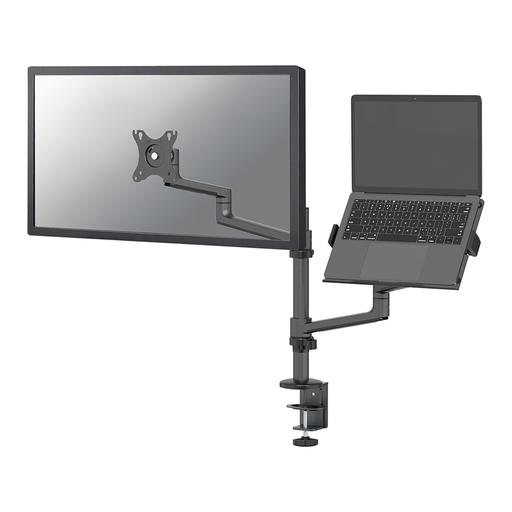
Why it suits this user: For home workers who want to combine a laptop and external screen at one workstation, without needing a separate laptop stand beside the monitor arm.
The product details give separate weight limits: up to 8 kg for the screen and 5 kg for the laptop. VESA 75 × 75 and 100 × 100 mm are also listed.
Suitable for screens up to 27 inches and laptops up to 17,3 inches, with manual height and depth adjustment and internal cable management.
We’ve put together a complete, up-to-date list of products that meet these strict selection criteria and the applicable European safety regulations.
A monitor stand without a clamp may be more practical if you don’t want to drill into your desktop or if you move your monitor regularly. For multiple screens or a tidy desk, a VESA monitor arm generally offers more adjustment options. A simple riser, such as an adjustable ergonomic monitor stand, may be all you need for a laptop or monitor that simply needs to sit higher.
No. Check the VESA pattern, weight and supported screen size. The most common patterns in this product selection are 75 × 75 and 100 × 100 mm. If your screen has a different pattern, you may need an adapter.
It depends on how you use it. If you adjust your screen frequently, you’ll generally get more out of gas spring support than if you keep it in a fixed position. Be sure to check the minimum and maximum weight capacity and set the tension correctly.
Its lifespan depends on the materials, weight load, installation and how often you move the arm. Keep the screen within the stated limits, check the fixings regularly and stop using the arm if it becomes loose, damaged or misshapen. Warranty terms vary by model, so check the information on the product page.
