
Vandaag of morgen in huis

Kwaliteit gegarandeerd

Welkomstaanbiedingen ontgrendelen: GRATIS bezorging | Tot 80% korting | Gratis 30 dagen JoyPlus-proefperiode
Download de app
A monitor arm or monitor stand can free up desk space, organise cables and position your screen at a comfortable height. But buying one doesn’t guarantee a good result. An arm that can’t support enough weight, a stand without the right VESA mount or a base that takes up too much desk space can quickly become frustrating.
For home workers, gamers, students and office professionals, there are three main pitfalls to watch out for:
Always check both figures. A monitor arm for 1, 2 or 3 screens will usually list a maximum screen size and a maximum weight per screen. For example, the Neomounts FPMA-D550DD3BLACK is designed for three screens from 13 to 27 inches, with a maximum weight of 6 kg per screen. The Neomounts FPMA-D700D3 supports three screens from 10 to 27 inches, weighing up to 8 kg each.
Don’t just take the weight of the monitor itself into account. A webcam, soundbar or other accessory attached to the screen can add extra load. If in doubt, choose a model with plenty of capacity to spare.
For larger screens, a monitor stand for 32-inch screens or a 32-inch monitor arm is more practical, provided it can support the weight. The Neomounts FPMA-D550DDBLACK is designed for two screens up to 32 inches and supports a maximum of 8 kg per screen.
VESA refers to the distance between the four screw holes on the back of the screen. Many monitor arms use:
Measure the distance horizontally and vertically, or check your monitor’s manual. Also check where the mount is positioned. On some screens, it’s partly covered by the built-in stand or casing.
A VESA monitor arm with a quick-release mount can be handy if you regularly swap screens. Just check that the screws supplied are suitable for your monitor.
An adjustable monitor arm can offer several functions:
A monitor arm with cable management has clips or built-in channels for routing cables along the arm. This helps keep your desk tidy, but check that the cables are long enough to allow the full range of movement.
Most models attach to the edge of the desk with a clamp. A grommet mount through a cable hole is another option. Check the maximum desk thickness and make sure the desktop is sturdy enough. A thin or fragile surface could be damaged by the pressure of a clamp.
A monitor arm largely frees up the desktop and gives you plenty of room to move your screen. This is especially useful with two or three screens, a small desk or a workspace that you regularly rearrange.
A desk monitor stand with a fixed base is easier to set up. A monitor riser or laptop stand is a good choice if you mainly want extra height and storage space without attaching a monitor at the back.
For example, the Neomounts NSMONITOR20 is an adjustable monitor riser for screens and laptops weighing up to 10 kg. Its height can be adjusted from 4,6 to 16,8 cm, and it has cable routing at the back. For a heavier screen, the Neomounts NSMONITOR40 is an alternative, with four height settings from 7 to 13 cm and a stated maximum load of 25 kg.
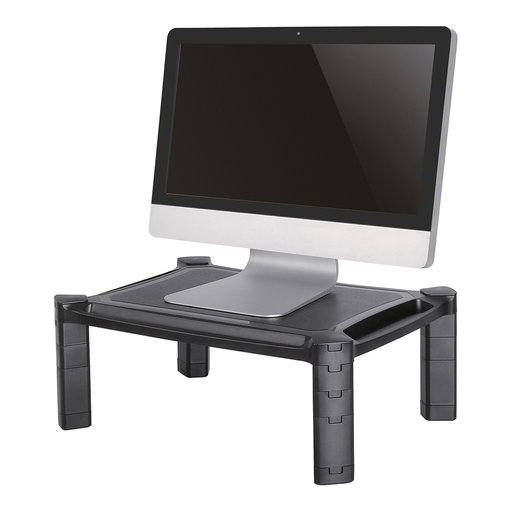
Why it suits this profile: This monitor riser is an accessible option for a desk with one monitor or laptop. No VESA mounting is required.
The stated maximum load is 10 kg. Just make sure the screen sits securely on the platform.
Height adjustment from 4,6 to 16,8 cm, storage space and cable routing.
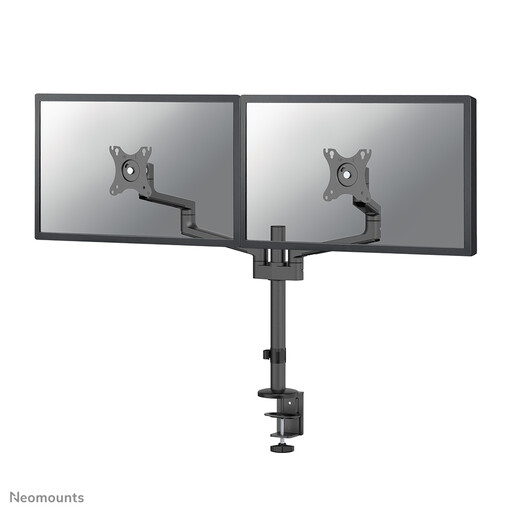
Why it suits this profile: This dual monitor arm is designed for a tidy, adjustable workspace with two screens from 17 to 27 inches.
It supports up to 8 kg per screen and is compatible with VESA 75 x 75 and 100 x 100 mm.
Full range of movement, cable management and a short upper arm to reduce the depth required.
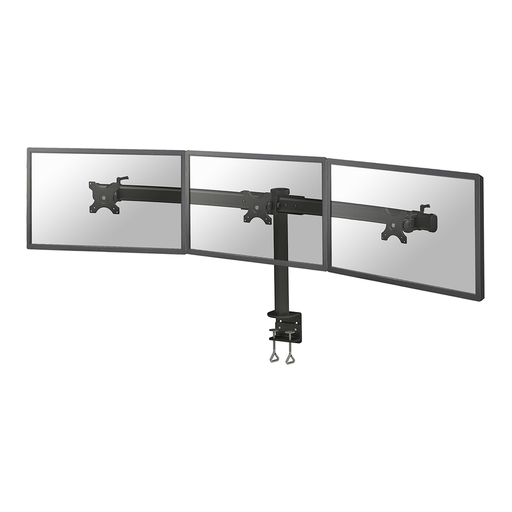
Why it suits this profile: A triple monitor arm for users who need three screens for tasks such as dashboards, video editing or multitasking.
The specifications state a capacity of 8 kg per screen, a desk clamp and VESA 75 x 75 and 100 x 100 mm.
Manual height adjustment from 32 to 42 cm, plus tilt, rotation and swivel.
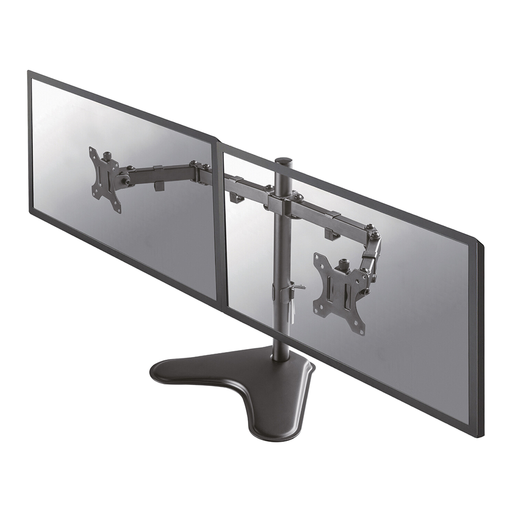
Why it suits this profile: Ideal if you use a monitor and laptop at the same workstation and want to move both devices.
The arm supports a screen up to 32 inches and a laptop weighing up to 4,5 kg. Check the weight of each device separately.
VESA 75 x 75 and 100 x 100 mm, height adjustment up to 44 cm and cable management.
We’ve put together a complete, up-to-date list of products that meet these strict selection criteria and the applicable European safety regulations.
Only install a monitor arm on a flat, sturdy desk. Tighten the clamp evenly and check after installation that the screen doesn’t tilt forwards. If the arm has a spring mechanism, adjust the tension to match the actual weight of the screen.
Leave enough slack in the cables. A DisplayPort, HDMI or power cable that’s connected too tightly can put strain on the port when you turn the screen. Check the screws and mounting points again after a few weeks, especially if you adjust the screens often.
No. Check that your monitor has VESA holes and note their size. Also check the maximum screen size and weight supported by the arm. A matching VESA size alone isn’t enough.
It depends on your desk and how you use it. An arm saves desk space and offers more adjustment. A fixed stand or monitor riser is easier to set up and may be more practical if you don’t want to clamp or drill into your desk.
Its lifespan depends on the load, how it’s installed and how often it’s adjusted. Keep the screen within the stated weight limit, check the fittings regularly and stop using the arm if any part becomes bent, loose or damaged. The warranty varies by product, so check the product page before buying.
