
Vandaag of morgen in huis

Kwaliteit gegarandeerd

Welkomstaanbiedingen ontgrendelen: GRATIS bezorging | Tot 80% korting | Gratis 30 dagen JoyPlus-proefperiode
Download de app
A monitor arm can free up space on your desk and make it easier to adjust your screen precisely. Yet many people choose an arm based solely on screen size. That can be risky. For example, a 34-inch monitor may fall within the stated size range but still be unsuitable because of its weight or VESA connection.
For home workers, business users and gamers, these three pitfalls are particularly important:
Below are the checks you should carry out before buying an adjustable monitor arm.
A 17-35 inch monitor arm is suitable for screens within the stated diagonal size, but always check your monitor’s weight without its original stand as well. The Neomounts DS70-250BL1 has a specified load range of 1 to 9 kg. The maximum load is not a guideline to exceed: a heavier screen can throw the gas spring out of balance and put strain on the mount.
Also check the VESA pattern on the back of the screen:
The DS70-250BL1 supports VESA 75x75 and 100x100 mm and is designed for one flat-screen or curved display. This makes it suitable for many office, home-working and gaming monitors, but not for every model without additional checks.
A fixed monitor stand raises the screen but offers little flexibility. A gas spring monitor arm uses a spring mechanism to make it easier to move the screen in height and depth. This is particularly useful if you switch between working while seated, standing or using different viewing distances.
According to the product specifications, the Neomounts DS70-250BL1 offers:
When looking at these figures, pay attention to the difference between rotation and swivelling. Rotation turns the screen around its own axis; swivelling moves the arm to the left or right. A monitor arm with a 180° stop can be useful when the desk is close to a wall or partition. With this model, the stop prevents the arm from moving directly into the wall or partition, according to the product description. The stop is not a complete lock and does not replace correct installation.
A monitor arm for a desk is usually attached with a clamp at the edge or with a grommet mount through the desktop. A monitor arm with a Topfix clamp is secured from the top of the desk. This can be useful when you have limited space beneath the desktop.
Before installation, check:
Do not mount an arm on glass, a damaged desktop or weak material if the manufacturer advises against it. With a grommet mount, you should also check that there is enough room for the mounting plate and cables.
Monitor arm cable management is not an insignificant detail. Taut cables can restrict the arm or pull on the connectors. Therefore, only route the cables permanently through the cable guides after setting the height and viewing angle.
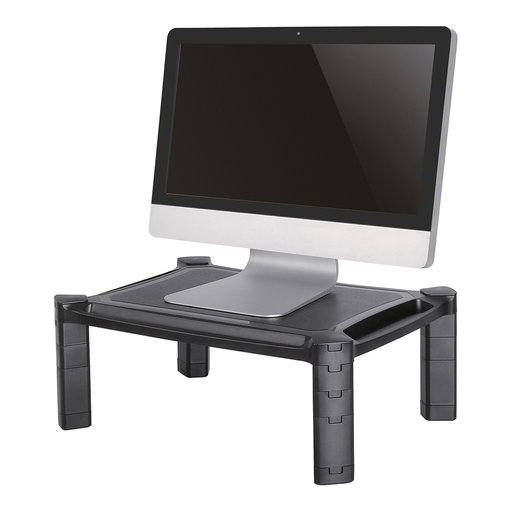
Why it suits this profile: For anyone looking for a simple height boost without a fully articulated arm. The stand supports one screen or laptop weighing up to 10 kg.
The load capacity, height range of 4.6 to 16.8 cm and screen size of up to 32 inches are clearly specified. There is no ambiguous gas spring that needs adjusting.
Adjustable height, cable routing and storage space at the front and back.

Why it suits this profile: A suitable choice for a single flat-screen or curved monitor where adjustability, cable routing and a compact desk installation are important.
The specifications state both the screen range of 17 to 35 inches and a maximum load of 9 kg, as well as VESA 75x75/100x100. The 180° stop limits movement towards the wall.
Gas spring height adjustment, Topfix clamp or grommet mount, support for curved screens and integrated cable management.
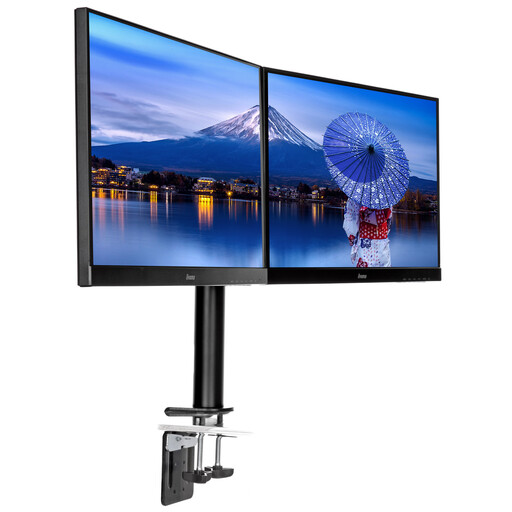
Why it suits this profile: Designed for users with two monitors of up to 30 inches, for example for multitasking, trading, video editing or an extended workspace.
You are not buying a single arm for two screens: this model is explicitly designed for two monitors and specifies a load capacity of 10 kg per screen.
Support for VESA 75x75 and 100x100, height adjustment, tilting, swivelling, rotation and cable management.
Only attach the screen to the arm once the clamp or grommet mount has been fully secured. Use the quick-release system only when the VESA plate has been correctly attached to the screen. Then adjust the gas spring according to the manual and check that the screen stays in position.
Also pay attention to these points:
We have put together a complete, up-to-date list of products that fully meet these strict selection criteria and the applicable European safety regulations.
No. Check the VESA pattern, weight and screen size. Many models use VESA 75x75 or 100x100 mm, but this is not universal. An adapter may be required if the connection differs.
It can be, provided the screen falls within the specified size, weight and VESA ranges. With a wide curved monitor, it is also important to check the arm’s depth and movement. The Neomounts DS70-250BL1 states that it supports flat and curved displays of up to 35 inches and 9 kg.
Its lifespan depends on the weight of the screen, the quality of the desktop, the installation and how often you adjust the arm. Regular checks and retightening connections help you spot wear or loosening in good time. For warranty and maintenance information, always consult the manufacturer’s product information.
