
Vandaag of morgen in huis

Kwaliteit gegarandeerd

Welkomstaanbiedingen ontgrendelen: GRATIS bezorging | Tot 80% korting | Gratis 30 dagen JoyPlus-proefperiode
Download de app
A monitor arm and phone holder might seem like simple accessories, but the wrong choice can quickly lead to frustration. A phone that shifts while you’re driving, a monitor that slowly droops downwards, or a TV bracket that doesn’t fit your VESA pattern – these are common problems that often only become apparent after you’ve made your purchase.
As a Joybuy Product Recommendation Officer, I therefore focus on verifiable data: dimensions, weight capacity, mounting method and compatibility. This way, you avoid relying solely on terms like “universal”, “extra strong” or “360-degree adjustable”.
A universal phone holder may be suitable for many models, but always check the specified screen size, device width and thickness with a case. For a bike phone holder or motorcycle phone holder, the handlebar diameter and vibration also come into play.
With monitors and TVs, you shouldn’t just look at the screen size. The VESA pattern and weight are decisive factors. A TV wall bracket for 32 to 55 inches isn’t automatically suitable for every screen within that size range.
A suction cup or dashboard phone holder works best on a clean, smooth and grease-free surface. Dust, dashboard texture and direct sunlight can all affect adhesion. Use the supplied cleaning wipe when instructed, and check the fixing regularly.
For a monitor arm desk mount, the desk itself is an important part of the structure. A thin or damaged desktop may be less suitable for a clamp or grommet mount, especially with a heavy monitor.
A monitor arm with tilt and swivel functions must be able to support the screen’s weight permanently. So look at the maximum weight per screen, not just the maximum inch size. With a dual monitor arm, the weight capacity usually applies per monitor.
For phone holders, a magnetic mount is quick to use, but check whether your smartphone or case supports a suitable magnetic solution. A thick metal case can reduce the magnetic effect.
VESA is the distance between the mounting holes on the back of a monitor or TV, for example 75 × 75 mm, 100 × 100 mm or 400 × 400 mm. Measure this distance before ordering a monitor arm, VESA wall bracket or TV wall bracket.
Also pay attention to:
A VESA adapter can sometimes accommodate a non-standard pattern. The Neomounts FPMA-VESA100, for example, is designed for screens with a 100 × 100 mm pattern and offers a 75 × 75 mm connection for a suitable bracket. Always check that your specific screen and the maximum load fall within the product specifications.
For a monitor arm desk mount, a desk clamp and grommet mount are common options. A gas spring is handy if you regularly adjust the monitor’s height or depth, but the screen weight must fall within the specified range.
For cars, you can choose from:
Position the holder so that your view, airbags, controls and airflow are not obstructed. Do not operate your phone while driving.
A wall bracket must be attached to a suitable wall structure. Check which wall plugs and screws are needed for concrete, brick, wood or plasterboard. If in doubt, it is wise to have it installed by a qualified professional.
For a PC holder under the desk, look at the width, depth, ventilation openings and weight of the computer. A mini-PC holder has different dimensions and fixing points than a holder for a large tower PC.
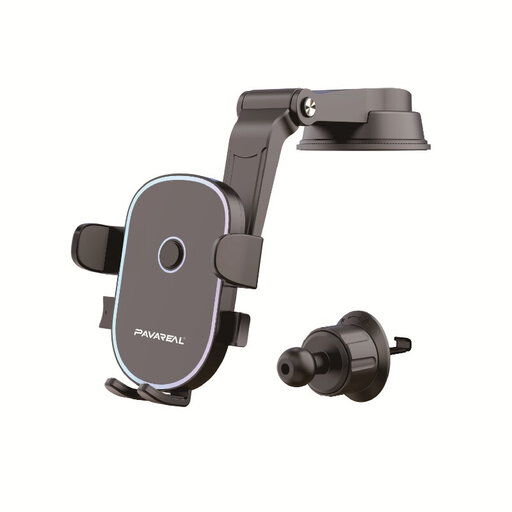
Why this fits the profile: This holder offers two mounting options: on a smooth surface with a suction cup or on an air vent. That’s practical when you use different cars.
The mounting method is clearly described. You can clean the surface beforehand and position the holder so that buttons and airflow remain unobstructed.
Two installation methods, one-handed operation and multiple viewing angles.
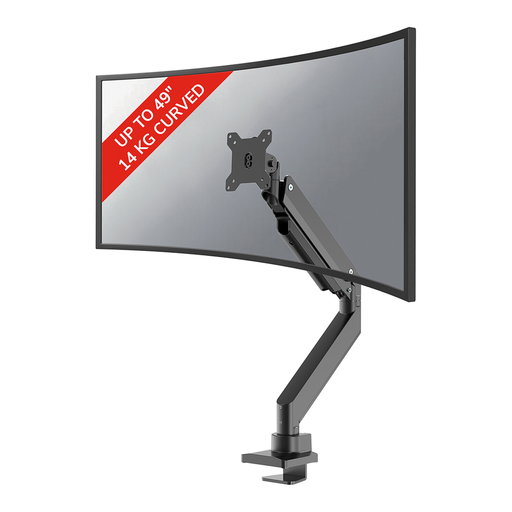
Why this fits the profile: This monitor arm is designed for large, curved screens up to 49 inches and a weight of up to 18 kg. The gas spring supports height and depth adjustment.
The maximum screen size and load are clearly stated. This makes checking before purchase easier than relying solely on the term “ultrawide”.
Supports VESA 75 × 75 and 100 × 100 mm, with cable management and 360-degree rotation.
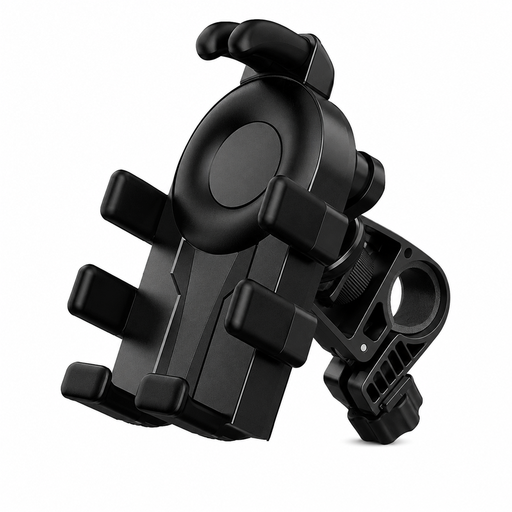
Why this fits the profile: This bike phone holder and motorcycle phone holder is designed for the handlebars of motorbikes, bicycles, scooters and similar vehicles. The holder supports phones from 4.7 to 7 inches with a case thickness of up to 12 mm.
The compatibility with phone size and case thickness is stated. Do check whether your device, especially with a case, falls within these limits.
360-degree adjustability, silicone protective parts and a handlebar clamp mount.
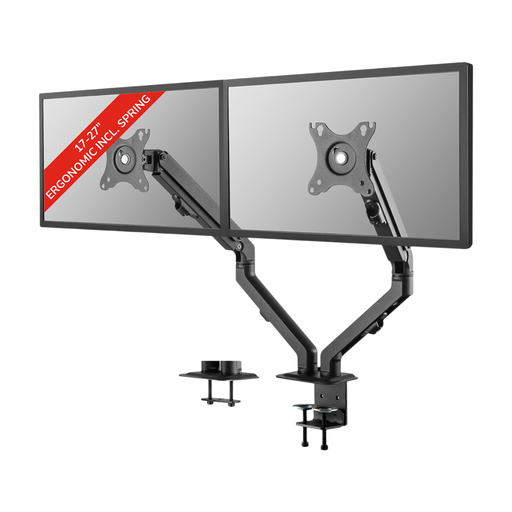
Why this fits the profile: This dual monitor arm is suitable for two screens of up to 27 inches and 7 kg per screen. That suits home offices, workplaces and gaming setups.
The weight capacity is stated per screen. This allows you to compare the weight of both monitors individually with the product specification.
Suitable for VESA 75 × 75 and 100 × 100 mm, with height and depth adjustment and cable clips.
We have compiled a full, up-to-date list of products that fully meet these strict selection criteria and current European safety regulations.
That depends on where you want to place it. An air vent holder is compact, while a dashboard phone holder with a suction cup can offer more choice in viewing angle. Check that the vent is sturdy enough and that the holder does not obstruct your view or the controls.
Measure the VESA distance, weigh the monitor and check the maximum screen size. Also look at the mounting: a clamp or grommet mount won’t fit every desk. For two screens, you need a dual monitor arm where the weight capacity per screen is sufficient.
The lifespan depends on the material, load, installation and usage conditions. Check suction cups, clamps and screws regularly. With a monitor arm, it is wise to retighten the fixing points when the arm is frequently adjusted. Always adhere to the maximum load and the installation instructions.
