
Vandaag of morgen in huis

Kwaliteit gegarandeerd

Welkomstaanbiedingen ontgrendelen: GRATIS bezorging | Tot 80% korting | Gratis 30 dagen JoyPlus-proefperiode
Download de app
A monitor arm can free up space, give you greater flexibility when positioning your screen and help keep your desk tidy. However, not every monitor mount is suitable for every monitor or desk. An arm that offers plenty of adjustment options on paper may prove unstable in practice, not fit your screen or take up too much space behind the desk.
So don’t focus solely on the price or product photo. Above all, check the load capacity, VESA mounting pattern and how the arm is attached to your desk.
A monitor arm for 2 screens, for example, may support 7 kg per screen, while another model supports 7 kg in total. That difference matters. With heavier monitors, remember to include any accessories attached to the arm.
A screen that is too heavy may prevent a gas spring or spring mechanism from staying in position properly. Always check:
A VESA monitor arm only works directly when the hole pattern on the back of the monitor matches the mounting plate. Many models use VESA 75 x 75 mm or 100 x 100 mm.
If your monitor has a different hole pattern, an adapter plate may be required. Also check whether the VESA mount is recessed too deeply or obstructed by the casing. An arm that is suitable for your screen size is therefore not automatically compatible with every monitor.
An adjustable monitor arm with tilt, swivel and rotation sounds appealing, but you should also check its range of movement. An arm may extend a long way forwards, for example, but offer very little height adjustment. If your desk is against a wall, the distance from the wall is also important.
A 180° stop, as found on some Neomounts models, is designed to limit contact with a wall or partition. This mechanism does not lock the arm in place and is not a substitute for correct installation.
The maximum screen size is a useful first indication, but it does not fully guarantee compatibility. A wide, curved monitor may take up more space than a flat screen of the same size. So, as well as screen size, check:
For a large screen, a gas spring monitor arm can be useful because its position can be adjusted more quickly. For a lighter screen, a manual or spring-assisted model may be sufficient.
Most desk monitor arms are attached using a clamp or a through-desk mount, also known as a grommet mount. A clamp is practical if you do not want to drill a hole in the desktop. A through-desk mount may be a good option if your desk already has a cable-routing hole.
Check the thickness and strength of the desktop beforehand. Avoid mounting the arm on glass, a damaged surface or a weak chipboard construction. Follow the installation instructions and tighten all screws and clamps securely before attaching the screen.
A monitor arm changes the route of your power and display cables. Integrated clips or cable channels can help, but check beforehand that the cables are long enough when the arm moves forwards or sideways. An additional cable guide can be useful for desk cable management, especially when using multiple screens.
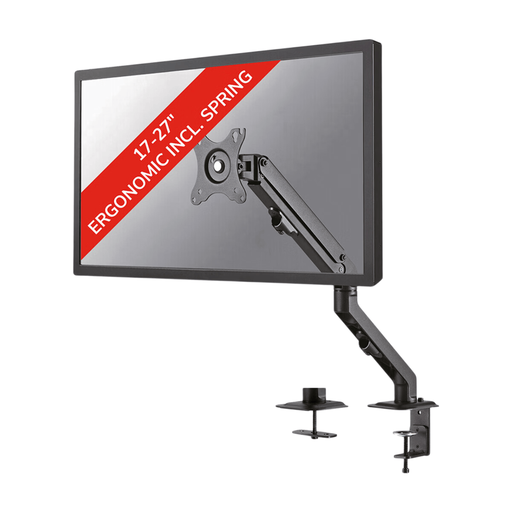
Why it suits this user profile: This model is suitable for a single flat screen measuring 17 to 27 inches and comes with both a desk clamp and a grommet mount. That makes it a practical choice for a home office with one monitor.
The load capacity of up to 7 kg and the 75 x 75 and 100 x 100 mm VESA patterns are clearly specified. However, check that your monitor falls within these limits.
Spring-assisted height adjustment from 11-42 cm, full motion and cable management clips.

Why it suits this user profile: This model offers extra reach for a single screen of up to 35 inches and is suitable for both flat and curved displays. The topfix clamp or grommet mount is ideal for a neat office or home office setup.
The model specifies a height range of 21.5-49.5 cm, a depth range of 7-52.5 cm and a load capacity of up to 9 kg separately. This makes it easier to assess the available desk space in advance.
Gas spring, 90° tilt, 360° rotation, 180° swivel, integrated cable management and a 5-year warranty according to the product information.

Why it suits this user profile: This monitor arm for 3 screens is designed for workstations with multiple windows, dashboards or a wide gaming setup. Each screen can weigh up to 6 kg.
The specifications clearly state that it supports three screens, 6 kg per screen and VESA 75 x 75 or 100 x 100 mm. Also measure the available width of 142.4 cm on your desk.
Full-motion adjustment, quick release, welded base, cable management and a 180° stop mechanism.
Place the monitor on a safe surface before attaching it to the arm. Never mount a screen if the screws, VESA plate or clamp are damaged. After installation, adjust the tension of a gas spring or spring mechanism according to the instructions.
Keep the following points in mind:
A fixed monitor stand can be an alternative if you rarely move your screens. For a simple workstation without attaching anything to the desk, an ergonomic monitor stand may also be sufficient.
We have put together a complete, up-to-date list of products that fully meet these strict selection criteria and the applicable European safety regulations.
No. Check the VESA pattern, weight and screen size. The most common patterns are 75 x 75 mm and 100 x 100 mm, but some screens have a different mounting pattern or no VESA holes at all.
This is generally not recommended. The clamp applies pressure to a small surface area. Check the manufacturer’s safety information and choose a sturdy, flat surface that can support the combined weight of the monitor and arm.
Its lifespan depends on the materials, installation, load and how often you adjust the arm. Do not exceed the maximum load capacity and check the connections regularly. The statutory guarantee in the European Union applies for at least the period set out in the applicable consumer protection rules; some product information also states a longer manufacturer’s warranty.
