
Vandaag of morgen in huis

Kwaliteit gegarandeerd

Welkomstaanbiedingen ontgrendelen: GRATIS bezorging | Tot 80% korting | Gratis 30 dagen JoyPlus-proefperiode
Download de app
A monitor arm with laptop stand can make your desk tidier and give you more freedom to position your screen and laptop. However, not every monitor arm with a laptop holder is suitable for every workspace. An arm that doesn't fit your desk, has too low a weight capacity, or lacks the right VESA mounting can quickly become frustrating.
For home workers, students, gamers and office staff, these three pitfalls are particularly relevant:
Always check the maximum weight for the screen and the laptop separately. Some models, for example, have a higher load capacity for the screen than for the laptop stand. Don't automatically add the weight of both devices together; the manufacturer may set separate limits for each component.
Also pay attention to size:
A monitor arm for laptop and screen must also remain stable when you rotate the screen or pull it forward. A heavy screen at the end of a fully extended arm places greater demands on the desk fixing.
A VESA monitor arm uses a standardised hole pattern on the back of the screen. Common patterns are 75 × 75 mm and 100 × 100 mm. Measure the distance between the screw holes before you order. If your monitor doesn't have VESA holes, you may need a separate adapter.
When it comes to fixing, consider the following:
The mounting materials supplied vary from product to product. Read the product information and instructions before you drill or tighten the clamp.
A height-adjustable monitor holder isn't automatically suitable for every sitting position. Look at the actual range in centimetres. The most important features are:
An ergonomic monitor stand is a tool for an adjustable workspace, not a guarantee of a particular physical outcome. Position the screen so you can look straight ahead comfortably, and place the laptop so that cables and ventilation openings aren't pinched.
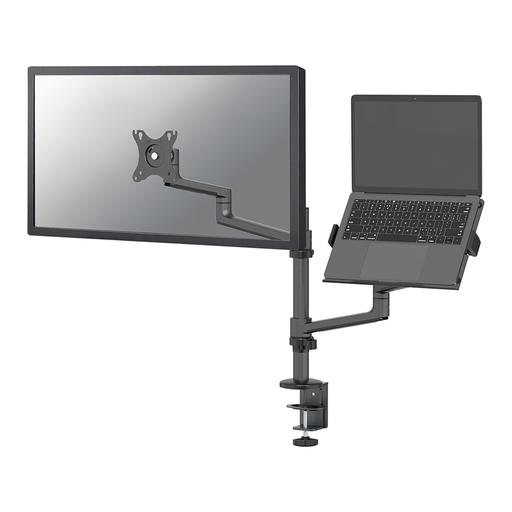
Why this fits the profile: This model combines a monitor arm and laptop stand in one desk solution. It's suitable for screens up to 27 inches and laptops up to 17.3 inches, making it a good match for many standard home office setups.
The specifications list separate weight capacities of 8 kg for the screen and 5 kg for the laptop. A desk clamp and grommet mount are also included.
Tilt up to 120°, rotation up to 360° and swivel up to 180°. The internal cable routing helps keep loose cables under control.
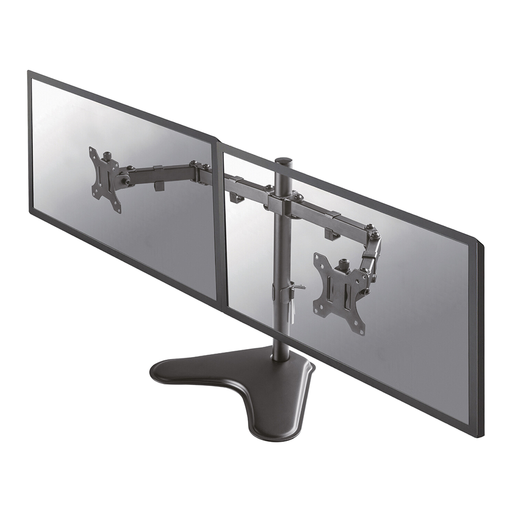
Why this fits the profile: This monitor bracket is designed for a wider screen range up to 32 inches and offers three pivot points. That suits users who regularly adjust their screen or use a larger monitor.
The product information states a screen load capacity of up to 8 kg, a laptop load capacity of up to 4.5 kg and VESA 75 × 75 and 100 × 100 mm. This means you can check in advance whether your equipment is compatible.
Manual height adjustment from 0 to 44 cm, depth adjustment from 4 to 52 cm and a stated warranty period of 5 years.
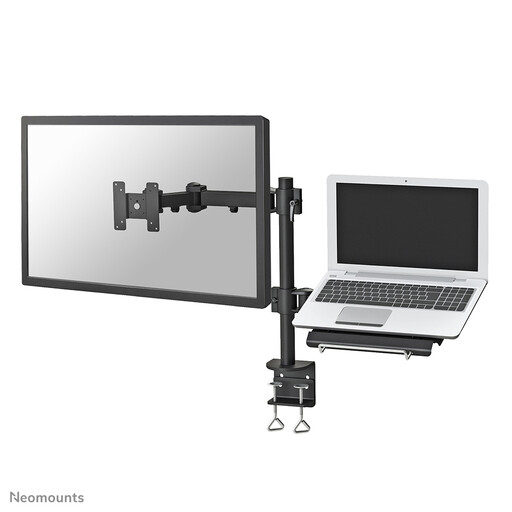
Why this fits the profile: This model is designed for users who want to position a screen and laptop flexibly and often switch between work, study and other applications.
The stated limits are clear: screens up to 27 inches, laptops up to 22 inches and VESA 75 × 75 or 100 × 100 mm. Always check the weight of your devices, though.
Height adjustment from 0 to 45 cm, depth adjustment from 10 to 43 cm and support for tilting, swivelling and rotating.
We've put together a full, up-to-date list of products that fully meet these strict selection criteria and comply with current European safety regulations.
Mount the monitor arm for laptop and screen on a flat, sturdy part of the desk. Tighten the clamp evenly and check that the desk doesn't visibly bend. Attach the screen using the correct VESA pattern and only use the laptop holder within the stated size and weight capacity.
After installation, check:
No. Check the minimum and maximum laptop size, the weight and the width of the holder. A model designed for laptops up to 17.3 inches isn't automatically suitable for a larger or heavier device.
For the screen, usually yes, if the monitor arm uses a VESA fixing. The most common patterns are 75 × 75 mm and 100 × 100 mm. Measure the holes on the back of your monitor before you order. The laptop is typically placed in a separate holder.
The lifespan depends on the load, installation, material strength and how often you adjust the arm. Use the arm within its stated limits, check the fixing regularly and don't force a heavy screen when moving it. The warranty period varies by model, so check the product page and terms and conditions.
