
Vandaag of morgen in huis

Kwaliteit gegarandeerd

Welkomstaanbiedingen ontgrendelen: GRATIS bezorging | Tot 80% korting | Gratis 30 dagen JoyPlus-proefperiode
Download de app
A monitor arm can free up space, position screens flexibly and keep cables out of sight. However, not every model is suitable for every monitor or desk. You often only notice you've made the wrong choice after installation: the arm slowly drops, the clamp does not fit or the screen cannot be moved far enough back.
For home workers, gamers, office workers and businesses, three purchasing pitfalls are particularly important. So check the technical specifications first, then choose a model based on price or appearance.
A monitor arm for a 32-inch screen may not be suitable for a heavy ultrawide monitor. The screen weight and size must both fall within the specified limits. Pay extra attention to the centre of gravity with curved screens. An arm that supports a flat screen well is not automatically stable with a curved display.
With a dual monitor arm, the load capacity is usually stated per monitor. Two screens weighing 8 kg each already require a combined capacity of 16 kg, excluding the weight of the arm. Also check whether your desk can withstand the concentrated pressure from a clamp or through-desk mount.
A monitor arm with multiple pivot points is not always practical on a shallow desk. Measure the available depth beforehand and check whether a wall, partition panel or cupboard will obstruct movement. A 180° stop can prevent the arm from rotating into a wall, but it is no substitute for secure mounting.
Compare your monitor's weight with the product specification, and do not rely on the maximum figure if you are right at the limit. For two lightweight 24- or 27-inch screens, a desk monitor arm with a capacity of 6 to 10 kg per screen may be sufficient. A monitor arm for an ultrawide monitor requires a different approach: check that it supports the screen's size and weight, as well as a curved housing if applicable.
Examples from the range:
A VESA monitor arm uses the screw holes on the back of your screen. The most common patterns in this range are 75 × 75 mm and 100 × 100 mm. Measure the horizontal and vertical distance between the holes before ordering. A different pattern can sometimes be accommodated with an adapter plate, but check the product information first.
An adjustable monitor arm can be adjusted manually or using a spring mechanism. A gas spring monitor arm generally moves more easily when adjusted regularly, but the tension must match the weight of your screen. A manually adjustable arm is often sufficient if you rarely move your monitor.
Pay attention to the mounting type:
A monitor arm with cable management helps guide cables along the arm. After installation, check that the cables have enough slack when turning and tilting the screen.
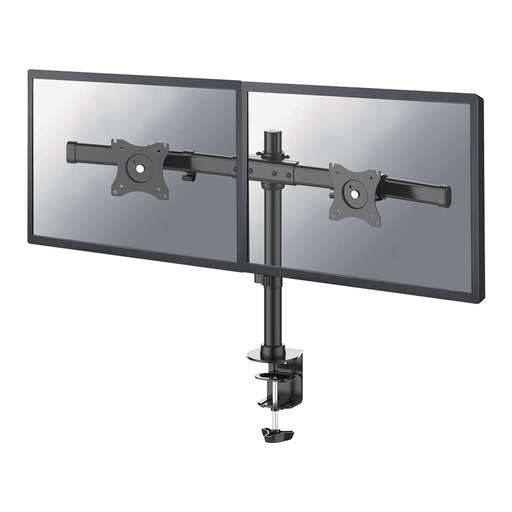
Why it suits this profile: This dual monitor arm is designed for two standard flat screens up to 27 inches and can be attached to the desk with a clamp or through-desk mount. This makes it suitable for a first set-up at home or in the office.
The load capacity is clearly specified as 10 kg per screen. The 75 × 75 and 100 × 100 mm VESA patterns are also listed.
Two screens, manual height adjustment from 0 to 45 cm and cable routing along the arm.

Why it suits this profile: This gas spring monitor arm is designed for large flat and curved ultrawide screens. The height and depth adjustment is practical when you regularly switch between work and gaming set-ups.
The product specification distinguishes between a maximum of 18 kg for flat screens and 14 kg for curved screens. This prevents confusion with heavy ultrawide models.
Suitable for screens up to 49 inches, gas spring height adjustment from 26.1 to 55.5 cm and a 180° stop for use close to a wall.

Why it suits this profile: For IT professionals, traders or users with a wide workspace, this monitor arm for 3 monitors accommodates three screens up to 27 inches.
The maximum load is specified as 6 kg per screen. This allows you to check in advance whether three monitors will remain within the structural limit.
Support for three screens, manual height and depth adjustment, cable management and a 180° stop.
Before installation, check the thickness, strength and flatness of the desk. Do not place a clamp on glass, a loose desktop or a damaged edge. Install the base first, then attach the VESA plates and only mount the screens once all screws are tightened.
Adjust the arm with the screen mounted. With a gas spring, the tension can be adjusted to match the screen's weight. Keep your fingers away from pivot points and make sure cables are not pulled tight when you turn the screen. Check the clamp and screw connections again after a few weeks.
We've put together a complete, up-to-date list of products that fully meet these strict selection criteria and the applicable European safety regulations.
No. Check the VESA pattern, screen weight and maximum size. The most common patterns are 75 × 75 and 100 × 100 mm, but not every screen has these mounting holes.
It depends on how you use it. A gas spring is useful when you frequently adjust the screen's height, depth or viewing angle. For a fixed workstation, a manual monitor arm may be sufficient and easier to adjust.
Its lifespan depends on the material, load, installation and how often you move the arm. Stay below the stated load capacity, check the connections regularly and do not use the arm if any parts are bent or damaged. The statutory warranty is at least two years according to the product information; some models come with an additional manufacturer's warranty.
