
Vandaag of morgen in huis

Kwaliteit gegarandeerd

Welkomstaanbiedingen ontgrendelen: GRATIS bezorging | Tot 80% korting | Gratis 30 dagen JoyPlus-proefperiode
Download de app
A monitor arm can free up space on your desk and make it easier to position your screen at your preferred height and viewing angle. However, not every monitor arm is suitable for every workspace. A screen that is too heavy, an incorrect VESA pattern or a weak desk clamp can result in an unstable setup.
This guide helps homeworkers, office employees, gamers, designers and IT professionals compare product specifications without being swayed by vague marketing claims.
A monitor arm for a 35-inch screen is not automatically suitable for every screen of that size. The weight of the monitor and the position of its centre of gravity are at least as important. A curved screen may place different loads on the arm from a flat screen because of its construction. Always check both the maximum screen size and the load capacity for flat and curved screens.
Many monitor arms use a VESA pattern of 75 × 75 mm or 100 × 100 mm. If your monitor does not have a VESA mount, or uses a different pattern, you may need a separate adapter. Check this before ordering a VESA monitor arm.
A clamp or grommet mount only works properly when the desk is sturdy and suitable. Glass, a thin chipboard top or a damaged edge may not provide enough support. Also measure the thickness of the desktop and check that the arm has enough room to move.
A Topfix monitor arm can be useful when you want to install the mount from the top of the desk. A grommet mount through a cable-management opening can provide a more secure solution if your desk already has a suitable hole.
With a single-monitor arm, the maximum weight is usually easy to compare. With a dual-monitor arm, you need to check the load capacity per arm. A model rated at 9 kg per screen is not the same as one that supports a maximum total of 18 kg when the two arms are subject to different loads.
For curved screens, look for a separate limit. The specifications for the selected Neomounts models sometimes list a lower capacity than the maximum for flat screens.
A gas-spring monitor arm generally makes height adjustment easier, but the gas spring must be set correctly for the weight of your screen. Look at:
An adjustable monitor arm with cable management also helps guide power and display cables along the arm. After installation, check that the cables have enough slack when you move the screen.
For a standard 24- to 32-inch screen, a single-monitor model is often sufficient. With two screens, you also need to consider the width of the desk and the position of the feet or clamp. An ultrawide monitor arm requires a sturdier construction, especially for 49-inch screens.
For curved screens, a monitor arm is generally more practical when the manufacturer explicitly states that it has a reinforced VESA head or provides a separate load capacity.

Why it suits this profile: For a single flat or curved screen from 17 to 35 inches, this model offers a straightforward starting point without having to buy a dual arm.
The 9 kg load capacity and 75 × 75 and 100 × 100 mm VESA sizes are clearly stated. The 180° stop reduces the risk of contact with a wall.
Gas spring, Topfix clamp or grommet, cable management and a height adjustment range of 21.5–49.5 cm.
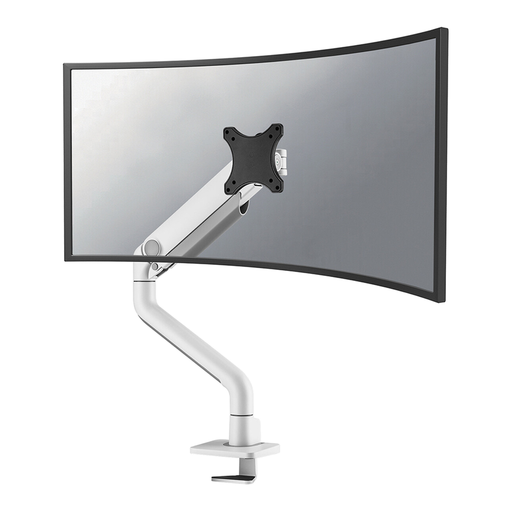
Why it suits this profile: Suitable for users who want to replace a single screen or later upgrade to a larger, potentially curved screen.
The specifications distinguish between a maximum of 18 kg for a flat screen and 15 kg for a curved screen.
Supports screens from 17 to 49 inches and features gas-spring adjustment, Quick-release VESA and cable management.

Why it suits this profile: A practical choice for designers, gamers and professionals with a curved ultrawide monitor up to 49 inches.
The product specification states that it has a reinforced head and a lower load capacity of 14 kg for curved screens.
Load capacity of up to 18 kg for flat screens, height adjustment from 26.1 to 55.5 cm, plus Topfix and grommet mounting.
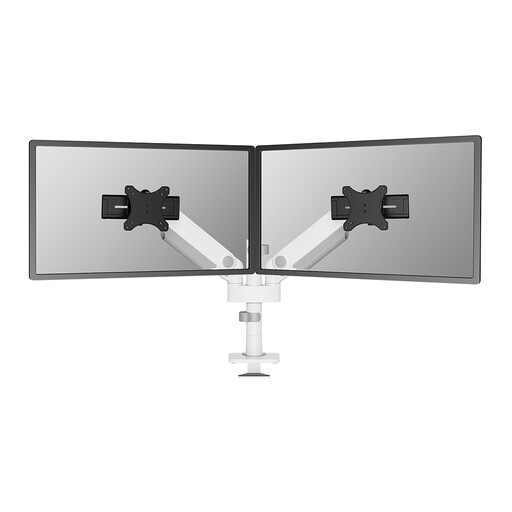
Why it suits this profile: For anyone looking for a dual-monitor arm to position two screens from 24 to 34 inches side by side.
The load capacity is specified per screen: up to 11 kg for flat screens and 9 kg for curved screens. The sliding cross arms help with positioning.
Two VESA mounts, gas-spring height adjustment from 0 to 54.2 cm, Quick-release and integrated cable management.
We have put together a complete, up-to-date list of products that fully meet these strict selection criteria and the applicable European safety regulations.
Use this quick checklist:
A desktop monitor stand is an alternative if you do not want to clamp or drill into your desk. However, it takes up space on the desktop. A monitor arm leaves most of that surface free, but it does require a sturdy mounting point and correct installation.
No. Check the VESA pattern, screen weight and maximum screen size. The models in this selection generally use VESA 75 × 75 mm and 100 × 100 mm. A screen without suitable mounting holes may require an adapter.
It can be, provided the model supports the size and weight of your curved screen. Pay particular attention to the separate limit for curved monitors. This may be lower than the load capacity for a flat screen. Adjust the gas spring after installation according to the instructions.
Its lifespan depends on installation, load and usage. Do not exceed the load capacity, check the screws regularly and prevent cables from becoming taut. Warranty periods vary by model, so check the product page before ordering.
