
Vandaag of morgen in huis

Kwaliteit gegarandeerd

Welkomstaanbiedingen ontgrendelen: GRATIS bezorging | Tot 80% korting | Gratis 30 dagen JoyPlus-proefperiode
Download de app
A monitor arm can free up space on your desk and make it easier to position your screen at the ideal height, depth and viewing angle. However, not every monitor bracket is suitable for every desk or screen. A monitor that is too heavy, the wrong VESA size or a weak desk mount can cause sagging, wobbling or damage to your furniture.
For home workers, gamers, professionals and office planners, there are therefore several points you need to check beforehand. Below, you will find out what to look for in a monitor arm for one, two or three screens.
A 32-inch screen does not automatically fit on every monitor arm designed for 32 inches. The weight including the stand and the VESA connection are at least as important. With ultrawide monitors, the shape of the screen also plays a role. A curved screen may require a reinforced VESA head.
Always check:
A gas spring monitor arm moves smoothly, but has a specific weight range. A monitor that is too light or too heavy can cause the arm to move upwards or slowly sink downwards. The spring tension often needs to be adjusted to the actual screen weight.
A classic, manually adjustable monitor arm can be more practical if you only move the screen occasionally. A gas spring is particularly useful when you regularly switch between sitting and standing positions.
A clamp mount is quick to install, but the edge of the desk must be strong enough. A thin desktop, glass work surface or fragile chipboard can deform under concentrated pressure. A grommet mount through an existing cable hole distributes the load differently, but requires a suitable hole and enough space underneath the desktop.
Also pay attention to the distance from a wall. An arm with a large swivel range can hit a wall or partition. A 180° stop mechanism limits that range of movement, but does not replace a sturdy mount.
VESA is the distance between the mounting holes on the back of your monitor. Many models support 75 × 75 mm and 100 × 100 mm. If your monitor has a different pattern, you may need a VESA adapter plate.
Also pay attention to the screws and the available space around the connections. A VESA monitor arm can technically fit, while cables or a protruding housing can make installation difficult.
With a single monitor arm, it is about one maximum load. With a dual monitor arm or a monitor arm for 2 screens, you need to check whether the stated weight applies per screen or to the entire structure.
For a monitor arm for 3 screens, the width of the desk and the position of the middle arm are also important. Three 27-inch screens require significantly more space than three compact displays. Therefore, check the total arm span and the distance to the wall in addition to the load capacity.
An adjustable monitor arm can have features such as:
A monitor arm with cable management keeps cables together along the arm. Make sure there is enough slack for the full range of movement. Cables that are bundled too tightly can pull on the connections when you rotate the screen.
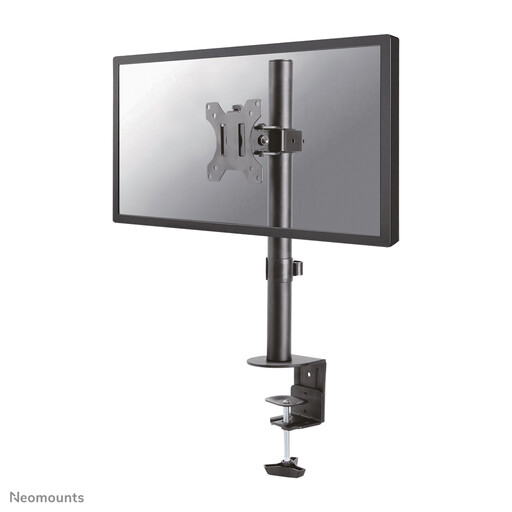
Why this fits the profile: This monitor arm supports one screen from 10 to 32 inches and can be mounted with a clamp or grommet. That makes it suitable for a standard home office setup with a single monitor.
The product details state a maximum load capacity of 8 kg, support for VESA 75 × 75 and 100 × 100 mm, and cable routing. Do check this against your own monitor's specifications.
Supports tilt, 360° rotation and 180° swivel. Height adjustment from 0 to 42.5 cm.

Why this fits the profile: This model is designed for larger, curved and ultrawide screens. It suits professionals and gamers who regularly adjust a single wide monitor.
The stated load capacity is a maximum of 18 kg for flat screens and 14 kg for curved screens. According to the product description, the reinforced head is designed for curved ultrawide monitors.
Suitable for screens from 17 to 49 inches, with gas spring adjustment, cable management and a 180° stop mechanism.

Why this fits the profile: This monitor arm for 3 screens is aimed at multitaskers, IT workstations and office setups with three displays up to 27 inches.
The capacity is specified at 6 kg per screen. According to the product information, the 180° stop prevents contact with a wall or partition when mounted nearby.
Supports three screens, has a quick-release system and offers tilt, rotation and swivel. Mounting can be done with a clamp or grommet.
Before purchasing, measure the desk thickness, available depth and distance to the wall. Do not mount the arm on an unstable or damaged desk. Tighten the fixing screws according to the instructions and check after the first period of use whether the clamp is still secure.
Position the screen so that you are looking straight ahead and do not have to constantly look downwards. This is a practical setting, not a medical guarantee. Move a mounted monitor gently and take into account cables, hinge points and the load on the desk.
For two screens, the iiyama DS1002C-B1 is an option with support for two displays up to 30 inches and a maximum of 10 kg per screen. If you want to expand an existing single arm, you could also look at the Neomounts FPMA-CB100BLACK Dual Crossbar Monitor Arm Adapter. When using an adapter, always check the total capacity of the original arm.
We have compiled a full, up-to-date list of products that fully meet these strict selection criteria and comply with current European safety regulations.
No. Check the VESA size, screen weight and dimensions. A model with VESA 75 × 75 or 100 × 100 mm will only fit without an adapter if your monitor has the same holes.
That depends on your desk and usage. A monitor arm saves space and offers more freedom of movement. A monitor stand often has a simple installation and can be more suitable if you do not want to clamp or drill into the desk.
The lifespan depends on the load, quality of installation and how often you move the screen. Regularly check the screws, clamp and VESA mount. Do not use the arm if parts are damaged or if the screen continues to sink despite correct adjustment.
