
Vandaag of morgen in huis

Kwaliteit gegarandeerd

Welkomstaanbiedingen ontgrendelen: GRATIS bezorging | Tot 80% korting | Gratis 30 dagen JoyPlus-proefperiode
Download de app
A monitor arm can free up space, manage cables more effectively and give you greater flexibility in positioning your screen. Yet making a purchase isn’t always straightforward. Manufacturers use terms like “full motion”, “ergonomic” and “suitable for large screens”, while important details can sometimes be less clear. As a Joybuy Product Recommendation Officer, I therefore focus on verifiable specifications: weight capacity, VESA compatibility, adjustment range and mounting method.
A 32-inch monitor doesn’t automatically fit every monitor bracket. The weight, VESA size and screen type are at least as important. A heavy ultrawide monitor has different requirements from a lightweight 24-inch office display.
So check:
With a dual monitor arm or a monitor arm for 3 screens, the weight capacity per screen can differ from the total weight capacity of the structure. Two 7 kg screens, for example, don’t just need two suitable arms – they also require a sturdy desk attachment.
When looking at product information, pay attention to the wording “per screen”. Also check that your desk can handle the combined load and the leverage effect of an extended arm.
A desk clamp is practical, but not every desktop is thick or sturdy enough. Glass, thin chipboard or a fragile surface can be damaged or become deformed. Some models also include a grommet (through-desk) mount. A wall solution can be suitable when there isn’t enough space at the desk edge, but the wall and wall plugs must be appropriate for the material.
VESA refers to the distance between the mounting holes on the back of your monitor. Many monitor arms support VESA 75 x 75 mm and 100 x 100 mm. If your screen has a different pattern, you may need a suitable adapter plate.
Also check that the VESA plate has enough room for the screws and that the shape of the monitor housing doesn’t create an obstruction. For a large curved screen, a reinforced mounting is relevant.
Don’t choose a product right at the limit of its maximum weight. A monitor arm that supports a maximum of 9 kg is intended for screens within that range, including any accessories attached to the arm. With gas spring monitor arms, the spring tension must also be adjusted to the actual weight. A screen that is too light or too heavy can cause the arm to become unstable.
For a large screen, the adjustment range and depth are also important. A short arm is handy against a wall, while a deep desk may require more movement range.
A standard monitor stand often only offers height adjustment. An adjustable monitor arm can also tilt, rotate and swivel. Look at the specific angles in degrees rather than just the term “full motion”.
Also pay attention to:
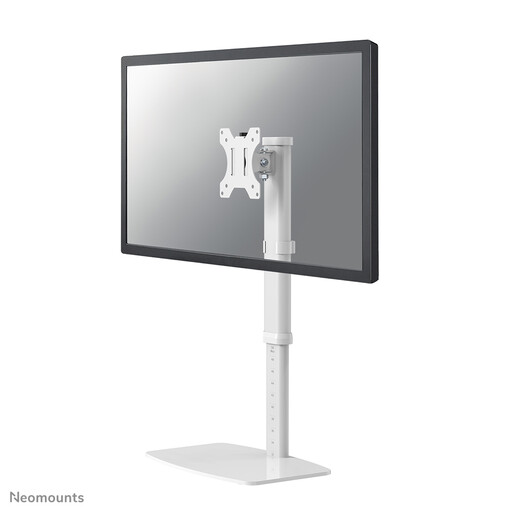
Why this fits the profile: This monitor stand is suitable for a single screen from 10 to 30 inches and supports a maximum of 6 kg. The height is manually adjustable from 36 to 54 cm.
The product details clearly state the screen size, weight capacity and VESA patterns of 75 x 75 and 100 x 100 mm, so you can check basic compatibility beforehand.
Tilt up to 80°, 360° rotation and 60° swivel; installation materials are included.

Why this fits the profile: This gas spring monitor arm is designed for one flat or curved screen from 17 to 35 inches, with a weight capacity of up to 9 kg.
The weight capacity and adjustment range are clearly stated. The 180° stop helps prevent contact with a wall or partition.
Gas spring height from 21.5 to 49.5 cm; topfix clamp and grommet plus integrated cable management.

Why this fits the profile: This monitor arm for 3 screens is designed for three displays from 10 to 27 inches, with a maximum of 6 kg per screen.
The number of screens, the VESA sizes of 75 x 75 and 100 x 100 mm and the weight per screen are listed separately.
Quick-release system, cable management and a 180° stop mechanism for placement near a wall.
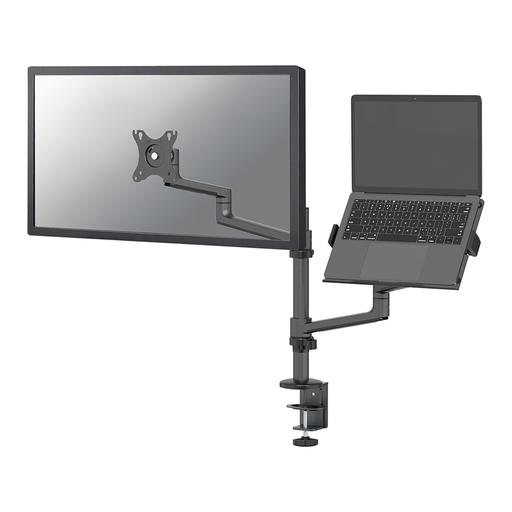
Why this fits the profile: The combination supports a screen up to 27 inches and a laptop up to 17.3 inches. That suits workstations where a laptop stand and monitor arm need to save space together.
The individual weight capacities are specified: a maximum of 8 kg for the screen and 5 kg for the laptop.
Tilt, rotation and swivel adjustment; desk clamp and grommet are included.
We’ve put together a full, up-to-date list of products that fully meet these strict selection criteria and comply with current European safety regulations.
No. Check the VESA size, weight and screen size. Many models support 75 x 75 and 100 x 100 mm, but different patterns may require an adapter.
That depends on the construction and the mounting instructions. A desk clamp can put pressure on the surface. Do not use any mounting without checking the manufacturer’s guidance, and if in doubt, choose a suitable reinforcement plate or a wall solution. The Neomounts AWL75-450WH, for example, is a wall adapter for specific DS70, DS70PLUS and DS75 mounts; it is not a universal monitor bracket.
The lifespan depends on the weight, the mounting, how often you adjust it and how well you maintain it. Regularly check screws, clamps and hinge points. Do not exceed the stated weight capacity and keep cables clear of moving parts. A warranty period, such as five years on certain Neomounts models, is not a substitute for correct installation and use.
