
Vandaag of morgen in huis

Kwaliteit gegarandeerd

Welkomstaanbiedingen ontgrendelen: GRATIS bezorging | Tot 80% korting | Gratis 30 dagen JoyPlus-proefperiode
Download de app
A monitor arm can free up desk space and give you more flexibility when positioning your screen. However, not every monitor mount fits every desk or screen. An arm that appears suitable on paper may have insufficient load capacity in practice, collide with a wall or fail to match your monitor’s VESA mounting points.
For home workers, gamers, office employees and creative professionals, these three pitfalls are particularly important:
Always check the weight of the monitor without its stand, and compare it with the maximum weight per arm. With a monitor arm for 2 monitors, the stated load capacity usually applies to each screen. An arm rated at 9 kg per screen is therefore not the same as a total capacity of 9 kg for two monitors.
Also consider the difference between flat and curved screens. A curved ultrawide monitor may have a different centre of gravity because of its shape. Models explicitly designed as a monitor arm for ultrawide monitors or a monitor arm for curved screens are the more logical options to consider.
A VESA monitor arm is attached to the mounting points on the back of the screen. The most common patterns in this selection are 75 × 75 mm and 100 × 100 mm. If your monitor has a different pattern, an adapter plate may be required.
Then consider which movements you actually need:
An adjustable monitor arm with a gas spring is generally easier to move when you adjust it regularly. A manually adjustable monitor stand may be sufficient if the screen usually stays in the same position.
Measure the depth of your desk and the distance to a wall or partition. A long arm can provide plenty of freedom of movement, but it also takes up more space. A model with a short upper arm is more practical for a desk positioned close to the wall.
A monitor arm with cable management prevents cables from hanging along the arm. However, check that the cables are long enough and do not become taut when swivelling the screen. A 180° stop can help prevent contact with a wall or panel, but it does not replace secure installation.
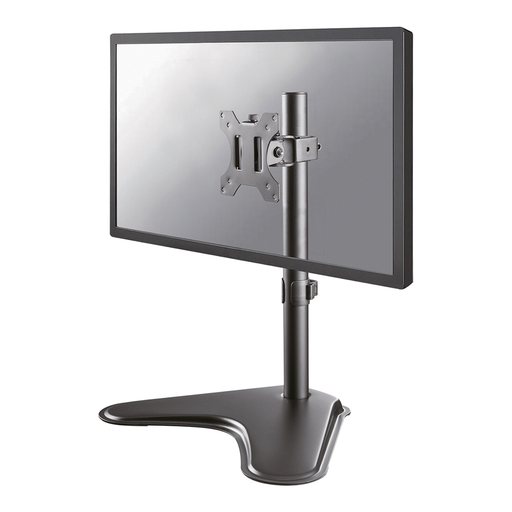
Why it suits this profile: This monitor stand is designed for a single screen from 13 to 32 inches and has a maximum load capacity of 8 kg. That makes it a straightforward choice for a first set-up at home or in the office.
Support for VESA 75 × 75 and 100 × 100 mm, together with the stated load capacity, makes the most important compatibility check easier.
Manual height adjustment from 5.6 to 41.9 cm, tilting, rotating, swivelling and cable routing.
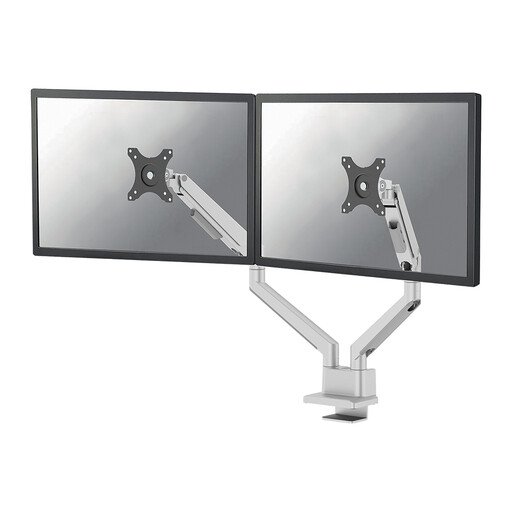
Why it suits this profile: For a fixed workstation with two screens, this desk monitor arm offers separate arms, each with a load capacity of 9 kg.
The model specifies both the maximum screen size of 32 inches and the load capacity per screen. The 180° stop limits the range of movement when positioned close to a wall.
Gas spring adjustment from 21.5 to 49.5 cm, depth adjustment, 90° tilting, 360° rotation and integrated cable management.

Why it suits this profile: This monitor mount is designed for a large curved ultrawide screen of up to 49 inches, for example for gaming, video editing or multiple work windows.
The product specification distinguishes between flat screens up to 18 kg and curved screens up to 14 kg. This prevents a single general weight limit from being misinterpreted.
Reinforced head for curved ultrawide screens, gas spring height adjustment from 26.1 to 55.5 cm and cable management.
We have put together a complete, up-to-date list of products that fully meet these strict selection criteria and the applicable European safety regulations.
Check the following points before installation:
A monitor arm for 1 monitor requires less desk space than a model for multiple screens. For two screens, choose a monitor arm for 2 monitors; for a wide work or gaming set-up, there are also versions for 3 monitors. A monitor arm with laptop stand can also position a laptop beside or below the main screen.
No. Check the VESA pattern, screen weight and maximum size. With curved screens, also check the specific load capacity for curved models.
That depends on how you use it. A gas spring is practical when you regularly adjust the screen’s height, depth or viewing angle. For a fixed workstation, a manually adjustable monitor stand may be sufficient.
Its lifespan depends on installation, load and how often the arm is moved. Do not exceed the stated weight, and check the screws, clamps and cables from time to time. The statutory guarantee in the European Union is at least two years; some models also come with a longer manufacturer’s warranty.
