
Vandaag of morgen in huis

Kwaliteit gegarandeerd

Welkomstaanbiedingen ontgrendelen: GRATIS bezorging | Tot 80% korting | Gratis 30 dagen JoyPlus-proefperiode
Download de app
A monitor arm can free up desk space, keep cables out of sight and make it easier to position your screen at the desired height. However, not every monitor mount is suitable for every desk or screen. The wrong VESA size, an overly heavy monitor or a flimsy desk clamp can cause frustration after installation.
So don’t just focus on price, the gas spring or the number of movement directions. The following three pitfalls are particularly common:
VESA refers to the distance between the mounting holes on the back of your monitor. Many models support VESA 75 × 75 mm and 100 × 100 mm. Measure this before ordering a VESA monitor arm. Also check the weight of the monitor without its separate stand. With two or three screens, you need to consider the weight capacity per screen.
For example, a monitor arm for 1 monitor with a capacity of 9 kg is not automatically suitable for two screens weighing 7 kg each. For multiple screens, you need a dedicated monitor arm for 2 monitors or monitor arm for 3 monitors.
The stated size is only a guideline. An ultrawide or curved screen may place different demands on the arm because of its dimensions and centre of gravity. Always check the following combination:
For example, an arm for 17 to 35 inches is practical for larger office and gaming monitors, but only if the screen also falls within the weight limit.
A desk monitor arm is usually attached with a clamp or a through-desk mount, also known as a grommet mount. A top-fix clamp can be useful when you want to secure the arm from above. Check the thickness and sturdiness of the desktop beforehand. Glass, thin chipboard or an uneven surface may be unsuitable.
For a flexible setup, height, depth, tilt, rotation and swivel functions are important. A 180° stop can prevent the arm from moving into a wall or partition, but it is not a complete lock. Cable management is also useful if you regularly move an adjustable monitor arm.
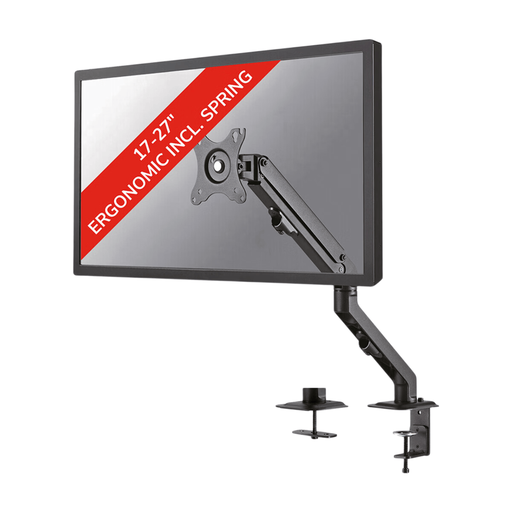
Why it suits this profile: This monitor arm for 1 monitor supports screens from 17 to 27 inches and up to 7 kg. The included clamp and grommet mount give beginners two mounting options.
The weight capacity, screen range and VESA patterns of 75 × 75 and 100 × 100 mm are clearly specified. This reduces the risk of choosing an unsuitable combination.
Tilt, rotation and swivel functions, height adjustment from 11 to 42 cm and cable clips.

Why it suits this profile: For a home office or workplace with a larger flat or curved screen, this gas-spring monitor arm offers a wide range of adjustment.
The specifications state a maximum of 9 kg, a VESA range from 75 × 75 to 100 × 100 mm and a 180° stop. Check these values against your own screen.
Gas-spring height adjustment from 21.5 to 49.5 cm, depth adjustment and integrated cable management.

Why it suits this profile: This monitor arm for 3 monitors is designed for multitaskers, trading workstations, video editing and gaming setups with three screens.
The capacity is specified at 6 kg per screen, and the model is designed for three screens from 10 to 27 inches. This makes the total load easier to assess.
Full range of movement, quick-release mounting, cable management and a 180° stop.
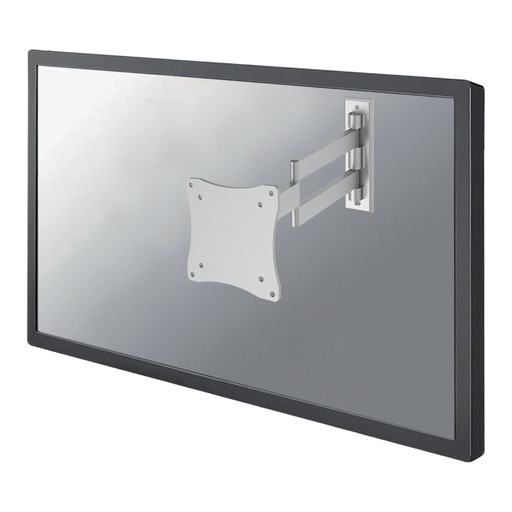
Why it suits this profile: A wall-mounted monitor bracket is ideal if you don’t want to lose desk space or if a desk clamp is unsuitable.
The wall bracket supports VESA 75 × 75 and 100 × 100 mm and up to 12 kg. However, check that the wall and plugs are suitable for the combined load.
20° tilt range, 180° swivel and depth adjustment from 4 to 36 cm.
We’ve put together a complete, up-to-date list of products that fully meet these strict selection criteria and the applicable European safety regulations.
Always follow the manufacturer’s instructions when installing your monitor arm and check the following points:
With a wall bracket, first check where pipes and cables run. Use fixings suitable for concrete, brick or wooden studs. A hollow wall is not automatically suitable for every monitor mount.
No. Ideally, the monitor should have VESA mounting holes and fall within the stated screen size and weight capacity. If it has non-standard mounting points, an adapter may be required, but first check that it is officially suitable for your screen.
Its lifespan depends on the materials, load, installation and how often you move the screen. An arm that is constantly used above its maximum weight may wear out more quickly. Regularly check the clamp, screws, hinges and cables.
A standard mechanical monitor arm, monitor stand or wall bracket does not use electricity. A gas-spring model works without power. Only motorised or electrically powered versions require a power connection and may involve additional running costs.
