
Vandaag of morgen in huis

Kwaliteit gegarandeerd

Welkomstaanbiedingen ontgrendelen: GRATIS bezorging | Tot 80% korting | Gratis 30 dagen JoyPlus-proefperiode
Download de app
A monitor arm can free up desk space and give you greater flexibility when positioning your screen. However, not every monitor mount is suitable for every workspace. An arm with plenty of adjustment options on paper may offer too little load capacity in practice, extend too far from the wall or not fit your screen.
That is why you should focus on the technical specifications rather than terms such as “ergonomic”, “space-saving” or “full motion”. According to manufacturers’ own product information, these terms refer to certain features, but on their own they say nothing about whether a product is suitable for your desk.
A 32-inch monitor may be lighter than a smaller model with a heavy stand. The weight of the screen, including any accessories is therefore at least as important as its size. Check the maximum load capacity per arm and allow some headroom.
With a dual monitor arm, you must also calculate the weight per screen, not just the total load capacity of the structure.
Most monitor arms support VESA 75 x 75 mm or 100 x 100 mm. These are the distances between the mounting holes on the back of your monitor. If your screen has a different mounting pattern, you may need an adapter plate.
A monitor stand without a VESA connection is not automatically suitable for a monitor arm. Check the manual or measure the distance between the holes before ordering.
A desk clamp or grommet mount distributes the load over a relatively small surface area. As a result, a thin, fragile or glass desk may be unsuitable. Check:
A top-fix clamp can be useful when you want to install the mount from above. When positioning the arm close to a wall, a 180° stop mechanism is helpful, but it does not replace secure mounting.
Choose a monitor arm based on the actual screen weight. For a single screen, models with a load capacity of 7 to 9 kg are suitable for many standard monitors. For heavy curved or ultrawide screens, higher-capacity versions are available, such as models supporting 18 kg.
Also consider the combination of screen size and construction. A monitor arm for ultrawide monitors must not only support the weight, but also provide sufficient stability for a wider housing.
A coil spring monitor arm uses a mechanical spring for height adjustment. A gas spring monitor arm uses a gas-pressure mechanism and is often designed for smooth adjustment within a specific weight range. This does not mean that every gas spring is automatically a better fit: the screen weight must fall within the specified lower and upper limits.
Always adjust the tension according to the instructions during installation. If the screen slowly drops down or moves upwards instead, the tension may need to be adjusted.
An adjustable monitor arm may include features such as:
A monitor arm with cable management helps guide cables along the arm. After installation, check that the cables have enough slack when you move the screen. A cable connected too tightly can put strain on the ports.
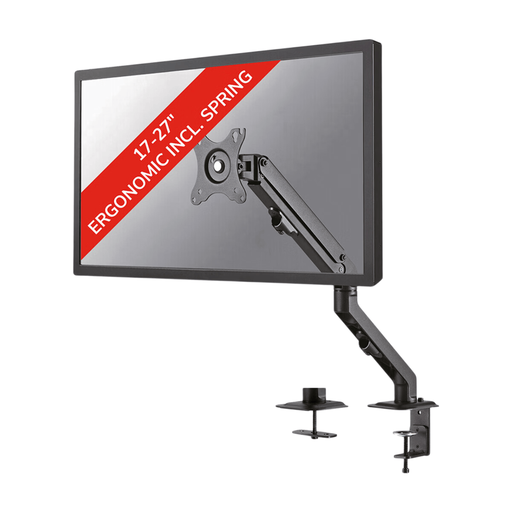
Why it suits this profile: For one standard monitor, this monitor arm offers a well-balanced range of features without the need for a dual-arm setup.
The product specifications state a load capacity of up to 7 kg, support for 17-27 inch screens and VESA 75 x 75 and 100 x 100 mm. This lets you check in advance whether your screen is compatible.
Spring-assisted height adjustment from 11-42 cm, depth adjustment up to 49.4 cm and cable clips. Clamp and grommet mount included.

Why it suits this profile: This monitor mount is ideal for a workspace where a larger flat or curved screen needs to remain precisely adjustable.
The arm is specified for screens up to 35 inches and a maximum weight of 9 kg. According to the product description, the 180° stop limits contact with a wall or panel.
Gas spring height adjustment from 21.5-49.5 cm, depth adjustment from 7-52.5 cm, Quick-release VESA and integrated cable management.
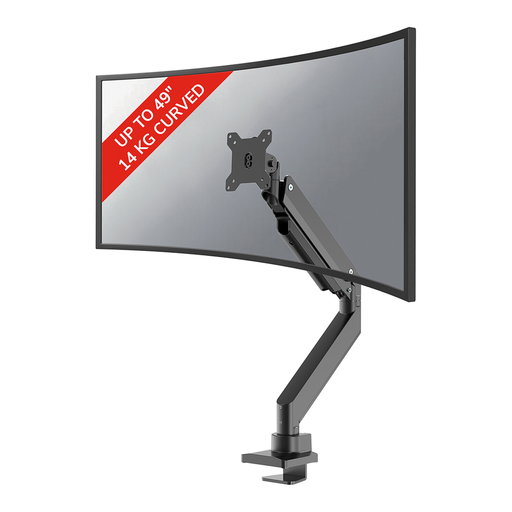
Why it suits this profile: A suitable choice for users with a wide curved or ultrawide monitor that requires more load capacity than a standard monitor arm.
The product specifications state support for curved screens up to 49 inches and a maximum weight of 18 kg. Always check the exact weight of your monitor.
Gas spring height adjustment up to 60 cm, depth adjustment up to 63 cm, reinforced head and cable management. Supports VESA 75 x 75 and 100 x 100 mm.

Why it suits this profile: For a workspace with three screens, a sturdy, wide setup is more important than a compact arm for a single monitor.
The arm is specifically designed for three 10-27-inch screens weighing up to 6 kg each. According to the product information, the welded base is designed to provide stability.
Supports three monitors, with a 180° stop, Quick-release and cable management. The height can be adjusted manually from 14 to 40 cm.
We have compiled a complete, up-to-date list of products that fully meet these strict selection criteria and the applicable European safety regulations.
Only install the monitor arm after checking the desk, VESA size and screen weight. Use the supplied screws and mounting components, and tighten all connections securely. Do not mount an arm on glass or an unstable desktop if the manufacturer advises against it.
After installation, slowly move the screen through its full range of motion. Look out for:
With intensive use, it is advisable to check the fittings regularly. The service life depends on the weight, how often you move the arm and the quality of the desk on which it is mounted.
No. Check whether your monitor has VESA holes and whether the pattern matches the arm, usually 75 x 75 mm or 100 x 100 mm. Also check the maximum supported size and weight.
It can be, but only if the screen weight falls within the specified range. A model rated for a maximum of 9 kg is not suitable for a 12 kg monitor. With ultrawide screens, you must also take the shape and centre of gravity into account.
This varies by model and mounting position. A monitor arm frees up the desk space occupied by the original stand, but the arm itself may extend backwards or to the side. Measure the depth of your desk and check the specified distance from the wall before ordering.
