
Vandaag of morgen in huis

Kwaliteit gegarandeerd

Welkomstaanbiedingen ontgrendelen: GRATIS bezorging | Tot 80% korting | Gratis 30 dagen JoyPlus-proefperiode
Download de app
A monitor arm can free up desk space and make it easier to position your screen. However, not every monitor arm is suitable for every desk or screen. The wrong combination can lead to a wobbly set-up, insufficient load capacity or cables that pull whenever you adjust the arm.
For home workers, gamers, office professionals and creative users, there are three common pitfalls to watch out for:
The maximum load capacity is usually specified per screen. So, if you’re using a dual monitor arm, don’t simply add up the total weight without checking the arm’s construction and fixing. A monitor arm with a limit of 8 kg per screen is suitable for screens that stay within that limit, including any accessories.
Remember to factor in the weight of the arm itself, too. A six-monitor set-up puts more strain on the desk top and clamp than a single monitor arm. For example, the Neomounts FPMA-D700D6 weighs 16.26 kg and is designed for a maximum of 8 kg per screen. With a configuration like this, check that your desk can support the combined load.
A label such as 27-inch monitor arm or 30-inch monitor arm only tells you which screen sizes the arm supports. Also check:
The models listed support VESA patterns of 75 × 75 mm and 100 × 100 mm. A non-standard hole pattern may sometimes require an adapter, but check the product information before you order.
An adjustable monitor arm can change the height, depth, rotation and tilt of your screen. Don’t just look at the number of directions it moves in; check the actual adjustment range, too. An arm with a wide height range won’t necessarily suit a low or narrow desk.
A monitor arm with a desk clamp is handy if you don’t want to make a hole in your desk top. A model with a grommet or through-desk fixing may be a better fit if your desk already has a suitable opening. Tighten the fixing securely and check all the connections again after installation.
Cable management stops power and display cables from becoming taut when you move the arm. Check that the cable clips have enough space for your cables. Don’t route them so tightly that they pull on the connectors.
In practice, an ergonomic monitor arm mainly means you can adjust your screen to suit your working posture. Position the screen at a comfortable viewing height and make sure the arm won’t hit a wall, shelf or desk lamp. The product description may list the adjustment options, but your working posture and desk layout will determine how well it works for you.
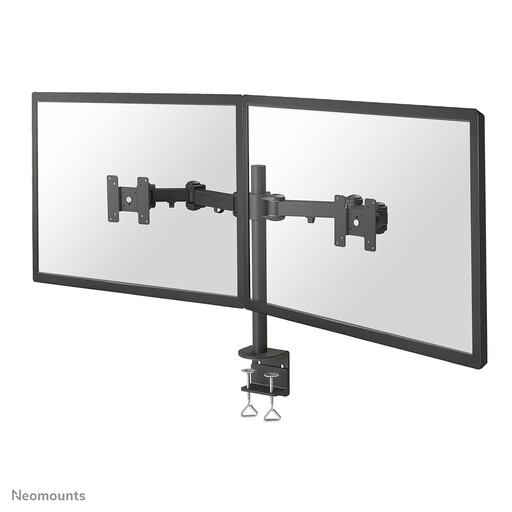
Why it suits this user: This dual monitor arm is designed for two screens up to 27 inches and attaches with a desk clamp. That makes it a good fit for a home office with two compact monitors.
The specifications state a load capacity of 8 kg per screen, VESA 75 × 75 and 100 × 100 mm, and a height adjustment range of 0 to 45 cm.
Suitable for two screens, with tilt, rotation, swivel and integrated cable management.
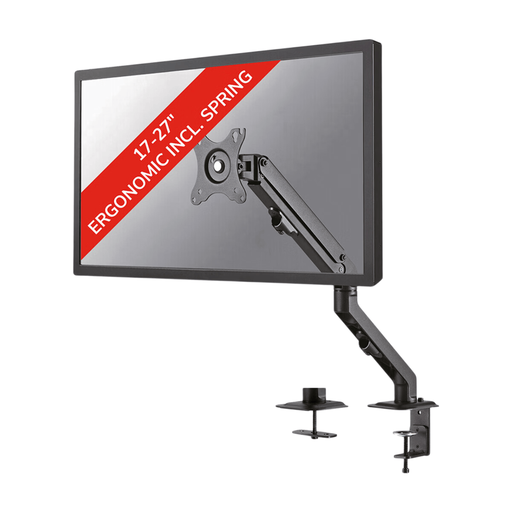
Why it suits this user: The spring-assisted adjustment is useful if you regularly reposition your single screen, for example when switching between work and gaming.
The arm has a specified load capacity of 7 kg, an adjustment range of 11 to 42 cm, and comes with both a desk clamp and grommet fixing.
130° tilt, 360° rotation, 180° swivel and cable clips, with VESA 75 × 75 and 100 × 100 mm.
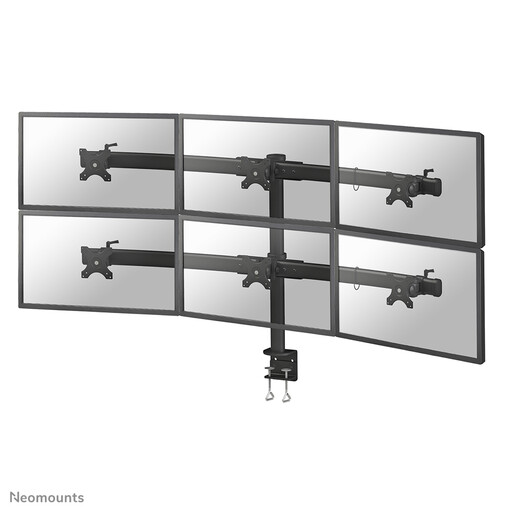
Why it suits this user: This six-screen monitor arm is designed for control rooms, trading environments, IT workstations and other set-ups where you need to view a lot of information at once.
The specifications clearly state a maximum of 8 kg per screen, a height range of 22 to 70 cm, and VESA 75 × 75 and 100 × 100 mm.
Space for six screens, 360° rotation, 180° swivel and cable management. Check your desk’s stability especially carefully beforehand.
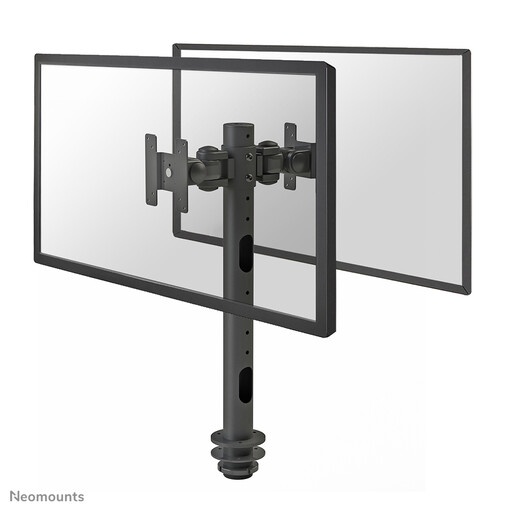
Why it suits this user: For users with two larger screens, this model supports screens up to 30 inches and attaches through a single hole in the desk.
The specified load capacity is 10 kg per screen. The screen size, VESA measurements and height range of 17 to 50 cm are also listed.
Supports two screens up to 30 inches, with 20° tilt, 360° rotation, 180° swivel and cable management.
We’ve put together a complete, up-to-date list of products that meet these strict selection criteria and the current European safety requirements.
No. Check the VESA pattern and the screen’s weight. Many models in this selection support 75 × 75 mm and 100 × 100 mm, but always check your monitor’s specifications.
Not necessarily. A desk clamp needs a sturdy desk edge, while a through-desk fixing requires a suitable hole. Also check the maximum desk thickness and whether the desk top can support the combined weight of the arm and screens.
Its lifespan depends on the load, installation and how it’s used. Don’t exceed the stated load capacity, tighten fixings correctly, and check the screws and clamps regularly. If your arm has a spring mechanism, take extra care when adjusting it without a screen attached.
