
Vandaag of morgen in huis

Kwaliteit gegarandeerd

Welkomstaanbiedingen ontgrendelen: GRATIS bezorging | Tot 80% korting | Gratis 30 dagen JoyPlus-proefperiode
Download de app
A monitor arm can free up space on your desk and make it easier to position your screen at the right height and viewing distance. However, many people buy a model that turns out not to be suitable. A monitor that is too heavy can cause an arm to drop, the wrong VESA size can make installation impossible, and an unsuitable clamp can damage your desktop.
Use these checkpoints to compare a monitor stand, monitor mount or adjustable monitor arm based on verifiable product specifications.
A 32-inch monitor is not automatically suitable for every monitor mount. The weight, including the stand if it is not removed, is just as important. Always check:
An ultrawide monitor often has a different centre of gravity from a standard 16:9 screen. As a result, a conventional monitor arm may be less stable than expected.
The most common mounting patterns are VESA 75x75 mm and VESA 100x100 mm. Measure the distance between the mounting holes on the back of your screen. If there is no VESA pattern, you may need an adapter plate.
Also check for protruding connections or a curved back. These can prevent the VESA plate from sitting flush.
A clamp is practical, but not every desk is suitable. A thin chipboard desktop, glass desk or weakened edge may not distribute the load from a desk-mounted monitor arm effectively. A grommet mount through a cable-management opening may be more stable in some situations, provided the desk is suitable for it.
Also check whether the arm has enough space behind the desk. Some models extend a long way backwards, while an arm with a short upper arm is better suited to positioning close to a wall or partition.
Do not choose based on screen size alone. A single monitor arm with a capacity of 7 kg, for example, is suitable for many compact screens but not for a heavy ultrawide model. For two screens, check the maximum weight per screen as well as the total load capacity.
With a dual monitor arm, allow for the additional leverage. Two screens place different demands on the mounting point than one screen, even when the combined weight remains within the stated limit.
A fixed monitor stand is sufficient if you rarely move the screen. For home working, reception desks or flexible workspaces, an adjustable monitor arm is more practical. Look at:
A gas-spring monitor arm is useful when you regularly want to move the screen higher, lower or closer to you. However, the gas spring must be adjusted correctly to match the screen’s weight.
A desk clamp is usually quick to install and can be removed without drilling a hole in the desk. A grommet mount uses an existing or drilled hole and allows cables to be routed neatly. In both cases, check the maximum desktop thickness and tighten all fixings securely.
Integrated cable management prevents loose cables from hanging along the arm. After installation, check that the cables do not become taut when the arm is rotated.
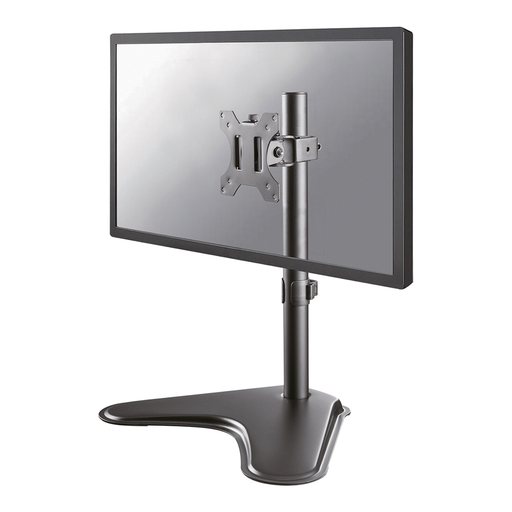
Why it suits this profile: This monitor mount is suitable for one screen measuring 13 to 32 inches and can be placed on a desk, with manual height adjustment from 5.6 to 41.9 cm.
The specifications state both the maximum screen size of 32 inches and a load capacity of 8 kg. However, check beforehand whether your screen uses VESA 75x75 or 100x100 mm.
Tilting, rotating and swivelling; quick-release VESA; cable management; 5-year warranty according to the product information.

Why it suits this profile: This ergonomic monitor arm is designed for a screen measuring 17 to 35 inches, including certain curved screens, with a load capacity of up to 9 kg.
The gas spring supports height adjustment, while the 180° stop limits movement towards a wall or panel. Check the desk mounting and adjust the spring tension to match the actual screen weight.
Height 21.5-49.5 cm; depth 7-52.5 cm; 360° rotation; VESA 75x75 and 100x100 mm; integrated cable management.

Why it suits this profile: For IT specialists, traders or office professionals who want to position three screens measuring 10 to 27 inches side by side.
The load capacity is specified as 6 kg per screen, and the mount is suitable for VESA 75x75 and 100x100 mm. Check that your desk can support the combined load.
Suitable for 3 screens; height adjustment from 14-40 cm; quick-release system; 180° stop and cable management.
We have put together a complete, up-to-date list of products that fully meet these strict selection criteria and the applicable European safety regulations.
No. Your screen must have a suitable VESA pattern, usually 75x75 or 100x100 mm, and fall within the specified weight limit. An adapter plate can sometimes make non-standard patterns compatible, but check the product specifications first.
That depends on your desk and how you use it. A monitor arm frees up desk space and often offers a greater range of movement. A monitor stand generally sits directly on the desk and is useful when drilling or clamping is not desirable. For both options, check the stability, height and load capacity.
Its lifespan depends on the load, installation and how often you move the screen. Retighten the fixings regularly and do not exceed the maximum weight. A gas-spring monitor arm may need its tension adjusted over time. Always follow the manufacturer’s installation and safety instructions.
