
Vandaag of morgen in huis

Kwaliteit gegarandeerd

Welkomstaanbiedingen ontgrendelen: GRATIS bezorging | Tot 80% korting | Gratis 30 dagen JoyPlus-proefperiode
Download de app
A monitor arm can free up desk space and give you more flexibility when positioning your screen. However, not every desk monitor mount is suitable for every monitor or desktop. Choosing the wrong one can result in an unstable setup, limited movement or an arm that cannot properly support your screen.
So don’t focus only on the price or maximum screen size. The load capacity, VESA compatibility and mounting method are what determine whether a monitor arm works well in practice.
A 32-inch screen may weigh less than another screen of the same size. Screen size alone doesn’t tell you whether an arm is suitable. Always check the weight of the monitor without its stand and compare it with the load capacity per screen.
With a dual monitor arm, you also need to take into account the weight of both screens and the load placed on the desk.
Most models in this selection use VESA 75 × 75 mm or 100 × 100 mm. These measurements refer to the distance between the mounting holes on the back of the screen. If your monitor has a different hole pattern or no VESA mount at all, you may need an adapter.
Also check that the supplied screws fit. Don’t use screws that are too long, as they could reach the monitor’s internal components.
A monitor arm with a clamp places the load on a limited area of the desktop. A thin, fragile or uneven surface may bend under the pressure. So measure the thickness of the desk and check that the clamp can be secured properly.
A through-desk or grommet mount uses a hole in the desk. This can be a stable solution, but it’s only practical if your desk already has an opening or you can make one safely.
Check the maximum weight per arm, not just the total load capacity. A model for two screens with a capacity of 8 kg per screen is suitable for two monitors that each stay within that limit. Leave some extra capacity for cables and movement.
Heavier screens or an ultrawide monitor arm require a reinforced arm. According to its product specifications, the Neomounts NM-D775SILVERPLUS supports one curved screen up to 49 inches and weighing up to 18 kg.
A fixed monitor stand usually offers less adjustment than a monitor arm. When choosing an adjustable monitor arm, look for:
A gas spring monitor arm often makes height adjustment easier. However, the tension needs to be set according to the weight of the screen. If the tension is too low or too high, the arm may move unexpectedly.
A clamp-on monitor arm is handy if you don’t want to drill a hole in your desk. A top-fix clamp or grommet mount can be useful for desks positioned close to a wall. Check the space behind your desk and the arm’s maximum range of movement beforehand.
Integrated cable management stops cables from hanging around the joints. Make sure you leave enough slack for height adjustments and rotating screens.
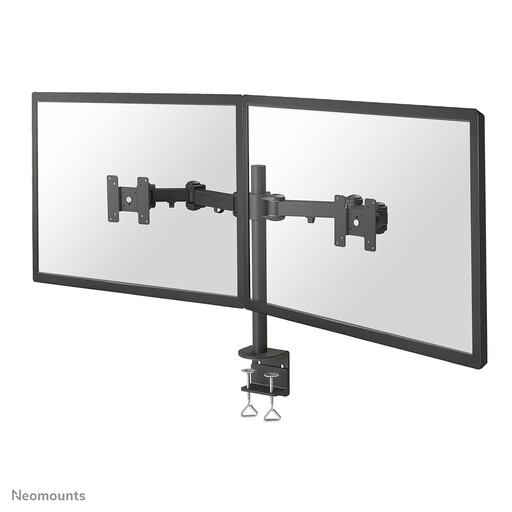
Why it suits this user: This dual monitor arm is designed for two screens up to 27 inches and uses a desk clamp. That makes it a good fit for a simple home-working setup with two compact monitors.
Its load capacity is specified as 8 kg per screen, and the VESA measurements of 75 × 75 and 100 × 100 mm are clearly listed.
Manual height adjustment from 0–45 cm, depth adjustment from 10–43 cm and integrated cable management.
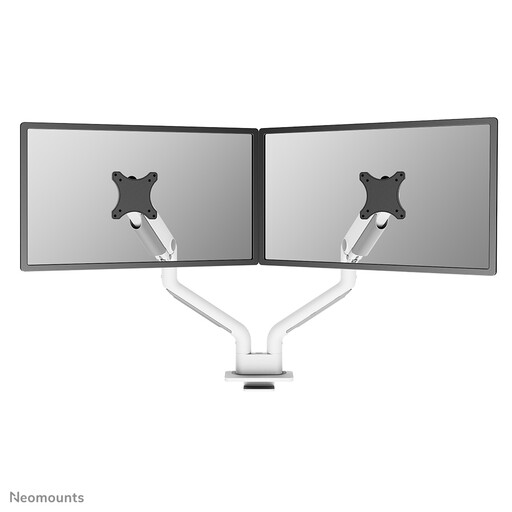
Why it suits this user: This gas spring monitor arm can hold two screens up to 35 inches and is designed for users who regularly adjust their height, depth and viewing angle.
The 180° stop limits movement towards a wall or partition. The maximum load capacity is 18 kg per screen.
Height adjustment from 20.2–52.2 cm, depth adjustment from 8.8–62.5 cm, and VESA 75 × 75 and 100 × 100 mm.
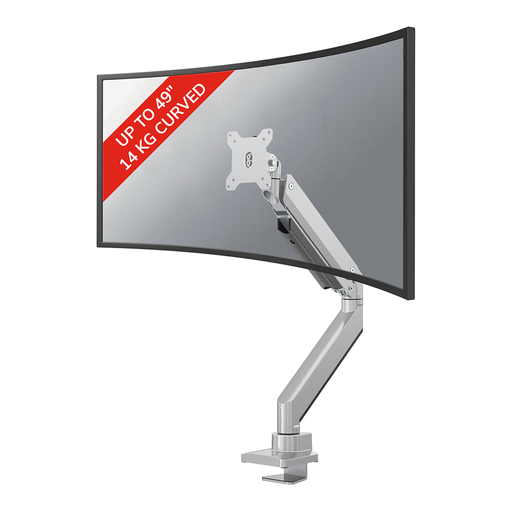
Why it suits this user: This model is a good fit for a workspace with one large curved or ultrawide screen, for example for creative software, dashboards or several windows side by side.
The product specifications explicitly state that it supports curved screens up to 49 inches and a maximum weight of 18 kg.
Gas spring height adjustment up to 60 cm, depth adjustment up to 63 cm and a reinforced head for curved screens.
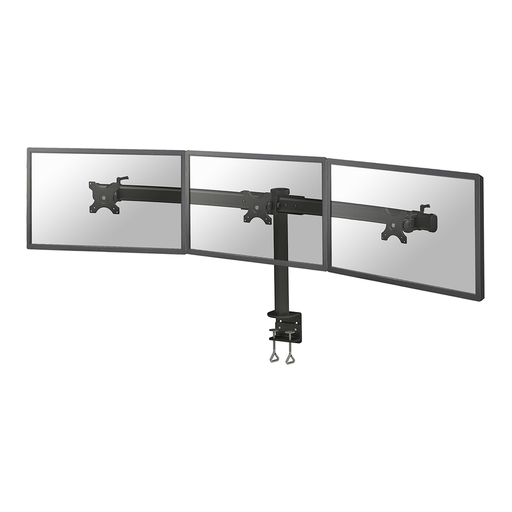
Why it suits this user: This solution is designed for IT users, traders and multitaskers who want to mount three screens up to 27 inches on a single desk mount.
The arm is specified for three screens with a maximum of 8 kg per screen. Make sure your desk can support the total load.
Suitable for three screens, with manual height adjustment from 32–42 cm and 360° rotation according to the product specifications.
We’ve put together a complete, up-to-date list of products that meet these strict selection criteria and the applicable European safety regulations.
Fit the arm according to the supplied instructions and check that the clamp or grommet is secure before mounting the monitor. Then check the following:
A 180° stop is useful when your desk is close to a wall. Without one, the arm may hit the wall when you turn it.
No. Check the hole pattern, usually 75 × 75 mm or 100 × 100 mm, and the weight of the screen. If the measurements differ, you may need a suitable adapter.
It depends on how you use it. If you move your screen often, smoother height adjustment can make things easier. For a fixed workspace, a manually adjustable arm may be enough.
Its lifespan depends on the load, how it’s mounted and how often it’s moved. Stay within the specified load capacity and check the screws and clamps regularly. The statutory guarantee in the European Union is at least two years; some models also come with a longer manufacturer’s warranty, as stated in the product information.
