
Vandaag of morgen in huis

Kwaliteit gegarandeerd

Welkomstaanbiedingen ontgrendelen: GRATIS bezorging | Tot 80% korting | Gratis 30 dagen JoyPlus-proefperiode
Download de app
A monitor arm frees up space on your desk and gives you more control over your screen’s position. However, not every monitor mount is right for every workspace. An arm designed for a lightweight 24-inch screen may not be suitable for a heavy ultrawide monitor. The mounting method, VESA size and weight capacity are also often overlooked.
In this guide, the Joybuy Product Recommendation Officer explains what to look out for. You can compare a desk monitor arm, a dual monitor arm or a model for multiple screens using verifiable specifications rather than marketing claims.
A 32-inch monitor isn’t automatically suitable just because the arm supports screens “up to 32 inches”. The weight of the screen is just as important. Remember to include any accessories attached to the back of the screen, too. Always check the maximum weight per arm, not just the maximum screen size in inches.
The maximum supported weight may also be lower for a curved ultrawide monitor than for a flat screen. According to its product specifications, the Neomounts DS70PLUS-450WH1 supports up to 18 kg for a flat screen and 14 kg for a curved screen.
Most models in this selection use VESA 75 x 75 mm or 100 x 100 mm. These measurements refer to the distance between the mounting holes on the back of your screen. If your monitor doesn’t have VESA holes or uses a different pattern, you’ll need an adapter plate.
A monitor arm with a quick-release fitting can make installation easier, but it doesn’t change the VESA size required. Check this in your monitor’s manual or specifications before you buy.
A desk clamp applies pressure across a relatively small area, so a thin, hollow or damaged desktop may bend. Make sure there’s also enough space at the back of your desk. A grommet mount fitted through an existing cable hole may be an alternative, provided your desk is suitable.
When installing the arm, check the maximum desk thickness, the combined weight of the arm and screens, and how much room the arm needs. A 180° stop can be useful if your desk is close to a wall or partition.
Choose a model with enough capacity to spare. For two screens weighing 6 kg each, a dual monitor arm with a capacity of 8 kg per arm is technically suitable according to the product specifications. Also check that the structure can support the combined weight of the screens and monitor mount.
The load on your desk increases significantly when you use three or six screens. The Neomounts FPMA-D700D6 weighs 16.26 kg and is suitable for six screens measuring 19 to 27 inches, with a maximum weight of 8 kg per screen. It needs a stable, sturdy desk.
An adjustable monitor arm can be adjusted manually or using a spring system. A gas spring monitor arm is practical if you regularly want to move your screen higher, lower or closer. For a gas spring arm, always check both the minimum and maximum screen weight. A screen that’s too light may be less stable if the spring tension isn’t set correctly.
Look out for these features:
A monitor arm with cable management has guides or clips to route power and display cables along the arm. Check that the cables have enough slack when you turn or extend the arm. A cable that’s connected too tightly can put strain on your monitor’s ports.
A desk clamp is usually easy to fit. A grommet mount looks neater, but requires a suitable hole in the desktop. For a fixed setup, a simple monitor stand may be enough. If you often change your viewing angle, a fully adjustable arm is a better choice.
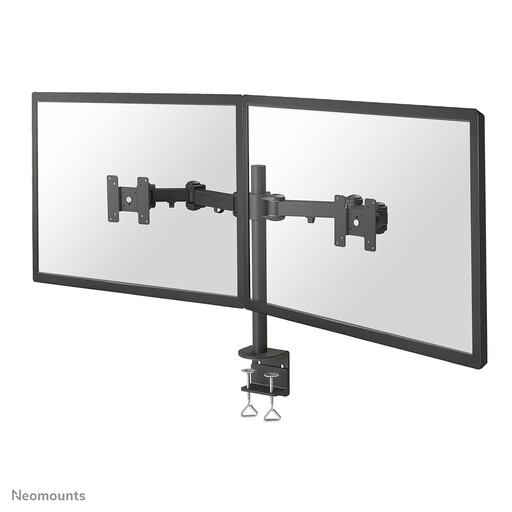
Why it suits this profile: This dual monitor arm is designed for two screens up to 27 inches and attaches with a desk clamp. That makes it a good choice for a standard home office with limited desk space.
The product specifications list a capacity of 8 kg per screen, VESA 75 x 75 and 100 x 100 mm, and adjustment from 0 to 45 cm. This means you can check the key compatibility details in advance.
Suitable for two screens up to 27 inches; cable management and 360° rotation according to the product specifications.
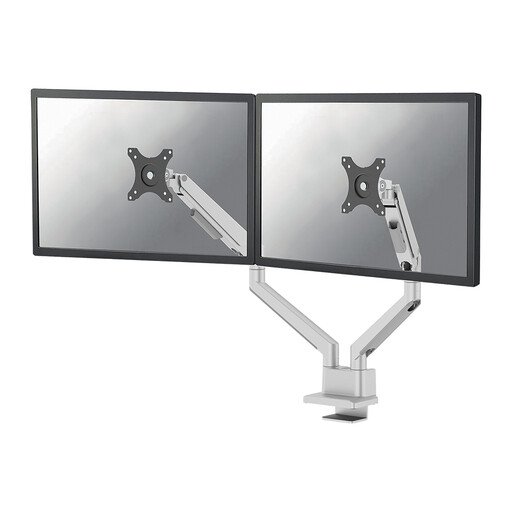
Why it suits this profile: This arm gives professionals working from home or in an office a gas spring mechanism, a top-fixing clamp and a wide range of adjustment for two screens.
The stated limit is 9 kg per screen, and the arm has a 180° stop. You can check that the weight capacity and use close to a wall are right for your workspace before you buy.
For two screens measuring 17 to 32 inches; gas spring height adjustment from 21.5 to 49.5 cm and cable management.
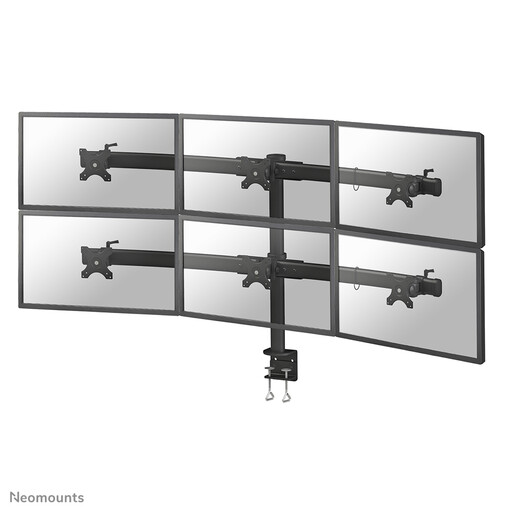
Why it suits this profile: For IT users, trading floors or information-rich dashboards, this monitor arm provides space for six screens.
The product information specifically lists six screens, a maximum of 8 kg per screen and a weight of 16.26 kg for the arm itself. This makes it clear in advance that you’ll need a sturdy desk.
Supports six screens measuring 19 to 27 inches; height adjustment from 22 to 70 cm and cable management.

Why it suits this profile: This model is designed for a large or curved ultrawide screen, making it a good fit for gamers and professionals who work with a single wide display.
The product specifications distinguish between flat and curved screens: up to 18 kg for a flat screen and 14 kg for a curved one. This avoids confusion about the maximum screen size of 49 inches.
Suitable for screens up to 49 inches; gas spring adjustment, 180° stop and VESA 75 x 75 and 100 x 100 mm.
We’ve put together a complete, up-to-date list of products that meet these strict selection criteria and the applicable European safety requirements.
No. Check whether your screen has VESA holes and whether the pattern matches the arm, usually 75 x 75 mm or 100 x 100 mm. Check the weight too, and make sure it doesn’t exceed the arm’s maximum capacity.
It depends on how you use it. A manually adjustable arm may be enough for a fixed workspace. If you regularly change your sitting position, viewing angle or screens, a gas spring arm may be useful. Make sure you check the permitted weight range and set the tension correctly.
Its lifespan depends on the materials, load, installation and how often you move the arm. Check the fittings regularly, don’t exceed the weight capacity and use the arm according to the manual. The minimum statutory warranty in the European Union is two years; some manufacturers state that specific models have a longer manufacturer’s warranty.
