
Vandaag of morgen in huis

Kwaliteit gegarandeerd

Welkomstaanbiedingen ontgrendelen: GRATIS bezorging | Tot 80% korting | Gratis 30 dagen JoyPlus-proefperiode
Download de app
A monitor arm can free up desk space and make it easier to position a screen at your preferred height, depth and viewing angle. However, a quick purchase is not always a wise one. An arm that cannot support your monitor’s weight, an incorrect VESA connection or an unsuitable desk mount can lead to instability, limited freedom of movement or a screen that gradually sinks.
In this guide, the Joybuy Product Recommendation Officer explains what to look out for. The selection is based on verifiable product specifications, such as load capacity, screen size, VESA pattern and adjustment range.
A monitor arm for a 32-inch screen is not automatically suitable for every 32-inch monitor. The weight and position of the centre of gravity are at least as important. A heavy monitor or curved screen may place greater demands on the arm than a lightweight, flat model.
Always check:
A monitor arm with gas spring makes height and depth adjustment easier, but the mechanism must be correctly adjusted to the screen’s weight. With a monitor that is too light or too heavy, the arm may move upwards or sink downwards. Gas spring tension is therefore not a minor detail, but a practical point to check during installation.
Also pay attention to the actual adjustment range. An arm may rotate 360°, yet still offer too little depth for your desk setup.
A monitor arm supports not only the screen, but also its own construction. A thin desktop, glass or unstable chipboard is not always suitable for a clamp or grommet mount. Check the desk’s strength and thickness before ordering.
A topfix clamp is generally attached from the top of the desk. A grommet or through-desk mount uses an opening in the desktop. Choose the method that suits your workspace and follow the installation instructions.
Most of the selected Neomounts models support VESA 75 x 75 mm and 100 x 100 mm. These are the distances between the mounting holes on the back of the screen. Measure the horizontal and vertical distances before buying a VESA monitor arm.
If your monitor has a different pattern, a suitable adapter plate may be required. Check the manufacturer’s information on compatible accessories.
With a dual monitor arm, you need to look at the load capacity per screen, not just the total load capacity. For example, an arm rated at 9 kg per screen is designed for two monitors that each remain within this limit.
For two standard monitors up to 32 inches, models from the DS70 and DS75 series are practical options. For larger or curved screens, special versions are available with a reinforced head and higher load capacity.
An adjustable monitor arm can combine various functions:
An arm with cable management helps guide cables along the structure. This does not automatically prevent cable damage: leave sufficient slack when moving the arm and check that cables do not become trapped.

Why it suits this profile: For a single monitor, this model provides adjustability without the need to buy a dual arm. It supports screens from 17 to 35 inches and up to 9 kg.
The specifications state both the screen size and load capacity. The VESA connection is 75 x 75 or 100 x 100 mm.
Gas spring height adjustment from 21.5-49.5 cm, 360° rotation, 180° swivelling and integrated cable management.
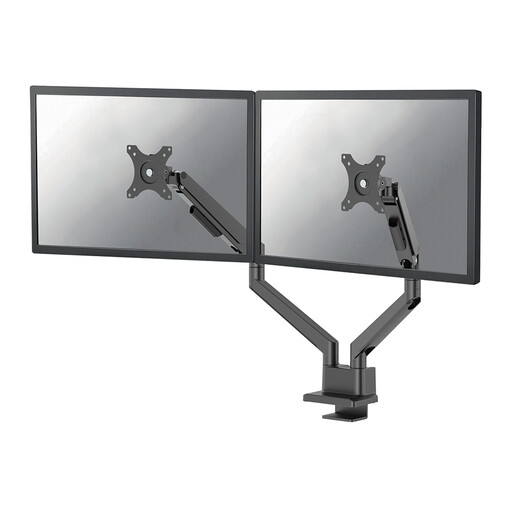
Why it suits this profile: This dual monitor arm is designed for two screens from 17 to 32 inches, with a maximum of 9 kg per screen. It is suitable for many home-working and office setups.
The load capacity is specified per monitor. The 180° stop helps limit contact with a wall or partition.
Height adjustment from 21.5-49.5 cm, depth adjustment from 7-52.5 cm, plus quick-release VESA and cable management.
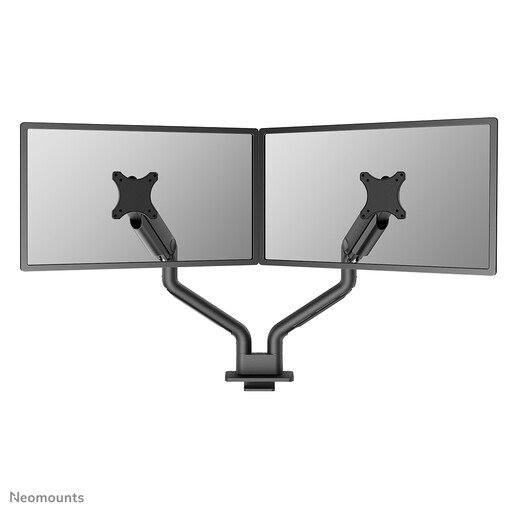
Why it suits this profile: For intensive use with two larger screens, this model offers a maximum of 18 kg per screen and a 10-year warranty period according to the product information.
The higher load capacity provides a clear margin for heavier screens, but the desk must still be suitable for the total load.
Suitable for two screens up to 35 inches, gas spring height adjustment from 20.2-52.2 cm and cable management.

Why it suits this profile: This model is designed for an ultrawide monitor, including curved screens, with a maximum of 18 kg for flat screens and 14 kg for curved screens.
The load capacity distinguishes between flat and curved screens. This prevents you from relying solely on the maximum screen size.
Suitable for 17 to 49 inches, gas spring height adjustment from 26.1-55.5 cm, 180° stop and cable management.
We have put together a complete, up-to-date list of products that fully meet these strict selection criteria and the applicable European safety regulations.
According to the product information supplied, Neomounts products are covered by a minimum of two years’ legal guarantee under EU consumer rules. Some models also state a longer manufacturer’s warranty. Always check the current terms and conditions on the product page.
Not automatically. The desktop must be stable and strong enough to support the arm and monitor. Do not attach a clamp to glass, very thin board material or a damaged edge without checking first. A through-desk mount may be an alternative if the desk is suitable for it.
First note the number of screens, the weight of each screen, the size and the VESA pattern. Then choose between a single arm, a monitor arm for 2 screens or a model for an ultrawide monitor. With curved screens, always check the separately stated load capacity.
A mechanical monitor arm with a gas spring does not use electricity during normal adjustment. The gas spring works without a power supply. Any electricity costs come from the monitor, laptop or other equipment you use on the desk.
