
Vandaag of morgen in huis

Kwaliteit gegarandeerd

Welkomstaanbiedingen ontgrendelen: GRATIS bezorging | Tot 80% korting | Gratis 30 dagen JoyPlus-proefperiode
Download de app
A monitor arm can free up desk space and makes it easier to set your screen at the ideal height and viewing angle. But not every monitor mount suits every monitor, desk or wall. An arm that looks flexible on paper may in practice lack the load capacity, not match the VESA size, or offer too little room for a curved screen.
In this buying guide we explain what to look out for. After that, you’ll find some popular picks for home workers, gamers, office staff and professional workplaces.
A 34- or 49-inch monitor doesn’t automatically fit every arm that lists that size. Weight, curvature and the centre of gravity matter too. An ultrawide screen can put more force on the hinge due to its wider housing than a standard monitor.
Always check the maximum load capacity for your specific screen. Some models have a lower maximum for curved monitors than for flat ones.
Most VESA monitor arms use mounting patterns such as 75 × 75 mm or 100 × 100 mm. Measure the distance between the mounting holes on the back of your monitor before you order. A monitor without a suitable VESA mount can sometimes be fitted with an adapter, but that adapter must itself be rated for the weight and size.
A desk clamp spreads the load across the desktop. Thin chipboard, glass or an unstable table may be unsuitable. With a wall-mounted bracket, the wall must support the combined weight of the screen and arm. Don’t mount directly to plasterboard without suitable wooden studs or a load-bearing structure.
Also consider your cables. An arm that moves far forward needs cables with enough slack. Otherwise ports can be put under strain when you swivel the screen.
Look at three figures:
A single monitor arm is usually easier to position. With a dual monitor arm you also need to consider total width, foot placement and the space behind the desk. A triple monitor arm demands even more desk depth and a rock-solid mount.
An adjustable monitor arm can change height, reach, swivel and tilt. Check which movements are actually available. Some models rotate 360 degrees, while others can only tilt or swivel to a limited extent.
A gas spring monitor arm uses a mechanism that makes adjustments smoother. The spring tension must match the weight of your monitor. If the screen slowly sinks after installation or rises on its own, the tension may need adjusting.
A desk arm is usually fixed with a clamp to the desk edge or with a through-bolt via a cable grommet. A Topfix clamp is handy when you want to secure the arm from the top side of the desk.
A monitor arm with cable management has clips or channels to route power and display cables along the arm. That keeps your workspace tidy, but still check that the cables don’t go taut throughout the full range of movement.
For wall mounting there are two main types:
A TV wall mount or larger videowall bracket isn’t automatically suitable for a computer monitor. Always check the VESA size, weight and screen size.

Why this fits the profile: For one standard or medium-sized screen this monitor arm offers desk mounting with a clamp or grommet. The arm supports screens from 17 to 35 inches and up to 9 kg.
The product specs list both screen size and load capacity. The 180° stop helps prevent contact with a nearby wall or partition.
Gas-spring height adjustment from 21.5 to 49.5 cm, VESA 75 × 75 and 100 × 100 mm, plus cable management.
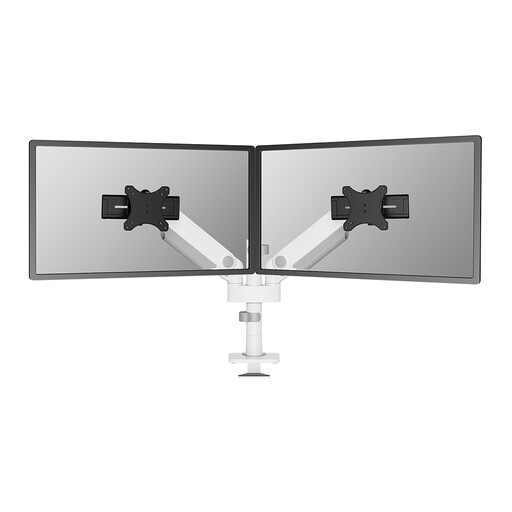
Why this fits the profile: This mount is designed for two flat or curved screens from 24 to 34 inches. It’s ideal for a fixed home office or workplace setup with two larger monitors.
It separates load capacity for flat and curved screens: up to 11 kg per flat screen and 9 kg per curved screen.
Gas-spring adjustment, sliding cross-arms, Quick-release VESA and, according to the product information, a 10-year warranty.

Why this fits the profile: An ultrawide or curved monitor up to 49 inches needs a reinforced mount. This model is built for a single wide screen and frequent, precise adjustments.
The specs distinguish between flat screens up to 18 kg and curved screens up to 14 kg. It doesn’t just look at the screen diagonal.
Support up to 49 inches, gas-spring height from 26.1 to 55 cm, VESA 75 × 75 and 100 × 100 mm, and integrated cable management.
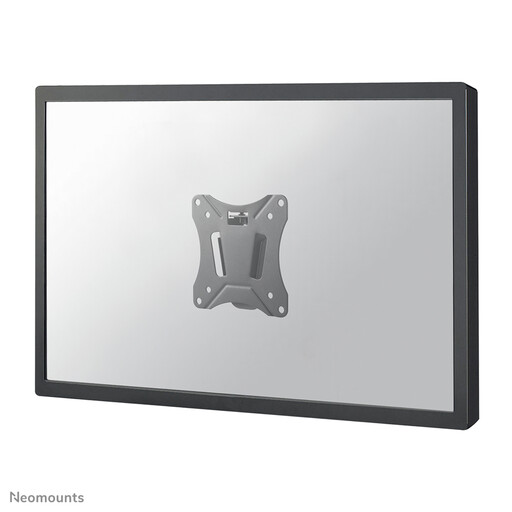
Why this fits the profile: For a fixed workstation, meeting room or compact space, this monitor wall bracket suits flat screens from 10 to 30 inches.
The fixed design has no moving arm to sag. Maximum load is 25 kg and the mounting depth is 1.2 cm.
VESA 75 × 75 and 100 × 100 mm, a slim 1.2 cm profile and installation materials included according to the product description.
We’ve put together a complete, up-to-date list of products that fully meet these strict selection criteria and comply with current European safety regulations.
No. The monitor must have a suitable VESA mount or be compatible with a proper adapter. Also check screen weight, size and any curvature.
That depends on how often you adjust the screen. For a fixed setup, a simple monitor stand may be enough. If you regularly alternate between sitting and standing, height and reach adjustment with a gas spring is usually more useful.
Service life depends on load, installation and use. Keep the screen under the stated maximum, retighten screws when needed and regularly check the clamp, grommet and hinge points. Product warranties vary by model; refer to the relevant product page.
