
Vandaag of morgen in huis

Kwaliteit gegarandeerd

Welkomstaanbiedingen ontgrendelen: GRATIS bezorging | Tot 80% korting | Gratis 30 dagen JoyPlus-proefperiode
Download de app
An extra screen, monitor arm or USB-C hub might seem simple to choose. Yet problems often only appear after purchase: a monitor doesn’t fit the stand, a laptop can’t deliver enough video signal, or a screen turns out to be too big for the available space. When it comes to screens and monitor accessories, a good purchase isn’t just about resolution or a low price.
A product may be suitable for many devices, but not automatically for your laptop, monitor or car. Check beforehand:
With a wireless display adapter, it’s not just the connection that matters. The receiver, the HDMI or VGA input being used, and the maximum resolution all determine the result.
A monitor arm can save space on your desk, but only if the screen falls within the permitted limits. Pay attention to:
A monitor stand that supports 10 kg is not automatically suitable for two screens weighing 20 kg together. With a dual monitor arm, you need to check the weight per arm and the total load.
Terms like “4K-ready”, “waterproof” or “plug-and-play” don’t tell you everything about the installation. With a projector screen, factors such as fabric tension, mounting and ambient light all play a part. A motorcycle CarPlay screen must be securely fastened and must not obstruct your view or controls. According to a brand’s own information, a product might have a certain temperature range or water resistance rating; always check the manual and the concrete product specifications.
An adjustable monitor stand or monitor arm is especially practical when you can adjust the viewing height, swivel angle and tilt. The iiyama DS1002C-B1 supports two screens up to 30 inches, with a maximum of 10 kg per monitor. The arm offers height adjustment, tilt, swivel and a 90-degree rotation function. It mounts with a desk clamp and is compatible with VESA 75 × 75 mm and 100 × 100 mm.
A simpler laptop stand or riser can be enough for a single device. The Neomounts NSMONITOR20 supports screens or laptops up to 10 kg and has an adjustment range of 4.6 to 16.8 cm. Do check that the underside of your laptop sits stably on the platform.
A USB-C hub is useful when your laptop has few ports. Don’t just look at the number of ports, but especially at the video capabilities. The Anker USB-C Hub A8389 features two HDMI ports, VGA, Ethernet, USB connections and card readers. According to the product specification, the two HDMI outputs can deliver 4K signal and VGA supports up to 1080p. The actual video capabilities also depend on your computer’s USB-C port and operating system.
A CarPlay screen for the car is interesting when you want a larger navigation display without replacing the built-in system. The ESSGOO 10.26-inch variant works, according to the product description, with wireless CarPlay and Android Auto, has a screen resolution of 1600 × 600 and is powered via a 12–24V connection. The set also includes a front camera, rear camera and 64GB TF card. Mount the screen so that your view is not blocked.
For motorcyclists, a waterproof housing, secure mounting and ease of operation are more important than just screen size. When choosing a motorcycle CarPlay screen, check whether the model fits your handlebars, power supply and smartphone. With a projector screen, pay particular attention to aspect ratio, size, mounting and whether it will be used indoors or outdoors. A large screen needs more space and, outdoors, must be secured against wind with ropes or other fixings.
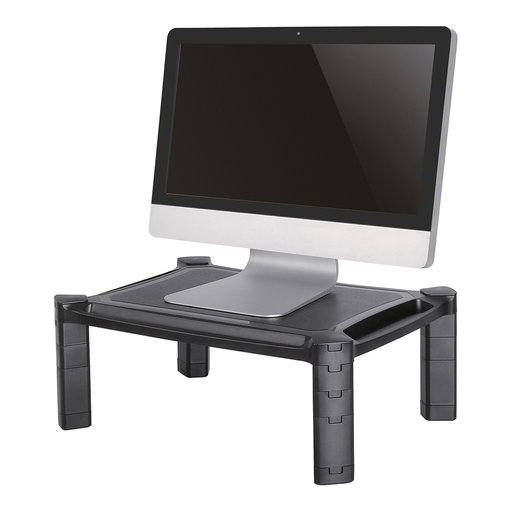
Why this fits the profile: A practical choice for anyone who wants to raise a single laptop or monitor without fitting a monitor arm. The stand also offers storage space for small accessories.
The product specifications state a maximum load of 10 kg, a range of 4.6 to 16.8 cm and support for screens up to 32 inches. This means you can check compatibility beforehand.
Height adjustable, cable management at the rear and compartments for items such as a tablet or stationery.
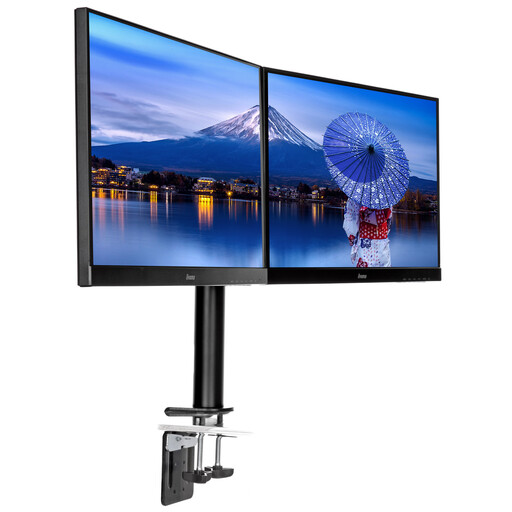
Why this fits the profile: Ideal for home workers and business users who want to place two screens side by side and regularly adjust the viewing angle.
The arm clearly states the VESA sizes, maximum screen size of 30 inches and load of 10 kg per monitor. This makes compatibility easy to check.
Two screens, height adjustment, tilt, swivel and integrated cable management.
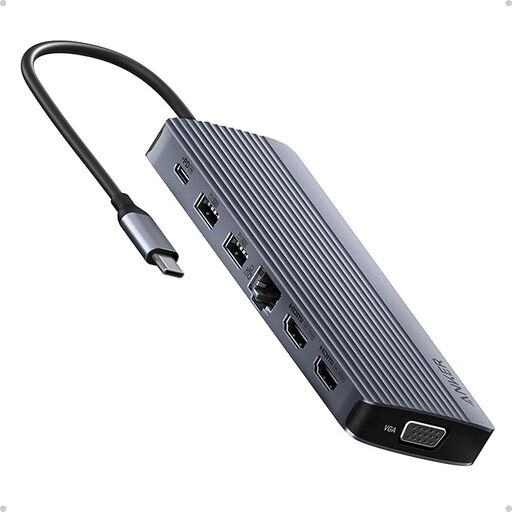
Why this fits the profile: Handy for users with multiple screens, network connections and peripherals who want to expand their laptop with a single hub.
The connections and maximum video capabilities are specified. However, check beforehand whether your USB-C device supports multiple external screens.
14 connection options, two HDMI outputs, VGA, Ethernet and SD/microSD card readers.
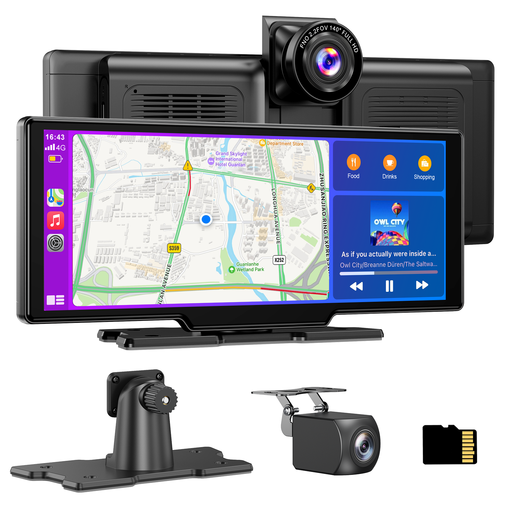
Why this fits the profile: An option for motorists who want to combine navigation, smartphone integration and camera display on a separate screen.
The power supply via 12–24V and the smartphone requirements for iOS and Android are stated. Mount the screen securely and outside your direct line of sight.
10.26-inch screen, wireless CarPlay and Android Auto, front and rear camera and multiple audio outputs.
We’ve put together a full, up-to-date list of products that fully meet these strict selection criteria and current European safety regulations.
That depends on your setup. For a single laptop, a laptop stand or adjustable monitor stand is often sufficient. For two screens, a monitor arm can save space. Always check the VESA size, weight and available desk space.
No. The laptop must support video signal via USB-C and the graphics hardware must be able to handle multiple screens. Also check the resolution per output, the operating system and whether the hub receives enough power via USB-C.
The lifespan depends on materials, load, mounting and usage. An arm or stand generally remains more stable when the maximum weight is not exceeded and fixings are checked regularly. With accessories that have cables or electronics, connections and power components may wear out sooner. Keep the manuals and check warranty and return conditions before purchase.
