If you usually film at the same table, first choose a setup that fits the whole book in frame and lets you check focus, white balance and audio. A mirrorless camera with a suitable lens gives you more framing options, but you’ll need to put your kit together more carefully. A compact camera is easier to move around, provided its field of view and mounting options work for your overhead shots. A tripod can be useful at home, and window light can change while you’re filming.
Who is this guide for?
Creators who film overhead from a fixed position
If you mainly film at one table, you’ll want the whole sketchbook in frame while you draw or turn the pages. The Consumers’ Association highlights a tripod as something to consider for filming at home; also check that the lens suits the distance to your table.
Creators who want to show colours accurately
If you want the paper and drawings to look true to life, it helps to be able to adjust the white balance when the window light changes. Canon Netherlands explains how changing light conditions affect colour reproduction.
Creators who want to appear on camera too
If you switch between showing the book, explaining things and appearing on camera yourself, look for a screen you can see from your working position and a suitable way to record your voice. Check which features the specific camera version has.
What should you consider when choosing?
Mirrorless camera with interchangeable lens
Choose this option if: you usually film in one place and want to choose a lens to suit the distance to your table. Canon, Sony and Nikon all describe models with interchangeable lenses.
Bear in mind: the camera body alone doesn’t determine the framing. Check the lens, mounting options and any microphone separately too.
Compact camera with fixed lens
Choose this option if: you want to move the camera around often or film from different angles. The DJI Osmo Pocket 3 is an example of a compact camera with a fixed lens and gimbal.
Bear in mind: the fixed field of view and mounting options still need to work for your overhead shots; gimbal stabilisation is not the same as a fixed mount above the book.
Canon Netherlands explains why white balance matters when light conditions change; the Consumers’ Association highlights a tripod as a useful consideration for filming at home.
| What to consider |
What should you check? |
Who is this important for? |
| Framing and focus |
Compare the distance above the table with the field of view and minimum focusing distance of your chosen camera and lens. Test whether the paper stays in focus when your hands are in shot. |
If I want to show the whole book and small details while turning the pages, I need to be able to check the framing from my usual distance from the table. Around 36% of consumers say framing and focus are their main concern when buying. |
| Colour in window light |
Check whether you can adjust the white balance, then take a test shot of white paper and your art materials in the light you’ll be filming in. |
If I want the colours of the paper and drawings to look true to life as the window light changes, I need to be able to review a test shot and adjust the white balance if necessary. Colour reproduction is the top priority for around 29% of consumers. |
| Spoken commentary |
Check whether the camera has a microphone input or another suitable way to connect an external microphone. Make a test recording from your usual speaking distance. |
If I’m explaining things while the camera is above the book, I need it to pick up my voice from where I’m speaking. Audio is the main buying concern for around 21% of consumers. |
| Moving and setting up |
Try positioning the camera where you want it above the book, then check whether you can use the screen and controls from your working position. |
If I want to film from other angles as well as show the book on the table, a camera that’s easy to move is important to me. Around 14% of consumers say portability and easy setup are their top priorities. |
Avoid common buying mistakes
-
Comparing a camera body with a complete kit
With a mirrorless camera, the lens you choose also determines whether you can get the shot you want of your sketchbook. And a microphone input doesn’t mean an external microphone is included.
Check which lens and accessories are included with each version, and assess the combination at your usual distance from the table.
A suitable lens, mount or external microphone may mean buying extra equipment, depending on the setup you choose.
-
Assuming a gimbal will work for every overhead shot
The DJI Osmo Pocket 3’s stabilisation specifications don’t prove that you can mount the camera above your sketchbook or get the framing you want.
Test the field of view and positioning before you choose, and select a mount to suit your actual setup.
For a fixed filming position, you may need a separate, suitable mount.
-
Prioritising resolution over changing light
Window light can change while you’re filming, making the paper and drawings look different.
Take a test shot of your sketchbook in the light you’ll be filming in, and check the white balance before recording the full review.
Camera brands to consider
Canon
The EOS R50 V is a video-focused mirrorless camera with an interchangeable lens, vari-angle screen and microphone input. That makes it a good option if you want to put together a fixed setup yourself.
- According to Canon’s product specifications, you can tailor the screen angle, lens and external microphone to your recording setup.
- Which lens will show the whole sketchbook from your usual distance from the table depends on the lens and version you choose.
Sony
The ZV-E10 II is a vlogging-focused mirrorless camera with an APS-C sensor and interchangeable lens. It’s worth considering if you want to make other types of video as well as filming your book.
- Sony describes changing lenses as a way to capture different types of footage.
- A body-only option and a kit with a lens are different versions. Check which lens is included in the offer and whether it suits your distance from the table.
Nikon
The Z 30 is a video-focused mirrorless camera with an interchangeable lens. Nikon lists 4K UHD video up to 30p.
- Nikon describes a screen that flips forwards, as well as options for recording audio with the built-in microphone or an external one.
- A stated recording time isn’t guaranteed for every setting or environment. Also check that the lens and mount suit your setup.
DJI
The Osmo Pocket 3 is a compact camera with a fixed lens and gimbal. It’s worth considering if you want to capture moving footage as well as shots at the table.
- DJI lists the Osmo Pocket 3 as weighing 179 g, with three-axis stabilisation and a minimum object distance of 20 cm.
- You’ll need to assess the fixed field of view and positioning above the book with your own setup; gimbal stabilisation doesn’t automatically provide a fixed overhead mount.
Cameras for sketchbook videos
This selection focuses on cameras for recording sketchbook videos. For each version, check that the lens, mount and listed features suit your recording distance and filming style.
 No image available
Osmo Pocket 4P Standard Combo, black
Worth considering if you’re looking for a compact camera to film a sketchbook. Check that this version and its field of view suit your fixed or portable setup.
The product name specifies the Standard Combo. Check which items are included with this version.
Joybuy
 No image available
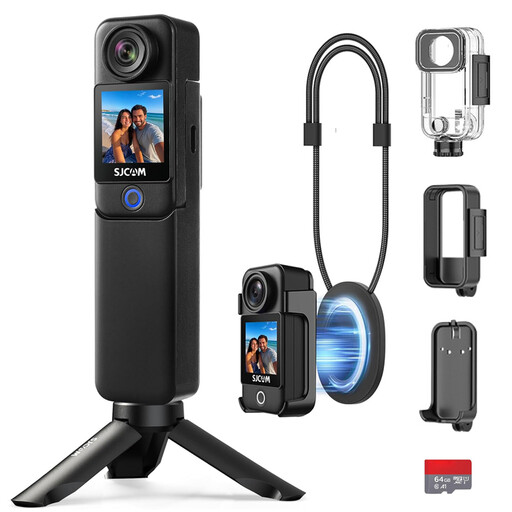
SJCAM C300 4K action camera, black
An action camera to consider if you want to record video of your sketchbook. Test whether the picture and controls work for your table setup.
The product name specifies 4K video and a dual screen. Check the full version and the accessories included.
Joybuy
 No image available
DJI Osmo Pocket 4 Standard Combo
A compact camera to consider if you want to switch between shots of your book and other angles. Check that the mount and field of view work for your overhead shots.
The product name mentions a rotating screen and built-in storage. Check the exact version and specifications before choosing.
Joybuy
 No image available
DJI Osmo Pocket 4 Creator Combo
A compact camera version to consider if you want to choose a fixed position for the camera. Assess the mounting options in the context of your table setup.
The product name mentions a handle with a 1/4-inch thread. Check that it’s compatible with the mount you want to use.
Joybuy
 No image available
Insta360 Luna Ultra Standard Bundle, Cosmic Black
A vlogging camera to consider if you want to make videos of your sketchbook. Check which features and items are included with this specific bundle.
Joybuy
Frequently asked questions
Do you really need 4K for a sketchbook review at home?
Don’t choose on resolution alone. First check that the book is clearly in shot, the details are sharp and your voice sounds clear enough. The Consumers’ Association lists a tripod as one thing to consider when filming at home and, if audio matters, a microphone input too. It doesn’t specify a universal minimum resolution for sketchbook reviews.
What can you do if white paper looks yellow or blue in your video?
Take a test shot in the window light you’ll be filming in and adjust the white balance if needed. Canon Netherlands explains that natural light changes with the conditions, and that white balance determines how the camera handles these colour differences.
What should you check when setting up an overhead shot?
Check that the whole book fits in frame, you can see the screen from your working position and the mount stays stable as you turn the pages. The Consumers’ Association highlights a tripod as useful for filming at home; test your chosen camera and lens at your own distance from the table.
What are the rules on returns and warranties for online purchases in the Netherlands?
When you buy from a business at a distance, you usually have a 14-day cooling-off period; check which terms and exceptions apply to your purchase. You’re also entitled to a product that is fit for purpose. According to the Dutch Government, there is no fixed statutory warranty period for all products in the Netherlands. If there’s a problem with a product, contact the seller to resolve it.
Can you post a sketchbook review online if other people are recognisable in it?
Images in which other people can be recognised are personal data and are covered by the GDPR, as the Dutch Data Protection Authority explains. Before publishing, consider which privacy rules apply in your situation.


