What should you look for when choosing?
First decide how small the detail you want to show is. Then compare the complete camera-and-lens combination and check how much room the lens leaves for your lighting.
| What to consider |
What should you check? |
Who should pay particular attention? |
| Magnifying knife marks |
Check the stated magnification, minimum focusing distance and whether the lens mount is compatible with the camera body. |
If I want to show fine grooves at a larger scale, I pay particular attention to magnification and the space between the lens and the spoon. Around 31% of consumers put close-up detail at the top of their list. |
| Wood colour and artificial light |
Check whether you can set the white balance manually and shoot in RAW; test the shutter mode with your own light. Canon Netherlands describes the control over white balance when shooting in RAW, while Canon Europe warns that some flickering lights can cause banding with an electronic shutter. |
When I want to keep the wood looking the same colour across a series of product photos, I need to be able to control my lighting and colour settings. Around 25% of consumers prioritise colour and artificial light. |
| Sharpness across the spoon |
Check whether the camera body supports focus bracketing and whether images are combined in-camera or afterwards. Use stable support for successive shots. |
With a curved spoon, I want the bowl, handle and carving to appear sufficiently sharp; a single shot won’t automatically keep everything equally sharp. Around 25% of consumers put sharpness across the whole spoon at the top of their list. |
| Complete setup |
Compare what the kit actually includes and check that the supplied lens offers the magnification you need. |
When I’m putting together my first photo table, I don’t want to assess the camera body separately from the lens and any support I need. Around 19% of consumers put the complete setup at the top of their list. |
Cameras at Joybuy
This selection of Joybuy products features cameras offered for photography. Check each model to make sure its lens options, focusing distance and settings are suitable for your close-ups and artificial lighting.
 No image available
Komery W6 digital camera, 12× optical zoom
Could be worth considering if you’re looking for a camera that can handle different framing options; the product title doesn’t say whether you can use interchangeable lenses.
The title lists 64 MP, 12× optical zoom, 4K and Wi-Fi. Check the lens options and minimum focusing distance for close-ups of knife marks.
View at Joybuy
 No image available
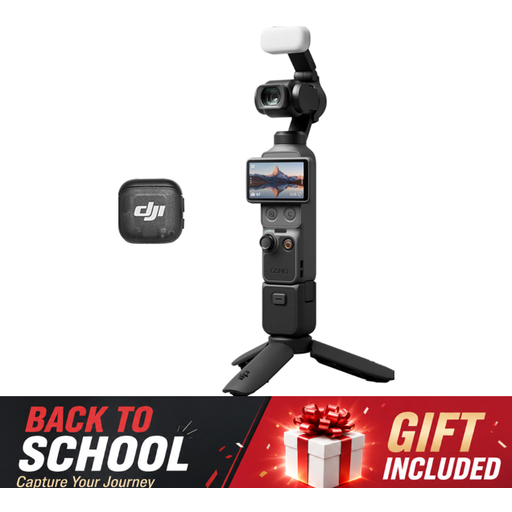
DJI Osmo Pocket 3 Creator Combo
Could suit anyone considering a compact camera for still subjects; check that its features meet your needs for close-up views of wood details.
The product title lists a 1-inch CMOS sensor, 4K/120fps video and 3-axis stabilisation. The description mentions fast focusing for stills and an included microphone.
View at Joybuy
 No image available
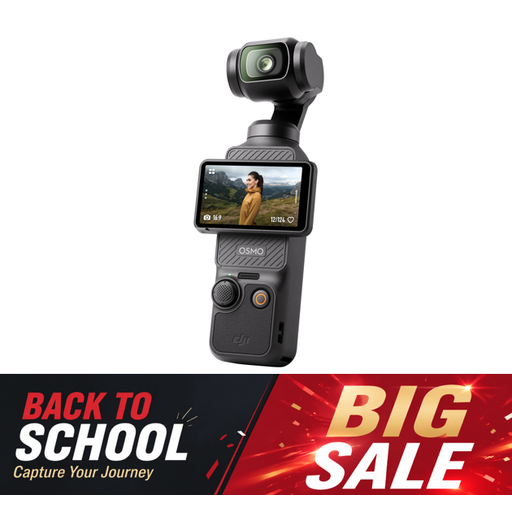
DJI Osmo Pocket 3
Could suit anyone looking for a camera for still subjects; check that its close-up capabilities cover the smallest details you want to photograph.
The product title lists a 1-inch CMOS sensor, 4K/120fps video, 3-axis stabilisation and a 2-inch rotating touchscreen. The description mentions fast focusing for stills.
View at Joybuy
 No image available
Sony ZV-E10 with 16–50mm zoom lens, black
The interchangeable E-mount setup described could be a good option if you want to choose a lens for product photography; check whether the kit lens can focus close enough for the details you need.
The product information lists an APS-C sensor, 24.2 MP, E-mount and a 16–50mm kit lens. It also mentions a setting that shifts focus from faces to subjects.
View at Joybuy
Frequently asked questions
Do I need a 1:1 macro lens straight away to photograph a whole wooden spoon?
Not necessarily. First decide how large you want the spoon to appear in the frame, then check whether your chosen lens can focus from the distance available. 1:1 magnification is most relevant if you want to show very small knife marks at a larger scale.
How do I set up a photo table for sharp close-ups?
Keep the camera and subject steady, position the light so the wood grain remains visible, and focus carefully. If a single shot doesn’t give you enough depth of field, you could try focus bracketing with a suitable camera. Check whether the images are combined in-camera or afterwards.
What can I do about a yellow colour cast or banding under my light?
Adjust the white balance to suit your lighting and, if you like, shoot in RAW so you can correct the colour later. If you see banding under LED or fluorescent light, try a different shutter mode or exposure setting with your own light; results depend on the light source and shooting method.
Who can help if a camera or lens I buy as a consumer in the Netherlands is faulty?
According to the Dutch government, if a product is faulty, the seller must provide a solution. The Netherlands has no fixed statutory guarantee period that applies to every product; any manufacturer’s guarantee is in addition to your statutory rights.
Can I return a camera bought online in the Netherlands?
According to the Dutch government, consumers usually have 14 days to change their mind when buying at a distance. Check who the seller is and which terms and any exceptions apply to your order; an online purchase from a private individual isn’t covered by the same distance-selling rules.


