What should you look for?
Start with your lighting and the framing you want. Then check whether the included lens will do the job or whether you’ll need a separate macro lens for small details.
| What to consider |
What to look for |
Who is this important for? |
| Banding and inconsistent exposure |
Check the shutter types and anti-flicker features available on the exact camera body. Take test shots under the lights you use. |
If I want to avoid banding or differences between shots under LED lighting, I test the settings with my own lights. Around 33% of consumers say avoiding flicker issues is their top priority. |
| Consistent colour |
Check the white balance settings and, if you want to make corrections later, whether the camera can save RAW images. |
If I photograph stationery sets at different times, I want to keep the colours of the paper and packaging consistent. Around 27% of consumers put colour consistency first. |
| Small details |
Compare the mount, actual reproduction ratio and working distance of the specific lens. |
When I want to fill the frame with pen nibs or paper texture, I also consider how much room there is for lights. Around 27% of consumers start with the smallest detail they want to capture. |
| Complete set and setup |
Check which lens is actually included in the kit you’re considering and whether a tripod suits your way of working. |
If I mainly want to photograph complete sets, I want to know what I can use straight away and which extras I really need. Around 13% of consumers say being able to get started easily with the included equipment is their top priority. |
Cameras at Joybuy
This Joybuy selection includes cameras with different types and supplied configurations. For stationery sets under artificial light, check that your chosen camera and lens offer the framing you want, and test white balance and any banding under your own lights.
 No image available
Komery W6 digital camera, 12× optical zoom
For photos of complete sets, check that the available framing suits the space you’re shooting in.
The product title lists 12× optical zoom and 4K; the product description lists a 64MP sensor.
View at Joybuy
 No image available
DJI Osmo Pocket 3 Creator Combo
If you mainly want to take still product photos, check that this type of camera and its available framing suit your setup.
The product title lists a 1-inch CMOS sensor, 4K/120fps video and 3-axis stabilisation. The product description mentions focusing for both stills and video.
View at Joybuy
 No image available
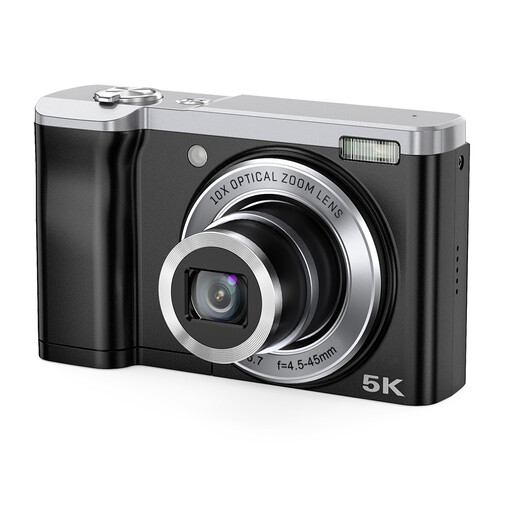
Songdian 5K digital camera, 10× optical zoom
For photos of complete sets, check that the camera offers the framing you want and can capture the smallest details.
The product title lists 5K and 10× optical zoom. The product description mentions front and rear cameras.
View at Joybuy
 No image available
Sony ZV-E10 + 16-50mm Zoom, Black
For different types of framing, check whether the included lens offers the angle of view you want. Then test colour and banding under your own artificial lighting.
The product description lists a 24.2-megapixel APS-C sensor and an E mount. The product title specifies the included 16–50mm zoom lens.
View at Joybuy
 No image available
Sony Alpha A6100 + 16-50mm f/3.5-5.6 OSS II
For different types of framing, check that the kit lens gives you the composition you want and is suitable for the smallest details.
The product description lists a 24.2-megapixel APS-C sensor and a Sony E mount. The product title names the 16-50mm f/3.5-5.6 OSS II lens.
View at Joybuy
Frequently asked questions
Should I buy a macro lens straight away?
Not if you’re mainly photographing complete sets to begin with. Decide which small details you might want to capture later and check which lens comes with the kit. Then compare the mount, magnification and working distance of a separate macro lens for close-ups.
What can I do if my photos show banding under LED lighting?
Take test shots using different shutter settings and check whether your camera model has a suitable mechanical shutter or anti-flicker setting. For a 50 Hz power supply, Sony lists 1/50 and 1/100 of a second among the possible settings, but how well they work depends on the light source and camera model.
How can I keep colours consistent between photo sessions?
Keep the lighting as consistent as possible and reset the white balance if the light changes. If you want to make colour corrections later, check that the camera body supports RAW images and allow for the processing and storage space you’ll need.
What are my rights if I buy a faulty camera as a consumer in the Netherlands?
According to the Dutch government, you’re entitled to a product that works properly, and you can contact the seller if it doesn’t. The Netherlands has no fixed statutory guarantee period; a manufacturer’s guarantee is in addition to your statutory rights.
Can I always return a camera bought online within 14 days?
According to the Dutch government, in many cases you have a 14-day cooling-off period when buying from a business at a distance. Not every online purchase counts as a distance sale, for example if you buy from a private individual. So check who the seller is and which terms apply.


