
Online shop owner
You regularly photograph notebook covers and open books against a white background, and want colours and framing to stay consistent across your product range.


For photos of whole notebooks, a mirrorless camera with a suitable standard zoom lens is a practical starting point. For example, the Canon EOS R50 kit includes an RF-S 18-45mm lens, according to Canon Netherlands. If you want to capture stitching, paper texture or embellishments in close-up, check the magnification of the specific lens: Nikon specifies 1:1 for the NIKKOR Z MC 50mm f/2.8. For a white background, controlled lighting, exposure and white balance are also important, so a camera or kit alone won’t guarantee true-to-life colours.
You regularly photograph notebook covers and open books against a white background, and want colours and framing to stay consistent across your product range.
You want to capture features such as stitching, paper texture or embellishments separately and at a larger scale. The lens partly determines the magnification you can achieve.
You’re looking for a straightforward first set-up and want to know which lens is included and what else you’ll need for your photo set-up.
Choose this option: if you mainly photograph full covers and open books, and want a lens included with the camera.
Bear in mind: a standard zoom lens won’t necessarily offer the magnification needed for small details. Also check that the whole book fits in the frame from your working distance.
Choose this option: if close-ups of details such as stitching or texture are an important part of your photography. Nikon describes a DX macro option for models including the Z50II.
Bear in mind: the macro lens is a separate item. Check the lens mount, magnification and the space available for your book and lighting.
| What to consider | What should you check? | Who is this important for? |
|---|---|---|
| Colour against white | Check the white balance and exposure by taking a test shot of your own paper and cover material. | I want white paper and coloured covers to look true to life in my product photos. Around 33% of consumers say colour reproduction is their main concern. |
| Framing the whole book | Compare the framing from your working distance with the size of your largest book, and check which lens is included. | I mainly photograph full covers and open books, and want to be able to frame those shots consistently. Around 27% of consumers say this is their main priority. |
| Capturing small details | Check the maximum magnification of the specific lens and make sure it’s compatible with the camera. | I want to capture details such as stitching or paper texture separately and at a larger scale. Around 20% of consumers mainly want to capture this kind of detail. |
| A complete first set-up | Check whether the lens is included with each version and decide whether you need a separate macro lens. | I want to know in advance which items come with the camera and what else I’ll need for my set-up. Around 20% of consumers say a straightforward first set-up is their main priority. |
A white background can still look grey, take on a colour cast or lose detail in light-coloured paper. Adobe recommends a controlled environment with good lighting for product photography; Canon Netherlands describes white balance as a setting that affects colour reproduction.
Take test shots with your own materials and check the exposure and white balance before photographing a whole series.
Setting up the lighting and adjusting the colour or exposure can take extra time.
The Canon EOS R50 kit lists an RF-S 18-45mm lens, while Sony also offers the ILCE-6400A as a body-only version. So the lens you need depends on the exact version you choose.
Compare the box contents for each model and check that the lens can capture both your whole book and the details you want to photograph.
With a body-only version, you’ll need to choose and buy the lens separately.
Magnification and working distance depend on the specific lens, not just the camera brand or the word ‘macro’. Nikon specifies 1:1 for the NIKKOR Z MC 50mm f/2.8.
Check the magnification of the exact lens and make sure there’s enough room for the book, camera and lighting.
If the magnification or working distance isn’t suitable, you may need a different lens.
The EOS R50 kit is a practical example of a set with a standard zoom lens for overview shots of books.
The Z system is worth considering if you want to photograph close-ups as well as whole books and choose your lens separately.
The E-mount ILCE-6400A is an option if you’d prefer to choose your lens separately.
The X-S20 is worth considering if you want to factor in RAW files and built-in image stabilisation.
This selection of Joybuy products includes compact cameras and cameras with zoom lenses. Check whether the lens and controls on each model suit the fixed set-up you want to use for your notebooks.
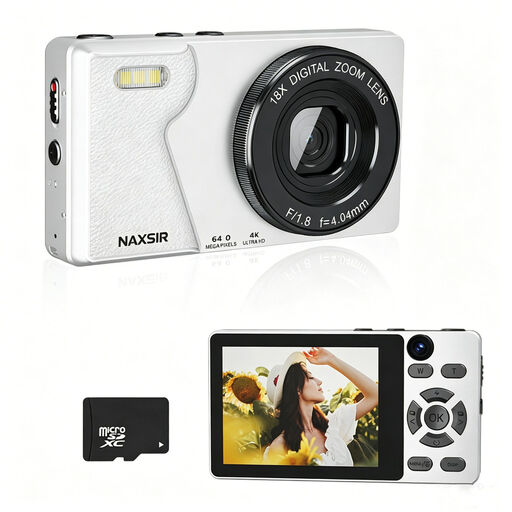 No image available
A compact camera to consider if you’re looking for a standalone model. Check that the controls and lens suit your fixed photo set-up.
The product name lists 64 MP photo resolution, 18x digital zoom and an included 32 GB memory card.
 No image available
A compact vlog camera to consider if you want to position the camera at different angles. Check that the set suits your work surface.
The product name lists a 330° rotating lens, a 1.72-inch touchscreen and a tripod.
 No image available
This camera is one to compare if you’re looking for a zoom lens. Check the framing from the distance at which you photograph your books.
The product name lists 12x optical zoom and 4K. The product description mentions a 64-megapixel sensor and Wi-Fi.
 No image available
A pocket camera to compare if you’re also considering a vlog camera for photos and video. Check that the fixed set-up suits your subject.
The product description lists a 1-inch CMOS sensor and a 2-inch touchscreen. The product name lists 4K/120fps video and 3-axis stabilisation.
 No image available
This version with a zoom lens is one to compare if you want to frame full covers or open books.
The product name lists a 16-50mm zoom lens. The product description mentions a 24.2-megapixel sensor and a vari-angle touchscreen.
No. For overview shots, a lens that frames the whole book from your working distance is often the best place to start. A macro lens is mainly useful when you want to capture small details at a larger scale. For example, Nikon specifies 1:1 for the separate NIKKOR Z MC 50mm f/2.8.
Use controlled lighting and check the exposure and white balance in a test shot. Adjust the settings without losing detail in light-coloured paper; a white background won’t automatically be exposed correctly by the camera.
Make sure the camera and tripod are stable, that you can check the composition and that there’s room to light the book evenly. Also check that the screen is easy to see from your chosen camera angle.
Check the box contents for the exact version: some offers include a lens, while others include only a camera body. Then compare the included lens with the framing and magnification you need for your books.
For a consumer purchase in the Netherlands, a product must meet the standards you could reasonably expect when used normally. According to ACM ConsuWijzer, the seller is your point of contact for a suitable solution. If you’re buying on behalf of a business, check the applicable contract terms.