
Photographer of prints behind glass
You want to reduce reflections from windows and the room without taking the print out of its frame for every shot. Colorado Art Services and Nikon USA discuss lighting and reflections when photographing artwork.


For framed prints in window light, your setup matters more than having extra megapixels: position the camera directly opposite the print and manage reflections before choosing a resolution. For straightforward documentation, an entry-level model with a suitable lens may be enough; higher resolution is mainly useful if you’re making large reproductions or want to crop images later. Also check the lens, filter size and included accessories for the version you choose.
You want to reduce reflections from windows and the room without taking the print out of its frame for every shot. Colorado Art Services and Nikon USA discuss lighting and reflections when photographing artwork.
You need sharpness, straight edges and consistent colours for documentation or further editing. The Consumentenbond explains what to look for in a mirrorless camera, while Canon Europe outlines the options for RAW editing.
You want to assess the complete setup, including a suitable lens and support, rather than comparing camera bodies alone. The Consumentenbond describes the body as the base to which you add other components.
First work out how you’ll manage reflections and the shooting angle, then choose a resolution and lens to suit the size and intended use of your photos.
| What to consider | What to look for when buying | Who is this important for? |
|---|---|---|
| Reflections in the glass | Check whether the lens can take a filter and what filter size you need. | If I photograph prints behind glass, I want to reduce reflections from windows and the room so they don’t obscure image details. Around 36% of consumers put managing reflections first. |
| Colour and fine detail | Compare effective photo resolution, RAW support and the availability of a suitable lens. | If I want to edit colours or crop a large print, consistent lighting and sufficient detail are important. Around 29% of consumers prioritise colour and fine detail over the other considerations. |
| Straight edges and sharpness | Check whether the lens can capture the entire print from your intended working distance, and how corrections work in your RAW workflow. | When I need straight frame edges and sharpness across the whole artwork, I want to be able to set up the camera securely and parallel to the print. Around 21% of consumers give straight framing and sharpness top priority. |
| Cost of the complete setup | Compare body-only options with kits, and check the lens, filter size, tripod and any other included accessories. | If I still need to buy a lens and support, I want to compare the complete setup rather than just the body. Around 14% of consumers put the total cost of the setup first. |
Resolution and managing reflections are two different things: more pixels won’t stop a window or the camera appearing in the glass.
First assess the window light and your setup. Then choose a resolution to suit the size and crops you need.
A body-only version and a lens kit don’t make up the same complete shooting setup.
Check exactly what’s included in the kit and whether it’s compatible with any lenses you already own before comparing versions.
In 2019, Sony Support described a RAW+JPEG workflow in which lens correction is applied to the JPEG, while the RAW file remains uncorrected. Check whether this applies to the camera, lens and software you use.
Test how straight frame edges appear with your exact lens and RAW software.
Checking distorted edges can mean spending extra time on editing.
The EOS R50 is a compact APS-C option for getting started with an RF or RF-S lens.
The Z50II is available as a body and in various lens kits.
The X-T5 may suit you if its extra resolution and RAW workflow match the reproduction size you need.
The α6700 is an APS-C E-mount option if you also want to use the same camera for other photography or video.
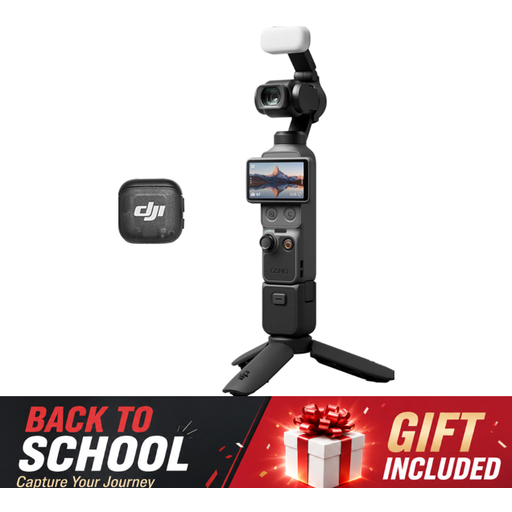
This Joybuy selection includes cameras for related shooting needs: a compact DJI Osmo Pocket 3 Creator Combo and a Sony ZV-E10 with a 16–50mm zoom lens. For each model, check whether its camera category and lens setup suit your needs for a mirrorless camera and for photographing prints behind glass.
 No image available
The rotating touchscreen can help you check the composition of horizontal or vertical shots.
The version includes a 1-inch CMOS sensor, a 2-inch touchscreen, mechanical 3-axis stabilisation and a microphone.
The product name mentions 4K/120fps video; check whether this video option suits your needs for still reproductions.
 No image available
This APS-C camera with an included zoom lens may suit you if you want an interchangeable-lens setup and would like to try a filter to reduce reflections.
The set includes a 16–50mm lens, Sony E mount and a 40.5 mm filter size.
An adapter or charger and a memory card are not included.
No. Nikon USA says a polarising filter can reduce unwanted reflections and sometimes remove them, but the effect depends on the glass and the angle of the light. Check the effect through the camera and adjust the light source or setup if needed.
Position the camera securely and as parallel to the print as possible, then check the edges in the frame. Colorado Art Services recommends diffused light and adjusting the angle of the light to reduce reflections. Avoid mixing window and artificial light if consistent colours are important.
It depends on the version you choose and which lenses you already own. A mirrorless camera has an interchangeable lens; Nikon Netherlands offers the Z50II both as a body and in lens kits. So check exactly what’s included and the lens mount before buying.
For a standard online purchase, ACM ConsuWijzer says you generally have up to 14 days after delivery to change your mind, subject to legal exceptions. Statutory consumer rights also apply if the product doesn’t do what you could reasonably expect under normal use; the seller is responsible for this.
Don’t assume that you’re automatically allowed to publish it. Dutch government information explains that artworks may be protected by copyright, and personal use is different from publication. Before publishing, check who owns the rights to the work shown and what permission or licence you need for your intended use.