Who is this setup for?

For documenting the whole piece

You want the edges, proportions and fine details of the entire collage panel to remain clear. A stable, parallel camera setup and a lens suited to your working distance are important. For large objects, the Canadian Heritage Information Network recommends stable support and photographing from above.

For colour-accurate documentation

You want to capture differences in material and colour, even against a dark background. Think about consistent lighting, carefully set white balance and a file format suited to your post-processing workflow. The Canadian Conservation Institute considers light sources and their effect on colour to be part of photographic documentation.

For collages with shiny or textured elements

Your panel may include reflective or protruding elements. Consider how you can adjust the lighting and whether different parts sit at varying distances; camera specifications alone do not determine how these materials will appear in the image.

What should you look for when choosing?

First, plan your fixed camera setup and lighting. Then compare the lens, RAW capabilities and exact package contents; together, these determine which equipment is right for your panel.

What to consider What to check before buying Who this matters to
A straight, detailed overview Check the included lens, mount and working distance. Plan a tripod setup with the camera parallel to the panel. If you want to capture the entire panel with accurate proportions and recognisable details, this is the main priority for around 36% of consumers.
Colour and dark tones Check RAW support and access to white balance and exposure settings. Take a colour reference shot under the lighting you use. For around 29% of consumers, consistently capturing colours and dark areas is the main priority.
Reflections and texture Consider the materials in your panel and whether you can reposition the lighting. For protruding elements, also think about the aperture setting and depth of field. This is the main priority for around 21% of consumers who want shiny or protruding elements to remain visible.
Completeness of the kit Check the exact package contents and lens mount, and compare camera bodies and kits on a like-for-like basis. Around 14% of consumers prioritise buying the equipment they need for this shoot without unnecessary extras.

Buying pitfalls

  • Choosing a more expensive camera body to fix setup problems

    A camera body will not automatically straighten a tilted shot or even out the lighting. The Canadian Heritage Information Network treats stable, parallel positioning and even exposure as separate parts of documentation.

    First, work out where the tripod can go and how you will light the panel evenly. Only then compare camera bodies and lenses.

    If you have yet to arrange the support and lighting, a more expensive camera body could add to your costs without solving the main setup problems.

  • Assuming RAW or a colour preset will automatically ensure accurate colours

    RAW, the light source, white balance and a colour reference each serve different purposes. A file format or creative colour setting alone cannot guarantee consistent reproduction of your collage.

    Keep the lighting consistent, set the white balance deliberately and, if needed, take a colour reference shot with your setup.

    An inconsistent setup can mean more time spent on post-processing or retaking photos.

  • Comparing a body-only price with a kit price without checking the lenses

    A camera body, a kit with one lens and a set with several lenses are different purchases. The Canon and Nikon packages mentioned include different lens combinations.

    Check the exact package name and contents. Only choose extra focal lengths if you will need them for other shots too.

    An extra lens may go unused for a single panel, while a body without a lens is not yet a complete setup for taking photos.

Relevant brands to consider

Canon

The EOS R50 is an APS-C option with an RF or RF-S mount, suited to an overview setup with an appropriate lens.

  • Canon Netherlands lists the EOS R50 as having 24.2 megapixels.
  • Canon does not list in-body sensor-shift stabilisation. Check which lens is included with the specific offer; the body specifications alone do not show how a collage will be reproduced.

Fujifilm

The X-S20 is an X-mount option if you regularly take close-up shots handheld as well as using a tripod.

  • Fujifilm lists 26.1 megapixels, RAW shooting and five-axis in-body image stabilisation.
  • The quoted stabilisation compensation is based on the stated CIPA test conditions and says nothing about reflections or the colour reproduction of a complete setup.

Sony

The ILCE-6400 is an APS-C option with an E mount and RAW shooting, suitable for a documentation kit you put together yourself.

  • Sony Netherlands lists the ILCE-6400 as having 24.2 effective megapixels and 14-bit RAW.
  • Check the full model code and the lens included in the offer: a body and a kit are different purchases.

Nikon

The Z50II is a Z system option; the version mentioned comes with two zoom lenses.

  • Nikon describes the kit in question as including a 16–50mm VR zoom and a 50–250mm VR zoom.
  • The extra telephoto reach is not automatically necessary for photographing a single collage panel. Check the contents of the specific kit before choosing.

Cameras at Joybuy

These cameras offer different ways to frame and capture a collage panel. For each model, check that the stated lens and specifications suit your working distance and shooting setup.
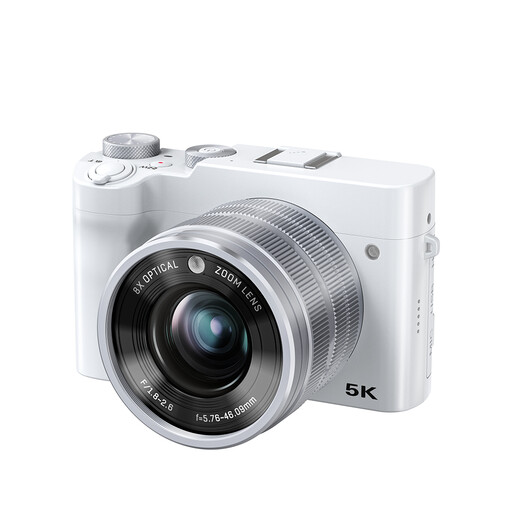
Songdian digital camera with optical zoom, 5K and 64 MP, white

Songdian digital camera, 8× optical zoom, 5K, 64 MP

The optical zoom can help you frame your shot from different working distances.

The product name lists 8× optical zoom, 5K and 64 MP.

The product information lists autofocus.

Joybuy

Sony ZV-E10 with 16–50mm zoom lens, black

Sony ZV-E10 with 16–50mm zoom lens

The zoom lens offers different framing options from a range of working distances.

The kit lists a 16–50mm lens and E mount.

The product information lists a 24.2 MP APS-C sensor.

Joybuy

Sony Alpha A6100 with 16–50mm f/3.5–5.6 OSS II lens

Sony Alpha A6100 with 16–50mm f/3.5–5.6 OSS II

The included zoom lens lets you frame the panel from different working distances.

The kit lists a 16–50mm lens and Sony E mount.

The product information lists a 24.2 MP sensor.

Joybuy

Frequently asked questions

Should you photograph the panel with the camera parallel to it?

For a straight documentary overview, a parallel camera setup is appropriate. The Canadian Heritage Information Network recommends a stable, overhead camera setup for large objects; you can also take additional views to capture individual textured details.

How can you keep colours consistent across multiple shots?

Keep the lighting consistent and reset the white balance whenever you change your lighting setup. You can also photograph a colour reference under the lighting you use. This is a documentation technique, not a guarantee that one camera model will automatically capture exact colours.

Can you publish a photo of a collage containing copyrighted material?

Check the rights to other people's material before making the image public. According to the Dutch government, you generally need permission from the creator to use other people's copyright-protected works; making a copy for your own use is different from distributing or publishing it. The situation for a particular collage depends on its contents and the rights attached to them.

Do you always have a cooling-off period when buying online?

According to the Dutch government, online purchases from a business generally come with a 14-day cooling-off period. There are exceptions, including online purchases from private sellers, so check who the seller is and which information applies to your purchase.

Should you contact the manufacturer or the seller about a warranty?

According to the Dutch government, if there is a problem with a consumer product, the seller must provide a solution. The manufacturer's warranty is in addition to your statutory rights; before paying for an extended warranty, check what it actually adds.
