
Ceramics seller with visible signs of wear
You want both overview shots and separate images of chips, crazing and maker’s marks. eBay Seller Center recommends photographing damage and wear up close too.


Start with soft, controllable light and a plain background. Then compare mirrorless cameras by their white balance, lens and the cost of the complete set-up. A suitable kit lens may be enough for overview shots, but to capture small chips, crazing or maker’s marks, the lens you choose needs to focus close enough. A different camera body won’t make up for poor lighting or the absence of separate photos showing signs of wear.
You want both overview shots and separate images of chips, crazing and maker’s marks. eBay Seller Center recommends photographing damage and wear up close too.
You photograph ceramics in changing light and want to avoid white balance or reflections altering how the glaze colour looks. Canon Netherlands explains how shooting in RAW gives you more scope to adjust the white balance afterwards.
You photograph several objects in a row and want to reproduce a similar frame and background each time. Canon Netherlands recommends using a tripod to create consistent product compositions.
First, decide how you’ll control the light and background. Then compare the body and lens against the details you actually want to show in your listings, and consider the equipment you need as one complete set.
| What to consider | What should you check? | Who is this important for? |
|---|---|---|
| Colour and reflections | Check whether you can set the white balance and shoot in RAW. Try soft light, and if reflections appear, adjust the position of the light or camera. | I want the glaze colour to remain recognisable, even when the surface is shiny. Around 28% of consumers give colour and reflections top priority. |
| Small details | Check the lens mount, maximum magnification and working distance of your chosen lens-and-body combination. Take a test shot of the smallest imperfection that matters. | If chips, crazing or maker’s marks need to be clearly visible in your listing photos, close focusing is important. These details come first for around 28% of consumers. |
| Repeatable set-up | Check that the camera fits your tripod and that you can easily use the screen and controls from your photo table. | If you photograph several objects in a row, you’ll want to be able to repeat the framing and background easily. This is the top priority for around 22% of consumers. |
| Complete equipment set | Compare what’s included with body-only and kit options. Also allow for a suitable lens, lighting, a tripod and a memory card. | I’d rather compare the complete, usable photography set than just the body. The full equipment set is the deciding factor for around 22% of consumers. |
Lighting and presentation matter too when taking product photos. The body alone won’t tell you whether the smallest relevant detail will be sharp and large enough in the frame.
Before choosing extra equipment, assess a test set-up with both an overview shot and a close-up of the smallest imperfection.
According to Canon, the Canon RF 35mm F1.8 MACRO IS STM offers up to 0.5× magnification. Nikon lists 1:1 magnification for the NIKKOR Z MC 50mm f/2.8. The terms alone don’t tell you how much detail a particular lens captures.
Check the maximum magnification, working distance and mount for the exact lens.
A lens with the magnification you want may need to be bought separately.
An overview image won’t always show chips, wear or other features of an individual second-hand item.
Alongside the overview shot, include sharp detail photos of relevant signs of wear and maker’s marks.
The EOS R50 is an APS-C body with an RF/RF-S mount. This combination is worth considering if you want to choose a compatible close-up lens.
The ILCE-6400 is an APS-C camera with an E-mount. Sony lists support for RAW files.
The Z50II uses the Z mount. The NIKKOR Z MC 50mm f/2.8 is a separate macro lens for this system.
The X-S20 is a camera with an X mount. Fujifilm lists RAW support and in-body image stabilisation.
The LUMIX G97 uses Micro Four Thirds lenses and, according to Panasonic, has an adjustable screen.
The products below range from digital zoom and vlogging cameras to Sony camera kits with a 16–50mm zoom lens. Check each model to make sure its lens options suit your needs for close-ups of ceramics.
 No image available
The stated optical zoom can help you adjust the framing for an overview shot; check whether the model also focuses close enough to capture chips and maker’s marks.
The product title lists 12× optical zoom, 64 MP, 4K and WiFi.
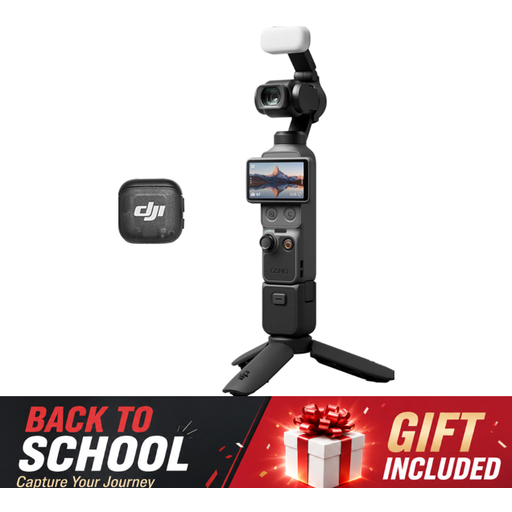 No image available
The product title focuses on vlogging and video; check that the lens and close-up capabilities suit your needs before choosing this model for detailed photos of ceramics.
The title lists a 1-inch CMOS sensor, 4K/120fps video, 3-axis stabilisation and a microphone included.
 No image available
The title describes a camera for vlogging and video. Check its still-photo close-up capabilities before using this model to show small signs of wear.
The title lists a 1-inch CMOS sensor, 4K video, 3-axis stabilisation and a rotating touchscreen.
 No image available
The included zoom lens is designed for framing overview shots; check that it focuses close enough for the smallest details you want to show.
The product description lists a 24.2 MP APS-C sensor, a vari-angle screen and an E PZ 16–50mm zoom lens included. A memory card and adapter/charger are not included.
 No image available
The included zoom lens could be a starting point for overview shots; check its close-up capabilities for chips, crazing and maker’s marks.
The product description lists a 24.2 MP APS-C sensor and a Sony E mount. The title lists an included 16–50mm f/3.5–5.6 OSS II zoom lens.
Not necessarily for overview shots. If chips or maker’s marks look too small, compare compatible lenses by their maximum magnification and working distance; the word ‘macro’ alone doesn’t tell you how much magnification a lens offers.
Start with soft light and a stable set-up. Check the white balance and, if you can see reflections, change the angle of the light or camera. Also take separate photos of any relevant signs of wear.
Check exactly what’s included in the kit and allow for a close-up or macro lens, lighting, a tripod and a memory card if needed. Check the manufacturer’s warranty terms separately from your statutory rights against the seller.
If you buy online as a consumer, you generally have a 14-day cooling-off period after delivery, subject to legal exceptions. ACM ConsuWijzer explains that under the statutory guarantee, the seller is responsible for faulty goods; this isn’t simply a fixed two-year guarantee period. Check separately which terms apply if you buy the camera for business use.