What should you look for when choosing?
Start with the lens, working distance and setup needed to capture the whole sheet. Then consider whether extra resolution or RAW shooting matters for your crops and colour correction.
| What to consider |
What should you check? |
Who is this important for? |
| Fine lines and room to crop |
Compare effective pixels alongside the lens, focusing and sharpness across the whole sheet; megapixels are not a reproduction test. |
If I want to crop into brushstrokes later, I need the lens and focusing to preserve detail across the whole sheet. Around 33% of consumers put fine lines and room to crop first. |
| Paper and ink colour |
Check RAW support and white balance settings, and make sure the window light falls evenly across the sheet. |
For subtle paper and ink colours, I want to account for changing daylight and be able to assess the white balance. Around 27% of consumers give colour reproduction the highest priority. |
| A straight image with even exposure |
Check that the camera and sheet fit comfortably above your workspace, and that the lens can capture the whole sheet from your working distance. |
In a small workspace, I want to photograph the whole sheet straight-on without any part being exposed differently. Around 20% of consumers put a practical setup first. |
| Complete setup |
Compare body-only options with lens kits, and check the lens mount, included accessories and any support equipment. |
If I need a usable setup for photographing the sheet, I want to know which lens and support equipment I still need. Around 20% of consumers focus mainly on the total cost of the setup. |
Joybuy products
This selection includes different types of cameras, from pocket gimbal models to a Sony ZV-E10 kit. For each model, check that the camera type, lens and controls suit photographing a sheet of calligraphy from directly above. The product names alone don’t make these options directly comparable.
 No image available
DJI Osmo Pocket 4 Standard Combo
This is a pocket gimbal camera. Consider whether this type of camera is right for taking a fixed overhead shot of paper.
The product name lists a 1-inch CMOS sensor, 4K/240fps, 3-axis stabilisation, 2× lossless zoom, 107 GB of built-in storage and a rotating 2-inch screen.
View at Joybuy
 No image available
Osmo Pocket 4 Creator Combo
This pocket gimbal camera is a different type of camera from a mirrorless model. Check that the controls and setup suit your reproduction needs.
The product name lists a 1-inch CMOS sensor, 4K/240fps, 3-axis stabilisation, 2× lossless zoom, 14-stop dynamic range and 107 GB of built-in storage. It also lists a handle with a 1/4-inch thread.
View at Joybuy
No image available
DJI Osmo Pocket 3 Creator Combo
The product name describes this model as a vlog camera. Check whether this type of camera is suited to photographing a sheet from directly above.
The product name lists a 1-inch CMOS sensor, 4K/120fps video and 3-axis stabilisation. The product information also mentions 10-bit D-Log M and a rotating screen for horizontal and vertical shots.
View at Joybuy
 No image available
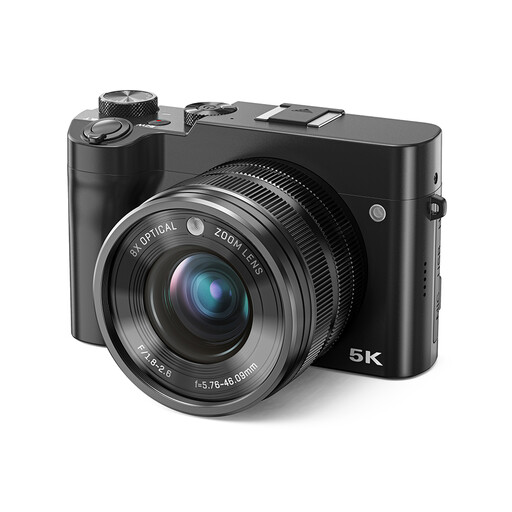
Songdian digital camera 8× optical zoom, black
This is a digital camera with a zoom lens. Check that the controls and working distance are suitable for capturing your whole sheet.
The product name lists 5K, 64 MP and a dual lens. The product information also mentions 8× optical zoom, autofocus, manual focus, a touchscreen and the ability to focus on a selected area.
View at Joybuy
 No image available
Sony ZV-E10 + 16-50mm Zoom Black
This APS-C kit includes a lens. Check that the focal length and framing suit the dimensions of your sheet of calligraphy.
The product information lists an E mount, 24.2 MP, a 16–50mm kit lens, autofocus and a tilting vari-angle screen.
View at Joybuy
Frequently asked questions
Do I always need a full-frame camera for photographing calligraphy in window light?
No, the requirements listed don’t automatically mean you need a full-frame camera. First decide on the output size you want, then assess the lens, level setup and light. The stated resolutions of APS-C models are not a comparative measure of reproduction quality.
Where should I start if the window only lights one side of the sheet?
First check the brightness and look for any glare across the whole sheet. If needed, adjust the position of the sheet or camera. The Canadian Conservation Institute explains how the direction of lighting affects the appearance of objects; its example using two lamps is not a prescribed setup for window light.
Why does white paper sometimes look coloured in a photo?
The colour of natural light can change, making paper look different in a photo. Set the white balance appropriately or use RAW so you can assess and adjust the colour later. Editing won’t automatically correct uneven lighting.
What should I check about the kit and the warranty?
Check whether the listed kit contains just a body or includes a suitable lens too. According to the Dutch government, purchases made as a consumer in the Netherlands are covered by a legal guarantee, and the seller is your point of contact if a product is faulty. For online purchases from a business, you generally have 14 days to change your mind; check the terms for your specific purchase.
Can I publish a photo of someone else’s calligraphy online?
Don’t assume that you can. According to the Dutch government, you may generally only use someone else’s copyright-protected work with the creator’s permission. You can’t distribute or publish a copy made for personal use. Check the rights to the specific work before publishing it.


