What should you look for when choosing?
First decide what you want to photograph: the whole tin, a small detail or a repeatable series. Then compare the lens and lighting set-up. A camera feature alone won’t determine how reflections appear on the tin.
| What to consider |
What should you look for? |
Who is this important for? |
| Reflections and lighting |
Consider where you can position the tripod and light modifier. Diffused light softens the lighting, but the shape of a softbox can also create a visible reflection. |
If I want the decorations to show up clearly on a shiny tin, I need to be able to position the light sources deliberately. Around 33% of consumers say reflections and lighting are their main concern when buying. |
| Small details |
Check the magnification and focusing distance of the exact lens. Canon Europe specifies a maximum magnification of 0.16× with autofocus for the RF-S 18-45mm at 45 mm; Nikon Netherlands lists 1:1 for the separate NIKKOR Z MC 50mm f/2.8. |
If I want to capture an ornament or textured detail in close-up, I’ll look at the lens and how much space the lighting needs. Around 25% of consumers prioritise small details. |
| Consistent framing and colour |
A tripod helps you maintain your framing. Check that the white balance and RAW workflow suit you; RAW files require post-processing. |
For multiple views, I want to be able to repeat the background and framing and check the colour under the same lighting. Around 25% of consumers make a consistent series of photos their main priority. |
| What’s included in the kit |
Check whether the deal includes just a camera body or also the lens you need, and whether the lens mount is compatible with the camera. |
If I don’t already have a suitable lens, I want to know what I can use straight away and what I’ll need to add later. Around 17% of consumers focus mainly on what’s included in the complete kit. |
Cameras for this subject
These Joybuy cameras are suited to product photography. For each model, check that the lens, framing and magnification you need for details suit your photo of the tin.
 Image unavailable
Komery W6 digital camera
The product name lists 12× optical zoom and 64 MP; these are product claims, not the result of an independent image quality test.
The description lists photography and close-ups as possible uses. Check that the camera and lens suit the framing you want for the tin.
Joybuy
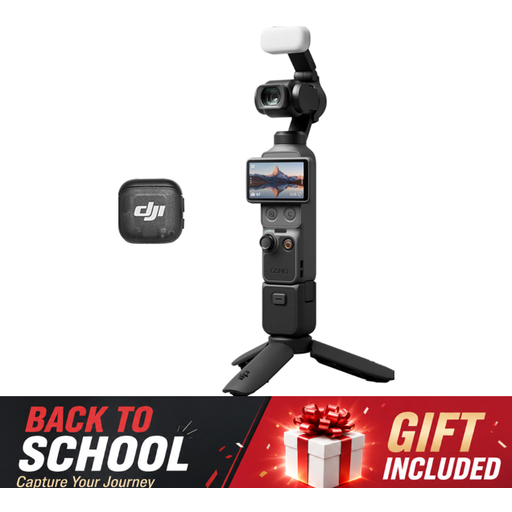 Image unavailable
DJI Osmo Pocket 3 Creator Combo
The product description lists a 1-inch CMOS sensor and a rotating screen for horizontal and vertical framing.
Check that this type of camera suits your set-up and gives you enough control over the lens and working distance for photographing the decorations.
Joybuy
 Image unavailable
DJI Osmo Pocket 3
The product description lists a 1-inch CMOS sensor and a rotating screen for horizontal and vertical framing.
See whether its framing options suit your set-up; the description doesn’t specify magnification for small decorations.
Joybuy
 Image unavailable
Sony ZV-E10 + 16-50mm Zoom Black
The product name lists an included 16-50mm zoom lens, giving you flexibility with your framing.
The product description says that an adapter and charger aren’t included. Check whether you’ll need them.
Joybuy
 Image unavailable
Sony Alpha A6100 + 16-50mm f/3.5-5.6 OSS II
The product description lists an APS-C sensor, electronic viewfinder and 16-50mm zoom lens.
It also lists Wi-Fi and Bluetooth for transferring files. Check that the lens gives you the framing and level of detail you want.
Joybuy
Frequently asked questions
Do you need a macro lens straight away to photograph the whole biscuit tin?
No, not necessarily. Start by checking the framing and working distance of the standard zoom in the exact kit. If you want to capture a small ornament in close-up, compare the lens magnification. Nikon Netherlands lists 1:1 for the separate NIKKOR Z MC 50mm f/2.8; Canon Europe specifies a maximum magnification of 0.16× with autofocus for the RF-S 18-45mm at 45 mm.
How can you keep a series of photos consistent against the same background?
Use a tripod, keep the background and framing consistent, and check the white balance under the lighting in your set-up. Canon Europe explains that RAW files let you adjust the white balance later, but you’ll need to post-process them.
What extra purchases and support should you check?
Check whether the version includes a camera body or a kit with the lens you need, and whether you’ll need a separate lens for close-ups. According to the Dutch government, the retailer is your point of contact for the legal guarantee if a product is faulty; any manufacturer’s warranty is in addition to this.
Do online camera purchases in the Netherlands always come with a 14-day cooling-off period?
For eligible distance purchases from a business, the cooling-off period is generally 14 days, according to the Dutch government. This doesn’t automatically apply to online purchases from private sellers, so check who the seller is and which terms apply to your specific purchase.


