What should you look for?
Wired remote shutter release
Best for: a fixed tripod setup, provided your camera supports the specific plug and connection.
Bear in mind: the cable limits where you can stand, and connections vary by camera model.
Bluetooth remote control
Best for: working around your setup without moving a cable, if your camera supports the specific remote control.
Bear in mind: pairing and features vary by model. Canon and Sony list a range of around 5 metres for certain models, which Sony says can vary depending on conditions.
Camera app
Best for: checking the image or focus on your phone, if your camera and app support these features.
Bear in mind: available features vary by camera model; check before relying on the app.
For miniature portfolio photos, first check compatibility with your complete camera model. Then choose the control method that suits your setup and the level of control you want.
| What to consider |
What should you check? |
Who is this important for? |
| Compatibility |
Check the complete camera model name and, for a cable, the connection. Don’t assume compatibility based on the brand alone. |
When choosing a remote shutter release, I want to know first whether it works with my camera. Around 36% of consumers put compatibility first when buying. |
| Taking photos without touching the camera |
Check that the remote shutter release activates your camera’s shutter; also use a stable setup and check the focus. |
With a fixed close-up setup, I don’t want to touch the camera when taking a photo. Around 29% of consumers prioritise releasing the shutter without moving the camera. |
| Consistent operation |
Decide whether a standard shutter button is enough, or whether you need features such as a half-press or lock; check each feature for your model. |
When taking a series of portfolio photos, I want to disturb the setup as little as possible between shots. Around 21% of consumers prioritise consistent operation. |
| Image and focus control |
Check which live-view and focus features your camera and app combination actually offers. |
When photographing small details, I want to be able to check the image and focus remotely. Around 14% of consumers prioritise this control over a separate physical shutter button. |
Joybuy products for smartphone photography
These products are designed to remotely control and support a smartphone camera; they aren’t a substitute for a remote shutter release made for a specific interchangeable-lens camera model.
 No image available
KINSI selfie stick with tripod, 170 cm
Suited to a smartphone setup where you want to control the camera remotely and use the tripod on a table or outdoors.
The product name lists a Bluetooth remote control, an extendable length of 170 cm, a rotating phone holder and support for smartphones from 4.7 to 6.0 inches.
View at Joybuy
 No image available
KINSI smartphone tripod with Bluetooth remote control
Suited to repeated smartphone photography using an adjustable, foldable tripod setup.
The product name lists a Bluetooth remote control and a foldable tripod for tabletop and outdoor use. Check that the phone holder fits your smartphone.
View at Joybuy
 No image available
Osmo Action GPS Bluetooth remote control
Suited to anyone looking for a remote control for one of the specified compatible Osmo cameras, not for general smartphone or camera control.
The product name lists compatibility with Osmo Action 4, Osmo Action 5 Pro, Osmo 360 and Osmo Action 6. Check your exact camera model.
View at Joybuy
 No image available
Ulanzi JJ02 Bluetooth selfie stick, 3-in-1
Suited to smartphone photography where you want a Bluetooth shutter and mini tripod in the same setup.
The product name lists an extendable mini tripod, dual cold-shoe mounts and compatibility with iPhone and Android.
View at Joybuy
 No image available
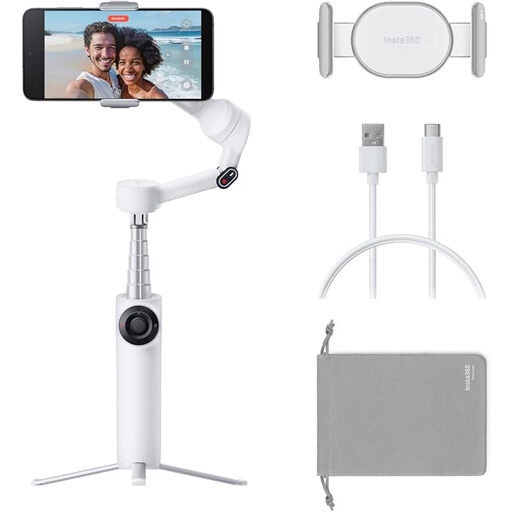
Insta360 Flow 2 White smartphone gimbal
Suited to a smartphone setup where you want a gimbal with an integrated tripod and remote control.
The product name lists a foldable gimbal with an integrated tripod and selfie stick, for iPhone and Android. Check whether it suits the way you photograph miniature figures.
View at Joybuy
Frequently asked questions
Do I need a remote shutter release to take sharp photos of miniature figures?
Not always: if your camera has a suitable app feature, you may be able to release the shutter without touching the camera. You’ll also need a stable setup and accurate focus; a remote shutter release won’t take care of these on its own.
How can I tell whether a wired remote shutter release will fit my camera?
Compare the connection specified by the manufacturer for your complete camera model with the plug on the remote shutter release. For example, the Canon RS-80E3 is designed for compatible cameras with an E3-type connection, while the Sony RM-VPR1 is described as having a multi-terminal connection. Don’t assume they’re interchangeable.
How can I keep a series of close-ups consistent?
Keep the camera and subject steady, and check the focus for every shot. If you’re taking a series at different focus distances, your camera must separately support focus bracketing; a standard shutter button won’t create a focus stack by itself.
What are my rights when buying online in the Netherlands?
For many distance purchases from a business, consumers have a 14-day cooling-off period, subject to exceptions. You’re also entitled to a product that meets the required standards, and the seller is your point of contact if something is faulty, according to the Dutch Government. These consumer rights don’t necessarily apply when you’re buying for a business.


