For filming small construction details, a camera with interchangeable lenses is a good choice if you can select a lens that focuses at your working distance. A compact camera is easier to set up, but its fixed lens needs to handle the close-ups you want. Check the minimum focusing distance and depth of field with a test shot of your smallest component. Also test the white balance, exposure, audio and recording time by filming a complete lesson.
Who is this choice relevant to?
Builder filming tiny details
If you film joints and small components close up, consider the working distance, lens and depth of field together. Sony Netherlands explains why a lens cannot focus when you get closer to the subject than its minimum focusing distance. Canon Netherlands explains how depth of field determines which parts of a subject appear sharp.
Maker with a white work surface
If you want to show your hands and components step by step against a white background, test the exposure and white balance. Sony Netherlands describes white balance as the setting that helps white appear white.
Teacher recording a voiceover
If you explain the process as you build, check how your voice is recorded and whether the camera can record for long enough to cover the lesson. Canon Netherlands lists microphone and headphone sockets for the EOS R50 V. Nikon publishes different recording-time conditions for the Z 30, depending on the video setting.
What should you look for when choosing?
Interchangeable-lens system camera
A good fit if: you want to film small joints so they fill the frame, or use a different angle of view later, and can choose a lens suited to the distance from your work.
The trade-off: the camera body or standard zoom does not guarantee suitable close-ups; you need to consider your choice of lens and the depth of field.
Compact camera with a fixed lens
A good fit if: you value a simple set-up and a test shot confirms that the fixed lens shows small components clearly from your working distance.
The trade-off: the lens cannot be changed. A wide-angle lens for filming yourself does not, by itself, indicate whether the camera is suitable for close-ups.
| What to consider |
What should you check? |
Who is this important for? |
| Filming small components in focus |
Check the minimum focusing distance of your chosen lens, then review a test shot to see whether the layers you need are in focus at the same time. |
If I want to show small joints clearly, the lens needs to focus at my working distance and the relevant components need to remain recognisable. Around 33% of consumers prioritise this level of detail. |
| White background and colour |
Test the white balance and exposure with both light and dark components in the frame. |
When I film components against a white surface, I want the white and colours to remain clear from one step to the next. Around 27% of consumers prioritise consistent, easy-to-read footage. |
| Clear voice recordings |
Check which audio sockets the exact model has and listen back to a test recording. |
If I narrate the building steps while my hands are busy, I want to be able to hear my voice clearly. Around 20% of consumers prioritise audio they can check. |
| Recording a complete lesson |
Compare recording times at your chosen resolution and check any power and temperature requirements. |
When I want to capture a lesson in one long take, the selected video mode needs to support the planned duration. Around 20% of consumers prioritise uninterrupted recording. |
Pitfalls to avoid
-
Comparing only the camera body or the 4K spec
Focusing at close range depends on the lens. With a system camera, the body and lens are separate choices.
Check which lens comes with the kit and take a close-up test shot from your work surface's usual distance.
-
Prioritising a blurred background over the building steps
A shallow depth of field can make components outside the area of focus harder to recognise.
Use a test shot to decide which components in successive steps need to remain visible at the same time.
-
Assuming the maximum recording time applies to 4K
For the Z 30, Nikon specifies a maximum of 125 minutes in Full HD/24p or 25p at 25 °C, depending on factors including battery life and internal temperature. For 4K UHD, Nikon specifies around 35 minutes.
Check the conditions for your chosen resolution and test a recording close to the planned lesson length.
Brands and models to consider
Sony
The ZV-E10 and ZV-E10 II system cameras are worth considering if you want to be able to change lenses. Always assess the complete camera-and-lens combination.
- Sony states that the ZV-E10 II is compatible with E-mount lenses. This lets you choose a lens to suit your working distance.
- A zoom lens included with the camera does not automatically mean small joints will be sharply framed from your work surface. Test the combination you choose.
Canon
The EOS R50 V offers an interchangeable-lens set-up, while the PowerShot V1 is a compact alternative with a fixed lens.
- Canon specifies a microphone and headphone socket for the EOS R50 V. For the RF 35mm F1.8 MACRO IS STM, Canon lists magnification of up to 1:2.
- The PowerShot V1 has a fixed lens, which cannot be replaced with a macro lens. Check in advance that its close-up performance meets your needs.
Nikon
The Z 30 is an interchangeable-lens system camera to consider for filming at a work surface.
- Nikon specifies 4K UHD up to 30p for the Z 30.
- Nikon specifies a maximum of 125 minutes for Full HD/24p or 25p at 25 °C, subject to conditions, and around 35 minutes for 4K UHD. So don't treat the Full HD maximum as a promise that you can record a long 4K lesson.
Panasonic
The LUMIX G100D is a Micro Four Thirds interchangeable-lens system camera for a compact set-up.
- For the DC-G100DW kit, Panasonic specifies 4K/30p, Full HD/60p and USB-C charging.
- These specifications apply to this kit. Check the version and lens of the model you are considering.
Camera and video options at Joybuy
This Joybuy selection includes cameras and a webcam you can consider for filming a work surface. Check whether each model's close-up distance and set-up are suitable for your miniatures.
 No image available
DJI Osmo Pocket 3
The product name highlights fast focusing and a rotating touchscreen for framing video. Take a test shot to check whether the camera can focus on small components from your working distance.
1-inch CMOS sensor; 4K video up to 120 fps; 3-axis stabilisation; 2-inch rotating touchscreen.
Joybuy
 No image available
Sony ZV-E10, body only
A body-only version is a good fit if you want to choose a lens to suit the distance and field of view for your work surface.
No lens is included. Check which lens you need and whether it can focus at your working distance.
Joybuy
 No image available
Sony ZV-E10 + 16-50mm Zoom Black
This kit includes a 16-50mm zoom lens. With the lens attached to the camera, test whether the smallest components are clearly framed from your working distance.
The lens is included; suitability for close-ups depends on the distance and framing you need.
Joybuy
 No image available
Insta360 Link 2C Standard Bundle Graphite Black
The product name describes this model as a webcam for PC/Mac with DeskView. It could be useful if you want to show your work surface through a computer.
This is a webcam for PC/Mac, not a stand-alone camera set-up. Check that the computer set-up it requires suits the way you plan to film.
Joybuy
 No image available
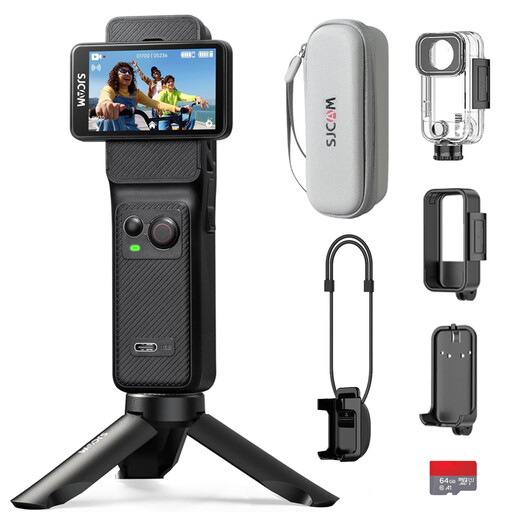
SJCAM C400 Action Camera
The product name lists 4K video and an included 64 GB card. Test whether the camera can focus on small components and capture the part of the work surface you want to show.
The listed specifications alone do not tell you whether the camera is suitable for close-ups of your miniatures.
Joybuy
Frequently asked questions
How can you check whether a camera can focus on small components?
First, measure the distance between the camera and the component in your set-up. Compare it with the minimum focusing distance of the lens you are using, then check in a test shot whether the layers you need remain sharp enough. The camera body or a 4K specification alone cannot tell you this.
How can you keep the white background consistent throughout the different steps?
Keep the lighting as consistent as possible, set the white balance for that lighting and check the exposure with both light and dark components in the frame. A test shot will show whether white areas and light details remain visible.
Can you rely on the maximum recording time for a complete 4K lesson?
Not without checking the conditions for your chosen model and video mode. For the Z 30, Nikon specifies a maximum of 125 minutes in Full HD/24p or 25p at 25 °C, depending on factors including battery life and internal temperature, compared with around 35 minutes in 4K UHD. Check the conditions for your recording settings.
What are your rights when you buy a camera online?
For many eligible distance purchases, you have a 14-day cooling-off period. According to the Dutch government, statutory guarantees in the Netherlands have no fixed duration; if a product is faulty, the retailer is your point of contact. Check the terms of the specific purchase. A manufacturer's warranty does not replace your statutory rights.
Can you publish a building lesson featuring identifiable pupils or colleagues?
If other people are identifiable in the footage and you are filming and publishing on behalf of an organisation or for professional purposes, the GDPR applies, according to the Dutch Data Protection Authority. Before filming and publishing, consider which lawful basis applies to the people involved and the specific use. Consent is one possible example, but it is not automatically the only lawful basis.


