
Website builder who puts quiet operation first
If you work in a quiet room, check whether the manufacturer specifies the full model code as fanless. MSI distinguishes between the fanless S series and the actively cooled version of the Cubi N ADL.


If fan noise is your main concern, a passively cooled mini PC is a sensible option; just check the cooling method for the exact model. A complete desktop involves less assembly, while a barebone gives you more choice but may not include memory, storage or an operating system. A local development computer is not automatically suitable for hosting your website publicly.
If you work in a quiet room, check whether the manufacturer specifies the full model code as fanless. MSI distinguishes between the fanless S series and the actively cooled version of the Cubi N ADL.
If you want to build and test your website on your own computer first, choose memory, storage and software to suit the way you work. MDN Web Docs describes local testing and public hosting as separate steps.
If you don’t want to add memory, storage and an operating system yourself, look for a pre-configured system. Also check which peripherals are included: for the ThinkCentre neo 50q Gen 4 version reviewed, Lenovo lists the monitor and keyboard separately.
For consumers looking for a mini PC to build websites in a quiet study, the main things to weigh up are cooling, development capacity, included components and compatibility with your existing workspace.
| What to consider | What to look for | Who should pay particular attention? |
|---|---|---|
| Noise while you work | Check the full model code and the cooling method specified by the manufacturer; don’t assume a model is quiet based on the series name alone. | If I work in a quiet room, I want to know whether the exact model has a fan. That’s why an estimated 33% of consumers put quiet operation first. |
| Capacity for development software | Compare the programmes and local services you use at the same time with the memory, SSD and upgrade options of the exact model. | If you want to use several development programmes locally, focus on memory and storage. Around 33% of consumers say development capacity is their top priority. |
| Ready to use straight away | Check what is installed and included with each product code, including memory, storage, operating system, monitor and keyboard. | If I don’t want to add components myself, what comes with the complete system is crucial. An estimated 17% of consumers prioritise a ready-to-use setup. |
| Compatibility with your workspace | Make a note of the connections you need for your monitor, network and peripherals, and check that your development software is compatible with the operating system. | If you want to keep using your existing monitors, network equipment or a specific software environment, compatibility matters most. An estimated 17% of consumers feel the same way. |
According to ASUS, the NUC 14 Essential Kit comes without memory, storage or a pre-installed operating system. You’ll need to factor these components into your setup yourself.
Before comparing models, check what’s included in the listing against your complete list of required components.
MSI specifies that the Cubi N ADL S is fanless, while the Cubi N ADL without the S is actively cooled. The family name alone doesn’t tell you which cooling system a model has.
Check the full model code and cooling method before choosing a model for a quiet workspace.
A local test server is for developing and testing on your own computer; public hosting is a separate step. MDN Web Docs makes this distinction when explaining how to publish a website, too.
Decide separately where you’ll develop your website and where visitors will be able to access the finished site.
The Cubi N ADL series is worth considering if passive or active cooling is a key factor for you in a compact PC.
The NUC 14 Essential Kit is a good fit if you want to choose your own memory, storage and operating system.
The ThinkCentre neo 50q Gen 4 version reviewed is a compact desktop option with specified memory and storage.
The Mac mini M6 is a compact macOS option if you want to use your development software in that environment.
The Pro Mini 400 G9 is an example of a pre-configured business PC with Windows, alongside kits and compact desktops for consumers.
This Joybuy selection includes compact mini PCs for local website work, including a model that MSI specifies as fanless. Check the full specifications, cooling and included items for each model.
 No image available
A compact option for local website work, with Windows 11 according to the product title.
8 GB DDR4 memory and a 256 GB SATA SSD.
Bluetooth 5.2 and Wi-Fi 5.
 No image available
A compact desktop option to consider for local website building and testing; check the model and connections to make sure they suit your workspace.
 No image available
A compact computer for local website building and testing, with Windows 11 Home according to the product title.
16 GB LPDDR5 memory and a 512 GB M.2 NVMe SSD.
HDMI 2.1, DisplayPort 1.4, Wi-Fi 6 and 2.5G Ethernet.
 No image available
A compact option for website development; check that the listed display outputs suit your workspace.
16 GB RAM and a 512 GB SSD.
Wi-Fi 6, Bluetooth 5.2 and support for output to three 4K displays according to the product title.
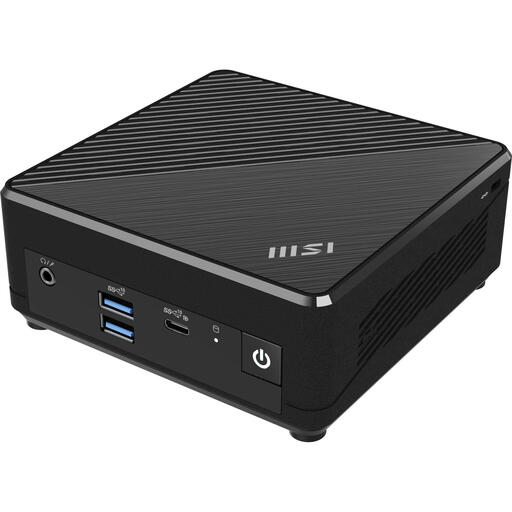 No image available
A compact option for a quiet workspace; MSI specifies that the Cubi N ADL S series is fanless. Check the cooling method for the exact model.
Windows 11 Pro, 4 GB DDR4 memory and a 128 GB SSD according to the product title.
No. You can develop and test locally on a mini PC, but public hosting is a separate step. Your choice of development computer doesn’t determine where your website is hosted.
Check the cooling method for the full model code and keep the ventilation openings clear, following the manufacturer’s instructions. MSI distinguishes between the fanless Cubi N ADL S and the actively cooled Cubi N ADL; don’t assume every product in the family uses the same cooling system.
Check whether memory, an SSD and an operating system are included with the specific listing. ASUS doesn’t list these as included with the NUC 14 Essential Kit reviewed; also check whether you already have a monitor and keyboard.
For eligible distance purchases from a business, the cooling-off period is generally 14 days. The Government of the Netherlands explains the exceptions and distinguishes these purchases from, for example, buying online from a private individual.
The GDPR may apply as soon as you process personal data, including during a pilot or test. The Dutch Data Protection Authority says that if you collect personal data through your website, you must use HTTPS at the very least; choosing a mini PC won’t automatically make your website GDPR-compliant.