Start with the browsers and devices you actually need to test: a Windows mini PC may suit a Windows-based setup, while a Mac mini is worth considering if you need to inspect Safari on macOS or web pages on a connected iPhone or iPad. Then compare the processor, memory, ports and in-box contents. A barebone system will need additional components and setup.
Who is a mini PC for web testing for?
Browser and Safari tester
Your choice starts with the browsers and devices a page needs to work on, and may include local Safari or iOS inspection. MDN Web Docs describes cross-browser testing as testing across different browsers and devices; Apple explains how to inspect Safari and connected iOS devices.
Developer running tests at the same time
You keep development tools and several test environments open at once, so it’s worth comparing specific processor, memory and storage configurations rather than just the size of the case. Compare the specifications of the complete model; ASUS and MSI offer a range of configurations.
Home worker with limited desk space
You want to connect the mini PC to your existing monitors and peripherals. The ports, mounting options and box contents determine which additional components or cables you’ll need, so check the details for the specific configuration.
What should you look for when choosing one?
Ready-to-use Windows mini PC
A good fit if: you mainly work on Windows and want a pre-installed system for browsers and development tools.
Keep in mind: a Windows PC won’t automatically replace local Safari inspection on macOS or testing on a real mobile device.
Mac mini
A good fit if: Safari on macOS and inspecting web pages on connected iOS or iPadOS devices are part of your work. Apple documents these inspection features.
Keep in mind: a Mac alone won’t replace testing across all browsers and devices. Check the storage and ports on the configuration you choose, too.
Windows barebone
A good fit if: you want to choose the memory, storage and operating system yourself.
Keep in mind: ASUS states that the NUC 14 Pro Kit comes without a pre-installed operating system, memory or storage, so choosing and installing components is part of the purchase.
MDN Web Docs describes testing across different browsers and devices as part of cross-browser testing. So start by deciding which test platforms you need, then assess the configuration and ports that suit your setup.
| What to consider |
What should you check? |
Who should pay particular attention? |
| Browsers and devices |
Which operating systems, browsers and connected-device inspection features you need. |
If I also need to inspect Safari or web pages on a connected mobile device, I choose my computer based on that test environment. Around 36% of consumers put browser and device coverage first. |
| Running tasks at the same time |
The processor, included memory and SSD for each complete model number. Don’t confuse maximum supported memory with the memory included. |
When I use several browsers and development tools at once, I compare the configuration of the specific model. Around 29% of consumers put capacity for running tasks at the same time first. |
| Ports |
The type and number of video outputs, USB and Ethernet ports, the cables you need and whether the exact model supports VESA mounting. |
If I want to keep using my existing monitors and peripherals, I check that the ports are compatible. Around 21% of consumers want to connect their existing setup. |
| Complete purchase |
Whether memory, an SSD, an operating system and the necessary cables are included. Also check who is selling the product and whether you’re buying as a consumer or mainly for business use. |
When I want to know in advance what I’ll need to get the computer up and running and what after-sales support applies to my purchase, I compare the full box contents and my buying situation. Around 14% of consumers prioritise a complete purchase and suitable after-sales support. |
Things to watch out for when buying
-
Comparing a barebone system with a complete PC
The ASUS NUC 14 Pro Kit is listed without a pre-installed operating system, memory or storage. So the price of the kit alone doesn’t tell you how much a complete test computer will cost.
Compare the components and installation you’ll need with a ready-to-use model. Check the box contents against the full model number.
You’ll need to choose suitable components and arrange installation yourself. Check whether you already have the cables you need, too.
-
Assuming one fast PC can handle every browser and device test
MDN Web Docs describes cross-browser testing across different browsers and devices. Apple explains how to inspect Safari on macOS and iOS and iPadOS web pages from a connected Mac. Choosing one computer won’t automatically cover these different test environments.
Make a list of the browsers and devices you need to test, then choose a computer. If necessary, include a real mobile device or an additional testing solution in your plan.
-
Following outdated Windows 10 advice without checking the support date
Microsoft states that regular support for Windows 10, version 22H2, ended on 14 October 2025.
When considering an older or refurbished mini PC, check the installed version of Windows and current support for the exact configuration.
Brands to consider
MSI
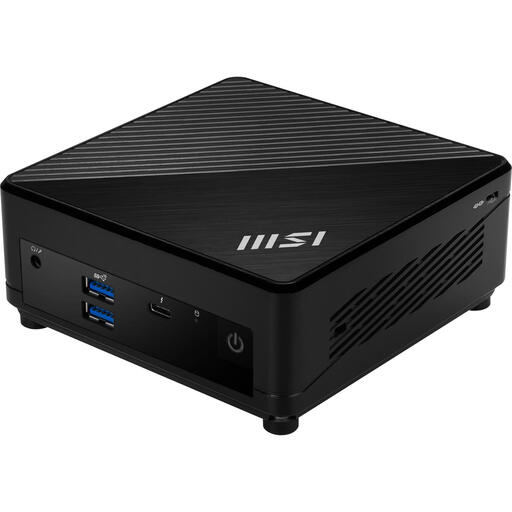
The Cubi 5 1M is a compact Windows range with several processor and memory options. A Dutch listing for the 1M-496EU specifies a Core 5 120U, 16 GB of memory and a 512 GB SSD.
- MSI lists HDMI, DisplayPort, Thunderbolt 4 and two RJ45 ports among the connections available in the range.
- These are range-level specifications, so check which ports are included on the model being offered.
ASUS
The NUC 14 Pro is available as a compact Windows mini PC and as a kit you can build yourself.
- ASUS clearly distinguishes the Mini PC from the Kit and lists several video outputs for the range.
- ASUS says the Kit doesn’t include a pre-installed operating system, memory or storage. Specifications also vary by model.
Apple
The Mac mini is worth considering if you need macOS and local inspection of Safari web pages, including on a connected iOS or iPadOS device.
- Apple lists 16 GB of unified memory and a 256 GB SSD for the Dutch M6 base configuration. Apple also documents Safari Web Inspector.
- These details don’t prove that the Mac mini will cover every browser or development workflow.
Lenovo
The ThinkCentre M70q Gen 5 is a business-focused Tiny range with different configurations and port options.
- Lenovo lists HDMI, DisplayPort and Ethernet for the range.
- Lenovo notes that some components vary by model. A Dutch listing for the 12TD000HMH specifies an i7-14700T, 16 GB and 512 GB; don’t infer the full range of ports from the family specifications alone.
HP
The Pro Mini 400 G9 is a business mini desktop range, with Windows configurations available in the Netherlands.
- The Dutch HP Store lists configurations including Windows 11 Pro, 16 GB of RAM and a 512 GB SSD.
- Product and configuration details vary by product number, so compare the exact model.
Joybuy products
These Joybuy products are ready-to-use Windows mini PCs for web testing and setting up a compact home workspace.
 No image available
SOYO Y5Pro Mini PC
A compact Windows mini PC for web testing; the product title lists two possible Intel Core i5 processor models.
Processor: Intel Core i5-8250U/8350U. Windows 11, 8 GB DDR4 and a 256 GB SATA SSD.
The description lists two HDMI outputs, a Type-C video output, four USB ports and Gigabit Ethernet. Check that the connections suit your monitors and peripherals.
View at Joybuy
 No image available
SOYO M5 Mini PC
A Windows mini PC with listed connections for a multi-monitor setup. Compare them with the monitors you own.
AMD Ryzen 3 4300U, 16 GB LPDDR4 and a 512 GB SSD. Windows 11 Pro.
The description lists HDMI 2.0, DisplayPort 1.4, a Type-C video output, six USB 3.0 ports and RJ45 Ethernet.
View at Joybuy
 No image available
FIREBAT R3 Mini PC
A Windows mini PC for a workspace where you use several browser and development windows at once.
AMD Ryzen 5 7430U, 16 GB RAM and a 512 GB SSD. The title lists Wi-Fi 6 and Bluetooth 5.2.
The product title and description state that it supports three 4K screens.
View at Joybuy
 No image available
MSI CUBI NUC AI 1UMG-005EU
A Windows 11 Pro mini PC for web testing and connecting several screens. Work out how many outputs you need before you buy.
Intel Core Ultra 7 155H, 16 GB DDR5 and a 1 TB SSD.
The description lists support for up to four screens, two HDMI outputs, two Thunderbolt 4 ports and VESA mounting.
View at Joybuy
 No image available
MSI Cubi 5 12M-002EU
A compact Windows 11 Pro mini PC for web testing and everyday development work. Check that the included configuration suits the tasks you’ll be running at the same time.
Intel Core i5-1235U, 8 GB DDR4 and a 512 GB SSD.
The description lists HDMI, Thunderbolt 4, Wi-Fi 6E, Bluetooth 5.3 and VESA mounting.
View at Joybuy
Frequently asked questions
Can one mini PC test all my web pages on every device?
No. One mini PC won’t automatically cover every browser and device. MDN Web Docs describes cross-browser testing across different browsers and devices, and also mentions emulators and virtual machines as additional options. If you need to test a mobile scenario, use a real device where necessary.
What else do I need to install with an ASUS NUC 14 Pro Kit?
ASUS states that the Kit doesn’t include a pre-installed operating system, memory or storage. Choose suitable components for the exact Kit and arrange installation before comparing its total cost with that of a ready-to-use mini PC.
How can I inspect a web page on an iPhone using a Mac?
Apple says to enable Web Inspector on the iOS device and connect it to the Mac. It will then appear in Safari’s Develop menu. The steps available may vary depending on your device and software version.
Do online purchases always come with a 14-day cooling-off period and a legal guarantee?
For a Dutch consumer purchase made at a distance, the ACM generally allows a cooling-off period of up to 14 days after delivery. The legal guarantee concerns what you can reasonably expect from a product. The ACM states that a purchase used mainly or solely for business isn’t covered by the same consumer protection. So check the capacity in which you’re buying.
What should I look for in a mini PC’s product information?
Check the product information and applicable CE marking for the mini PC being offered and its included power supply. EU information lists electrical and electronic equipment among the product categories covered by CE legislation; the specific product information is still important for the model you choose.


