Who is this guide for?

Tester working across multiple browsers

Your choice mainly depends on whether Chromium, Firefox and WebKit are enough, or whether you also need to test Safari itself. Playwright describes support for Chromium, Firefox and WebKit, while Apple Developer documents Safari’s own WebDriver.

Manager of a shared testing station

You’re setting up a computer for successive users and want to keep their files, settings and access separate. Microsoft Support explains how to use separate Windows accounts, while the Dutch Data Protection Authority stresses that organisations must prevent unauthorised access to personal data.

Setting up a compact desk

You’re looking for a small desktop that works with the monitors and peripherals you already have. Product specifications from Lenovo Netherlands, Dell Netherlands and Apple Netherlands can help you check the configuration and connections.

What should you look for when buying?

Compact Windows desktop

Best for: a shared Windows workstation for running browser and automated tests.

Bear in mind: a WebKit project is not a test in the Safari app. Also check the ports and what’s included with the computer.

Mac mini with macOS

Best for: a test plan that requires Safari itself.

Bear in mind: check that your other team software works on macOS, and find out which monitors, cables and input devices you’ll still need.

Consideration What should you check? Who is this important for?
Browser environment Establish whether you need to test Safari itself or whether a WebKit project will do. Check that the browsers and software you need work on the operating system you choose. If I need to test multiple browser engines, I want to know which test environment my work actually requires. Around 33% of consumers prioritise browser coverage.
Separate access Decide who will manage accounts and updates, and which access settings are right for your working environment. If several people use the same computer, I want to keep their settings and files separate. Around 27% of consumers prioritise separate access.
Size and displays Compare the connections on the exact configuration with your monitors, and check whether cables and peripherals are included. If I have limited desk space, I want to be able to connect the computer to my existing displays. Around 20% of consumers prioritise their desk set-up.
Complete workstation Compare what’s included in the configuration and check which service arrangements apply to your purchase. If I’m setting up a shared testing station, I want to know which components and support I still need to arrange. Around 20% of consumers prioritise the complete purchase and support.

Common pitfalls

  • Assuming WebKit testing is the same as testing in Safari

    Playwright describes WebKit as a test browser, while Apple documents its own route for automation in Safari. These two testing tasks are not interchangeable.

    Before you buy, write down whether you need to test the browser engine or the Safari app, then set up your test environment accordingly.

    If Safari itself is required, you may need a separate Safari testing environment.

  • Assuming a compact PC is a complete workstation

    A small case doesn’t automatically mean a monitor, suitable cables or input devices are included. Lenovo states that a display is sold separately for the ThinkCentre configuration reviewed.

    Check what’s included with the exact configuration and compare the available connections with your existing displays and peripherals.

  • Mistaking a NUC kit for a ready-to-use PC

    ASUS distinguishes between complete mini PCs, kits and a board. Some kits are supplied without a pre-installed operating system.

    Check the full model number and what’s included with the configuration you choose before ordering.

    If the configuration isn’t ready to use, you may need to source components, an operating system and drivers yourself.

  • Assuming consumer returns rights apply to a business order

    Business.gov.nl distinguishes between business sales and consumer rights. A business buyer is not automatically entitled to the same statutory cooling-off period as a consumer.

    Before placing a business order, confirm which return and service arrangements apply to it.

Brands to consider

Dell

The Dell Pro Micro QCM1250 is a compact business Windows desktop option.

  • The configuration reviewed lists Windows 11 Pro, 16 GB DDR5 and a 512 GB SSD.
  • These details apply to the configuration named; other versions may differ.

Lenovo

The ThinkCentre M70q Gen 5 Tiny is a compact business desktop for a workstation where placement and maintenance matter.

  • The Dutch configuration 12TD0017MH lists Windows 11 Pro, 16 GB of memory and a 512 GB SSD.
  • Lenovo states that a display is sold separately for this configuration; check what’s included in the bundle you choose.

Apple

The Mac mini is worth considering when your testing workstation needs macOS and tests in Safari itself.

  • Apple documents automation using Safari’s own WebDriver.
  • Specifications vary between M6 and M5 Pro versions and available configurations; check what your team software and workstation require.

HP

The HP Pro Mini 400 G9 is a compact business Windows desktop option.

  • The configuration reviewed, B6YN1ET#ABH, lists Windows 11 Pro, 16 GB RAM and a 512 GB SSD.
  • Ports and security features may vary by configuration; check the details of the exact model.

ASUS

The ASUS NUC 14 Pro is a mini PC range where the exact version matters when choosing your configuration.

  • ASUS distinguishes between complete mini PCs, kits and a board.
  • According to ASUS specifications, some kits are supplied without a pre-installed operating system; check the exact model and included components.

Joybuy product options

These desktops and mini PCs are options for a compact shared testing station. For each configuration, check the operating system, any set-up required and compatibility with your displays.

SOYO Y5Pro Mini PC with Intel Core i5 8250U/8350U

SOYO Y5Pro Mini PC

A mini PC option for a compact workstation; check that the listed configuration suits your test software and displays.

The product name lists Windows 11, 8 GB DDR4 and a 256 GB SATA SSD. The processor is listed as Intel Core i5 8250U/8350U.

Joybuy

ASUS ROG G700TF-07265F666W desktop PC

ASUS ROG G700TF-07265F666W

A Windows desktop option for a shared testing station; check that its size and connections suit your desk.

The product name lists Intel Core Ultra 7 265F, 32 GB DDR5, a 1 TB SSD, NVIDIA GeForce RTX 5070 12 GB and Windows 11 Home.

Joybuy

Lenovo Yoga Mini 01IPH11 Copilot+ PC mini desktop

Lenovo Yoga Mini 01IPH11 Copilot+ PC

A mini desktop option for a compact testing station; check that Windows 11 Home and the configuration you choose work with your team software.

The product name lists Intel Core Ultra 5 325, 16 GB LPDDR5X, a 512 GB PCIe 4.0 SSD and Windows 11 Home.

Joybuy

Lenovo ThinkCentre M70q Gen 5 mini PC

Lenovo ThinkCentre M70q Gen 5

A business mini PC option for a compact shared testing station; bear in mind that the power adapter must be purchased separately.

The product name lists Intel Core i7-14700T, 16 GB DDR5, a 512 GB SSD and Windows 11 Pro. According to the product information, the power adapter is not included.

Joybuy
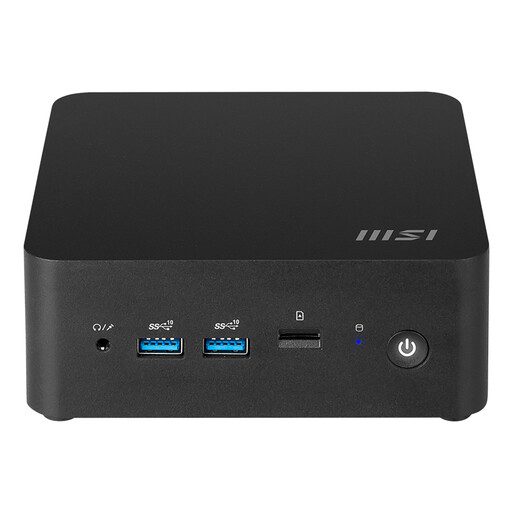
MSI CUBI NUC AI 1UMG-018BEU barebone mini PC

MSI CUBI NUC AI 1UMG-018BEU Barebone

A configurable mini PC option for a small desk, but not a ready-to-use testing computer straight out of the box.

The product information states that you’ll need to install an operating system and drivers yourself.

Joybuy

Frequently asked questions

Do I need a Mac for web testing?

Not for every test plan: Playwright supports Chromium, Firefox and WebKit in supported environments. If you need to test Safari itself, Apple’s documentation on Safari’s own WebDriver is relevant; a WebKit test is not a test in the Safari app.

How can several people use the same testing computer?

Set up separate user accounts and agree who will manage the computer and sign users out. Microsoft Support explains that this allows users to have their own settings and documents. If an organisation processes personal data, it must also assess appropriate measures to prevent unauthorised access.

Does the Dutch cooling-off period also apply to a business purchase made online?

Not automatically. The Dutch government states that many consumer purchases made at a distance come with a 14-day cooling-off period. Business.gov.nl explains that business sales are not covered by consumer law and that business buyers have no statutory cooling-off period. Check which terms apply to your business order.

Is a manufacturer’s warranty the same as my statutory rights?

No. According to the Dutch government, a manufacturer’s or seller’s warranty on a consumer purchase is in addition to statutory protection; there is no fixed statutory warranty period in the Netherlands. Different warranty rules apply to business purchases, so check your contract and service terms.

What should I check before ordering a mini PC?

Check the full model number, operating system, display ports you need and what’s included. This is particularly important with a kit or barebone, as you may need to source components, an operating system or drivers yourself.
