
Designer with a small desk
You want to set up a dedicated space for poster design while keeping enough room for your keyboard and mouse. A mini PC and an all-in-one call for different ways of arranging your computer and screen.


For poster design on a small desk, choose a mini PC with a separate monitor if you want to select the screen and decide where to place it yourself. An all-in-one may suit you better if you’d prefer a single integrated setup. Measure the complete setup, including the monitor stand and peripherals, and check your design software’s requirements. Adobe recommends 16 GB RAM or more for Photoshop 27.x on Windows and macOS; this isn’t a general requirement for every poster-design workflow.
You want to set up a dedicated space for poster design while keeping enough room for your keyboard and mouse. A mini PC and an all-in-one call for different ways of arranging your computer and screen.
You create posters for print and want to assess your screen and colour management carefully. Screen resolution alone won’t tell you how colours will look when printed.
You use apps for tasks such as image editing and layout, and want to check in advance that the memory, storage and operating system meet the requirements of your software.
First decide whether you want to choose your own monitor or would prefer an integrated screen. Then measure how much space the complete setup will take up on your desk.
| What to consider | What to look for when buying | Who this matters to |
|---|---|---|
| Space for the complete setup | Measure the space available and compare it with the monitor stand, computer and connections you’ll need. | If I have limited desk space, I want to know how much room the monitor, stand and computer will take up together. Around 33% of consumers put the space needed for the complete setup first. |
| Screen and colour for posters | Assess screen specifications separately from colour management, and match the colour profile and output settings to the printing process. | For print work, I want to assess colours carefully and match the output to my printing process. Around 27% of consumers give screen and print colour top priority. |
| Software compatibility | Compare the app version, operating system, RAM, available storage and graphics requirements with the software maker’s specifications. Adobe recommends 16 GB RAM or more for Photoshop 27.x on Windows and macOS. | If I use several design apps, I want to check in advance that the configuration I choose is suitable. Around 20% of consumers put software compatibility first. |
| Complete purchase and after-sales support | Check what’s included with the exact configuration and whether the connections will work with your screen and peripherals. | If I still need other components, I want to know what comes with the computer and who to contact if something goes wrong. Around 20% of consumers put the complete purchase and after-sales support first. |
The computer’s casing doesn’t determine how much space the complete setup will take up: you’ll also need room for the monitor, stand and peripherals.
Measure or sketch out the complete setup before choosing a mini PC or all-in-one.
Screen resolution and colour management answer different questions. Adobe notes that the selected colour profile affects how output is prepared for print.
Assess screen specifications separately, and match the colour profile and output settings to the intended printing process.
Configurations can vary within the same product line. Dell also notes that the options you select can change other specifications.
Compare the full product number and the configuration on offer with your software and connection requirements.
Apple Netherlands describes the Mac mini M6 as a compact computer for use with a separate screen.
The ThinkCentre M75q Gen 5 Tiny is a compact Windows option for use with a separate screen.
HP Netherlands offers both compact Pro Mini desktops and all-in-ones, giving you the choice of a separate or integrated screen.
The Dell Pro Micro Plus QBM1250 is a configurable micro desktop designed for use with a separate screen.
These product options are mini PCs for poster design, with a separate screen to choose. Before buying, check that the listed configuration and connections suit your software and workspace.
 No image available
A mini PC for anyone who wants to choose a separate screen for their poster-design workspace.
12-core CPU and 12-core GPU.
24 GB memory and 512 GB SSD.
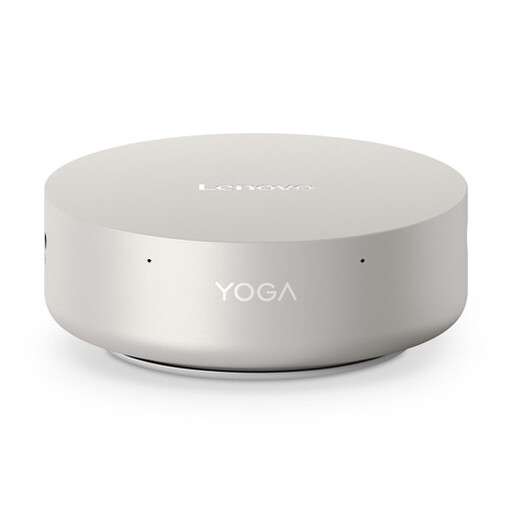 No image available
A mini desktop for anyone who wants to use a separate screen and compare the listed configuration with the apps they use.
16 GB LPDDR5X memory and 512 GB PCIe 4.0 SSD.
Windows 11 Home.
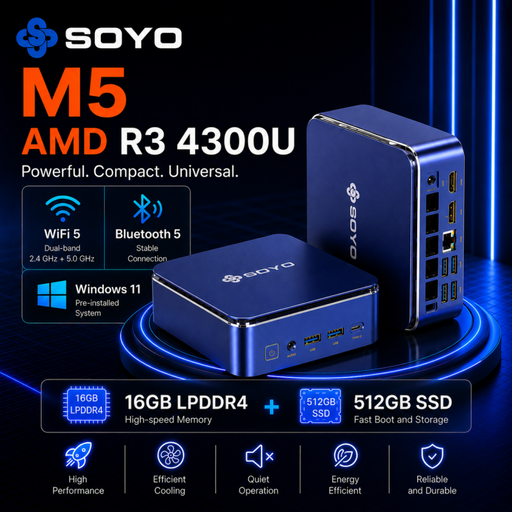 No image available
A mini PC for anyone who wants to choose a separate screen; check that the listed video connections are compatible with your screen.
16 GB LPDDR4 memory and 512 GB SSD.
HDMI 2.0, Type-C and DisplayPort 1.4 for video output.
Windows 11 Pro.
 No image available
A ThinkCentre mini PC for anyone who wants to connect a separate screen and compare the configuration with their design software.
16 GB DDR5 memory and 512 GB SSD.
Windows 11 Pro.
 No image available
A mini PC for anyone who wants to use a separate screen and check that the listed configuration suits their design apps.
16 GB DDR5 memory and 1 TB SSD.
Windows 11 Pro.
No, 16 GB RAM isn’t a general requirement for poster design. For Photoshop 27.x on Windows and macOS, Adobe lists 8 GB as the minimum and 16 GB or more as the recommended amount. Check the requirements for the apps and versions you use.
Start by working out how much room you need for your screen and input devices, then decide where to put the mini PC. Also check that the configuration you choose has the connections you need for your screen and peripherals. The computer’s casing alone doesn’t determine how much space the complete setup requires.
Match the colour profile and output settings to the intended printing process. Adobe notes that the selected profile affects colour conversion and print preparation; screen resolution alone doesn’t guarantee that the print will match what you see on screen.
For your statutory guarantee, contact the seller. According to ACM ConsuWijzer, if a product breaks under normal use sooner than you could reasonably expect, the seller must put it right free of charge, for example by repairing or replacing it, or giving you a refund.
According to ACM ConsuWijzer, online purchases generally come with a 14-day cooling-off period after delivery. Check which exceptions and returns conditions apply; the cooling-off period is separate from your statutory guarantee.