Choose a mini PC with a suitable host configuration if you want to run VMs on your everyday work PC; choose a separate host if the VMs need to run independently of your workstation. Microsoft Learn lists Windows 11 Professional and Enterprise for Hyper-V, while Proxmox Server Solutions specifies a minimum of 2 GB for the host system and services, in addition to the memory allocated to guest VMs. Then budget for the memory needed by all VMs running at the same time, and check which components and operating system are actually included.
Who is a mini PC for VMs suitable for?
Home worker testing VMs
You want to run virtual machines temporarily alongside your everyday work. Check which edition of Windows supports Hyper-V and set aside memory for both your work applications and the VMs; Microsoft Learn lists Windows 11 Professional and Enterprise for Hyper-V.
Home lab user with multiple VMs
You want a separate host for multiple guest VMs running at the same time. Allow for memory for both the host system and the VMs, and choose storage and network connections to suit your planned lab; Proxmox Server Solutions explains the memory requirements for the host and guest VMs.
Building a compact VM host
You want to choose and install the components yourself. Check whether the model is a kit and what it includes in terms of RAM, storage and operating system; ASUS Netherlands distinguishes between the NUC 14 Pro Kit and a complete mini PC.
What should you look for in a mini PC for VMs?
Windows work PC with Hyper-V
Suitable if: you work on the same PC and start VMs occasionally. Microsoft Learn lists Windows 11 Professional and Enterprise as editions that can enable Hyper-V.
Bear in mind: Windows 11 Home is not on that list; also check for SLAT and make sure hardware virtualisation is enabled.
Separate host with Proxmox VE
Suitable if: you want your VMs to run independently of your everyday work PC and you want to manage the host yourself.
Bear in mind: Proxmox Server Solutions specifies a minimum of 2 GB for the operating system and services, on top of the memory you allocate to guest VMs.
Microsoft Learn lists Windows 11 Professional and Enterprise for Hyper-V; Proxmox Server Solutions specifies a minimum of 2 GB for the host system and services, in addition to memory for guest VMs. Use the table to make the main choice for your setup.
| What to consider |
What to look for |
Who is this important for? |
| Memory for VMs running at the same time |
Add the memory needed by your planned guest VMs running simultaneously to the host's requirements, then compare the total with the RAM installed in the exact configuration. |
If I want to run several VMs at once, I want to know whether there will be enough memory left for the host. Memory for VMs running simultaneously is the top priority for around 31% of consumers. |
| Compatibility with the virtualisation host |
First choose Hyper-V on Windows or Proxmox on a separate host; then check the relevant Windows edition, processor features and firmware settings. |
If you want to use a particular hypervisor, you’ll want to know in advance whether the PC is suitable. Compatibility with the chosen virtualisation host is the main buying concern for around 31% of consumers. |
| VM storage and complete configuration |
Check the included SSD, operating system and available disk space; if you’re buying a kit, find out which components you’ll need to choose yourself. |
If I want to store VM disks and get started straight away, I want to know what’s already included. Storage and box contents are top priorities for around 23% of consumers. |
| Networking and placement of a separate host |
Work out how many physical network connections you need and whether they’ll suit your network equipment; check the ports on the exact configuration. |
If you want to connect a separate host at a specific point in your home network, the right ports will help. Networking and host placement are the main buying concern for around 15% of consumers. |
Common mistakes when buying a mini PC for VMs
-
Looking only at the maximum RAM supported by a product range
The maximum memory supported by a range doesn’t tell you how much RAM comes in the configuration on offer. The host and any VMs running at the same time share the available memory.
Check the RAM installed in the exact configuration, and add the memory needed by your VMs running simultaneously to the host’s requirements.
-
Treating a kit and a complete mini PC as the same product
ASUS Netherlands distinguishes between a complete mini PC and a kit in the NUC 14 Pro range. According to ASUS, the kit doesn’t include a pre-installed operating system, RAM or storage.
Compare the full model name and check what’s included before choosing components for your VM host.
-
Confusing Windows 11 Home with an edition that supports Hyper-V
Microsoft Learn lists Windows 11 Professional and Enterprise for Hyper-V, not Home. So a listing that simply says Windows 11 doesn’t confirm which edition comes with the configuration.
First decide which hypervisor you want to use, then check the Windows edition and the relevant hardware requirements.
Brands to compare
ASUS
According to ASUS Netherlands, the NUC 14 Pro range includes both a complete mini PC and a kit, giving you different options for what’s included.
- ASUS lists two DDR5 SO-DIMM slots and two M.2 storage slots for the range.
- According to ASUS, the NUC 14 Pro Kit doesn’t come with a pre-installed operating system, RAM or storage. The complete configuration is listed with Windows 11 Home; check the edition if you want to use Hyper-V.
Lenovo
The ThinkCentre M75q Gen 5 Tiny is a compact business desktop range, and you’ll need to check the configuration of each model.
- Lenovo describes tool-free access to the SSD and memory modules, and lists AMD Ryzen PRO configurations.
- The range information doesn’t specify how much RAM, which Windows edition or which other components are included with each individual configuration on offer.
MINISFORUM
The MS-01 is worth comparing if you’re looking for a separate host with specific networking or expansion plans.
- MINISFORUM lists, among other features, two 10Gbps SFP+ and two 2.5Gbps RJ45 connections for the MS-01.
- These connections are most useful if they suit the rest of your network and how you plan to use the host. Also check the exact configuration and what’s included.
Joybuy products for VMs in a home office
Joybuy picks for compact PCs in a home office or as a VM host. Check the host edition and included components for each configuration.
 No image available
SOYO Y5Pro Mini PC, Intel Core i5 8250U/8350U, 8 GB DDR4, 256 GB SATA SSD
Could suit anyone looking for a compact mini PC; consider whether the stated memory will leave enough room for both the host and the VMs running at the same time.
The title lists 8 GB DDR4, a 256 GB SATA SSD and Windows 11. Check which of the listed processor models and which Windows edition come with the configuration on offer.
Joybuy
 No image available
FIREBAT AM02L Mini PC, AMD 6600H, 16 GB LPDDR5, 512 GB M.2 NVMe
Could suit anyone looking for a mini PC with specified memory and NVMe storage; make sure the available memory can handle the host and your VMs running simultaneously.
The title lists 16 GB LPDDR5, a 512 GB M.2 NVMe SSD and Windows 11 Home. Microsoft Learn lists Windows 11 Professional and Enterprise for Hyper-V, not Home.
Joybuy
 No image available
FIREBAT R3 Mini PC, AMD Ryzen 5 7430U, 16 GB RAM, 512 GB SSD
Could suit anyone looking for a compact PC with specified RAM and SSD for a VM setup; check that the host edition and configuration are compatible with your chosen hypervisor.
The product title lists 16 GB RAM and a 512 GB SSD.
Joybuy
 No image available
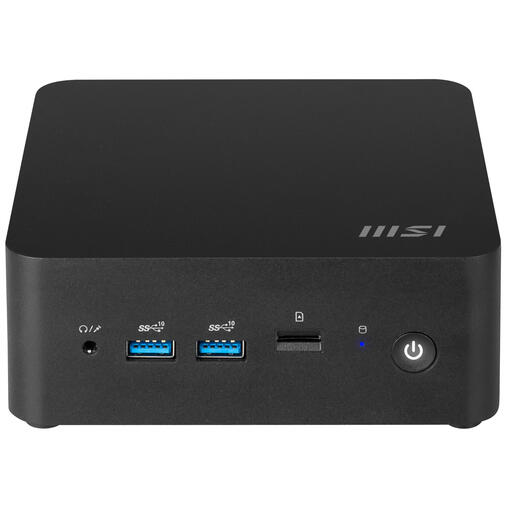
MSI Cubi NUC 1MG-237BEU Barebone, Intel SoC 150U, 0.84L
Could suit anyone who wants to configure a compact PC themselves for use as a VM host.
The product title lists a barebone configuration, Intel SoC 150U and a 0.84L size. Check which components are included with the configuration on offer.
Joybuy
Frequently asked questions
Can I use Hyper-V on a mini PC running Windows 11 Home?
Windows 11 Home isn’t among the host editions that Microsoft Learn lists for Hyper-V. Also check that the PC meets the requirements for SLAT and enabled hardware virtualisation, and set aside memory for both the host and the VMs.
How much RAM does a separate Proxmox host need?
Proxmox Server Solutions specifies a minimum of 2 GB for the operating system and Proxmox services, plus the memory you allocate to the VMs. Calculate the total needed for the guest VMs you want to run at the same time; features such as ZFS or Ceph may have additional requirements.
Is a barebone ready to run VMs straight away?
Not always; what’s included varies by configuration. ASUS Netherlands says the NUC 14 Pro Kit doesn’t come with a pre-installed operating system, RAM or storage. So check the full model name and included components before ordering.
What can I do if a mini PC I bought online doesn’t meet my expectations?
For distance purchases from a business, the Dutch government generally specifies a 14-day cooling-off period. ACM ConsuWijzer also describes the statutory guarantee as your right to a product that works properly for a certain period; a commercial guarantee doesn’t replace this right. Check who the seller is and which terms apply to your purchase.


