Start by choosing a system with enough memory for the virtual machines you want to run simultaneously, and check that it supports your virtualisation software. Then count the connections needed for your complete setup, including the monitor and backup equipment. A barebone gives you the freedom to choose your own memory and storage, but requires extra components and installation. An adapter’s wattage does not tell you how much power the system uses when running.
Who is this buying guide for?
Home lab with multiple VMs
You want to run several virtual machines at once, so you’re looking first at available and upgradeable RAM, processor compatibility and SSD space. Proxmox Server Solutions explains that the host needs memory in addition to the memory allocated to guests.
VM user with limited plug sockets
You want to connect a single compact host without creating an unsafe chain of extension leads, and you’re also accounting for your monitor, network and backup equipment. Brandweer Nederland advises against connecting extension leads to one another or plugging too many devices into a single extension lead.
Builder with storage or networking requirements
You’re happy to install the RAM and SSD yourself so you can tailor storage, backups or network ports to your setup. The specifications from ASUS and MINISFORUM show why it’s important to check the exact configuration and the connections you need.
What should you look for?
| What to consider |
What should you look for? |
Who should pay particular attention? |
| Memory |
Add together the memory needed by the host and guests. Check the RAM supplied, the number of slots and the maximum supported by the exact configuration. Proxmox Server Solutions recommends at least 2 GB for the operating system and services, in addition to memory for guests. |
If you want to run several VMs at once, check in advance how much memory will be available for the host and guests. Around 25% of consumers put sufficient, upgradeable RAM at the top of their list. |
| Plug sockets |
Count the plugs for your whole setup and check which adapter and power cable are included. Brandweer Nederland advises against connecting extension leads or power strips to one another and warns against plugging too many devices into a single extension lead. |
If you have limited wall sockets, you’ll want to connect your complete VM setup safely. Around 25% of consumers make space for connections and safe setup their top priority. |
| Processor and virtualisation |
Check the exact processor and firmware settings against your hypervisor’s requirements. Proxmox Server Solutions specifies Intel VT or AMD-V for x86-KVM; PCI(e) passthrough also requires VT-d or AMD-Vi. |
If you’ve already chosen your hypervisor or VM features, check before buying that the platform supports them. Around 20% of consumers start by looking at processor and virtualisation compatibility. |
| Storage and recovery |
Check the SSD supplied, available storage bays and where you’ll store recoverable backups. Proxmox Server Solutions describes options including Proxmox Backup Server and file storage as backup destinations. |
If you want to allow your VM disks to grow and plan for recovery, look beyond the internal SSD. Around 15% of consumers prioritise storage and recovery. |
| Network ports |
Match the number and type of ports to your network equipment. ASUS lists one RJ45 port for the NUC 14 Pro; MSI lists two RJ45 ports for the Cubi N ADL S; MINISFORUM lists two 10Gbps SFP+ ports and two 2.5Gbps RJ45 ports for the MS-01. |
If you have a specific wired network setup, make sure the ports suit it, rather than counting connections you won’t use as a benefit. Around 15% of consumers choose primarily on the basis of network ports. |
Common buying mistakes
-
Confusing adapter wattage with actual power consumption
An adapter rating, such as the 90 W or 120 W option ASUS lists for the NUC 14 Pro, describes the adapter. It doesn’t measure how much power a VM host uses when idle or under load.
Measure power consumption at the plug while you’re using the system, and compare your options under the same time and tariff conditions.
-
Assuming a ready-to-use mini PC is immediately suitable for multiple VMs
MSI specifies 4 GB RAM and a 128 GB SSD for the Cubi N ADL S-078EU. The host needs memory too, which can leave limited capacity for guests.
Budget for memory for both the host and guests, and check the maximum supported by the exact configuration before deciding whether you need an upgrade.
Choosing and installing separate components takes extra preparation.
-
Relying on extra internal storage as your entire backup plan
More local SSD space increases storage capacity, but it doesn’t automatically provide a separate destination for recoverable backups.
Choose a backup destination and test recovery before your VMs contain important data.
A separate backup destination may require extra storage or a separate service.
Brands worth comparing
ASUS
The NUC 14 Pro is available as a ready-to-use mini PC or as a Kit for those who want to choose their own configuration.
- ASUS lists two SO-DIMM slots and two M.2 slots for the Kit.
- The Kit comes without RAM or storage installed. The CPU, adapter wattage and power cable vary by configuration, so check the exact variant.
MSI
The Cubi N ADL S-078EU is a ready-to-use option to consider for a small-scale VM test setup.
- MSI specifies an N100, 4 GB RAM and a 128 GB SSD for this model.
- MSI lists a maximum of 16 GB RAM via one slot. Check whether that’s enough for your host and planned VMs.
Lenovo
The ThinkCentre M75q Gen 5 Tiny is a business mini PC range worth exploring if upgradeable memory and storage are important to you.
- Lenovo lists support for up to 64 GB RAM and two M.2 SSDs across the range.
- Specifications vary by model and region. The Dutch configuration reviewed, 12RQCTO1WWNL1, listed 32 GB RAM but no hard drive; check the order details.
HP
The Pro Mini 400 G9 is a ready-to-use business mini PC to compare with configurations you put together yourself.
- HP lists 16 GB RAM and a 512 GB SSD for configuration 6D494EA#ABH.
- These specifications apply to the model listed; check that the version on offer matches your requirements.
MINISFORUM
The MS-01 is a mini workstation worth exploring if you need plenty of storage or network connections.
- MINISFORUM lists, among other connections, two 10Gbps SFP+ ports and two 2.5Gbps RJ45 ports for the MS-01.
- Check the exact CPU, barebone or pre-assembled configuration, and the power supply included. The listed ports aren’t necessarily available on every variant.
Joybuy products
This selection features compact mini PCs with specified memory and storage configurations to consider as hosts for virtual machines. Whether a particular version is suitable depends on your hypervisor’s requirements, the VMs you’ll run simultaneously and your complete setup.
 No image available
NVIDIA DGX Spark Founders Edition, NVIDIA GB10, 128 GB RAM, 4 TB SSD
The listed memory and storage capacity may be worth considering if you’re looking into a VM host with substantial capacity; also check the requirements of your chosen virtualisation software.
The product title lists an NVIDIA GB10 processor with 20 cores, 128 GB RAM and a 4 TB SSD.
Check the applicable CE marking for the version on offer and the power supply included.
Joybuy
 No image available
FIREBAT Mini PC A6, AMD Ryzen 7 7735HS, 16 GB RAM, 512 GB SSD
This version may suit anyone considering a compact VM host with specified memory and storage; check that the configuration meets your hypervisor’s requirements and supports the number of VMs you plan to run.
The product title lists 16 GB RAM, a 512 GB SSD and two M.2 slots.
Check the applicable CE marking for the version on offer and the power supply included.
Joybuy
 No image available
SOYO S5Air Mini PC, AMD Ryzen 5 7535HS, 16 GB LPDDR5, 512 GB NVMe SSD
Consider this configuration if you’re looking at a compact host with specified memory and NVMe storage; check that the processor and memory suit your VM plans.
The product title lists 16 GB LPDDR5 and a 512 GB NVMe SSD.
Check the applicable CE marking for the version on offer and the power supply included.
Joybuy
 No image available
FIREBAT F1 Mini PC, AMD Ryzen 5 7640HS, 24 GB RAM, 512 GB SSD
The listed memory capacity may be worth considering when comparing hosts for multiple VMs; check your hypervisor’s requirements and how much memory the host itself needs.
The product title lists 24 GB LPDDR5 RAM, a 512 GB PCIe 4.0 SSD and 2.5G Ethernet.
Check the applicable CE marking for the version on offer and the power supply included.
Joybuy
 No image available
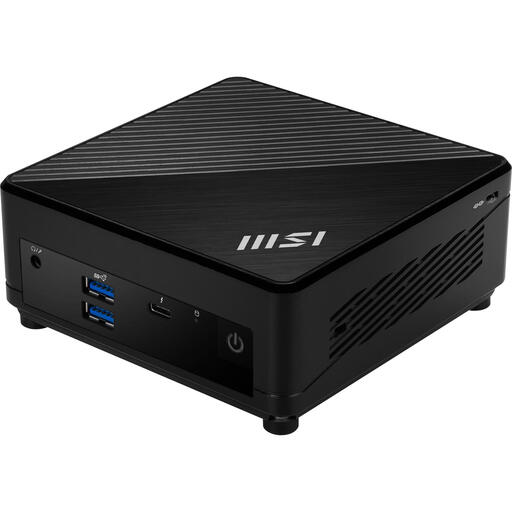
MSI Cubi 5 12M-405BEU, Intel Core i7-1255U
This version is worth considering if you want to tailor the memory and storage to your VM setup later; check which components are included with the order.
The product information lists support for up to 64 GB RAM via two memory slots, plus HDD and SSD storage.
Check the applicable CE marking for the version on offer and the power supply included.
Joybuy
Frequently asked questions
How can I check whether a mini PC is suitable for Proxmox VE?
Check the exact processor and firmware settings against Proxmox VE’s requirements. Proxmox Server Solutions lists Intel VT or AMD-V for recommended x86 hardware, and at least 2 GB for Proxmox services in addition to memory for guests; PCI(e) passthrough requires VT-d or AMD-Vi.
Can I solve a shortage of plug sockets with an extension lead?
First count the plugs needed for your complete setup, and don’t connect too many devices to a single extension lead. Brandweer Nederland advises using undamaged extension leads and not connecting extension leads or power strips to one another; this advice doesn’t mean it’s safe to overload a socket.
What do I need to provide myself with a barebone?
According to ASUS, the ASUS NUC 14 Pro Kit comes without RAM or storage pre-installed. Budget for suitable components and installation time, and check whether the required power cable is included with the exact version.
How should I arrange backups for virtual machines?
Choose a backup destination outside your internal VM storage and test that recovery works. Proxmox Server Solutions describes Proxmox Backup Server and file storage, including an NFS server, as possible destinations; extra internal SSD space doesn’t automatically replace a separate recovery plan.
What compliance should I check for an electrical mini PC?
Check that the version on offer and its power supply comply with the applicable EU product rules and carry the required CE marking. The European Union and the Dutch government explain the rules for equipment covered by CE requirements; a mention in this buying guide does not in itself confirm that every configuration complies.


