Who is this choice relevant to?

Traveller with two existing monitors

Wants to view a journey planner on one screen and departure times or alternative routes on the other. The inputs on both monitors determine which video outputs will work best; Microsoft Support explains how to configure screens separately in Windows.

User with a compact permanent workstation

Is looking for a small PC for several browser windows and wants to know in advance whether RAM, storage and a supported operating system are included. Lenovo notes that a monitor and keyboard are sold separately for the ThinkCentre neo 50q Gen 4.

DIY builder with two screens

Wants to choose their own components and software, so may consider a barebone, provided they know in advance what else is needed. ASUS and GMKtec distinguish fully configured models from kits or barebones that are missing certain components.

What should you look for when buying?

Two HDMI outputs

Suitable if: both monitors have HDMI and you want to use the same connection on each screen.

Consider: check the ports on the exact configuration; a product family may include several configurations.

HDMI and DisplayPort

Suitable if: your monitors have different inputs, or you can use an HDMI cable and a DisplayPort cable.

Consider: ports vary by model. Lenovo lists HDMI and DisplayPort for the specific ThinkCentre neo 50q Gen 4 configuration 12LM006LEZ, which Lenovo PSREF lists as withdrawn and intended for Belgium.

NUC as a complete PC or kit

Suitable if: you want several video connections or prefer to choose your own memory, storage and software. ASUS lists two HDMI ports and two Thunderbolt 4 ports with DisplayPort for the NUC 14 Pro.

Consider: the kit is listed without a pre-installed operating system, memory or storage, so check exactly which configuration you’re considering.

What to consider What to check before buying Who is this important for?
Two timetables on separate screens Check that the exact configuration supports two screens at the same time, and that it works with both monitor inputs and the cables you need. If both my monitors use HDMI, I want to connect them without ending up with the wrong connection. Around 36% of consumers prioritise connecting two screens correctly.
Supported operating system Check which operating system is included and how updates are provided for that installation. I want to check timetables online regularly on a suitably supported system. Around 29% of consumers prioritise system support.
Complete configuration Check whether RAM, an SSD and an operating system are included with each configuration; also consider which peripherals and cables you’ll need. If I want to set up my PC straight away, I want to know in advance which components are still missing. Around 21% of consumers prioritise buying a complete system.
Compact workstation Check where the video and USB ports are, and whether the PC will remain accessible in the location you’ve chosen. I want to keep my workstation compact without making the ports awkward to reach. Around 14% of consumers prioritise their workstation setup.

Common buying mistakes

  • Assuming a barebone is ready to use

    A barebone may be supplied without RAM, an SSD or an operating system. As a result, the PC may need extra components and some setup before you can start using it.

    Check what’s included with the exact configuration and compare it with what you still need, including memory, storage, software and cables.

    You may need to choose components separately and install the system yourself.

  • Assuming screen support listed for a product family applies to every configuration

    Manufacturers distinguish between models and configurations. A port description for a product family does not automatically confirm that every configuration can drive two monitors at the same time in the way you want.

    Check the full model number, simultaneous screen support and your monitors’ inputs; also check which cables you’ll need.

    You may need a different configuration or a compatible cable if the connections don’t match.

  • Choosing a Windows 10 listing without checking support

    Microsoft Support states that regular support for Windows 10 ended on 14 October 2025. This doesn’t mean the PC will stop working, but the support options for the exact installation are still worth checking.

    Check which system is supplied and what support is available for the PC you’ve chosen.

    Switching to a supported system may involve extra setup.

Brands to consider

GMKtec

GMKtec lists two HDMI video outputs for the NucBox G3 Plus. The EU product page distinguishes between barebone and fully equipped configurations.

  • Two HDMI outputs are useful if both monitors use HDMI.
  • The barebone is listed without RAM, an SSD or an operating system. Check what’s included with the configuration you choose.

MSI

MSI describes HDMI, DisplayPort and USB-C connectivity for multiple screens across the Cubi N ADL family.

  • The listed combination of ports gives you different ways to connect screens.
  • The S-078EU configuration is specified separately with Windows 11 Pro and 4 GB RAM; check the ports and configuration for the exact model.

ASUS

ASUS lists the NUC 14 Pro as both a complete mini PC and a kit, with several video outputs.

  • The specifications list two HDMI ports and two Thunderbolt 4 ports with DisplayPort.
  • The kit is listed without a pre-installed operating system, memory or storage; the configuration you choose determines how much setup is needed.

Lenovo

Lenovo PSREF lists HDMI and DisplayPort for the ThinkCentre neo 50q Gen 4 configuration 12LM006LEZ.

  • This combination may suit monitors with different inputs.
  • Lenovo PSREF lists this specific model as withdrawn and for the Belgium region; check the exact configuration and whether it’s available in your region.

Mini PCs at Joybuy

These mini PCs may suit a compact workstation with two screens. For each exact configuration, check whether it supports two monitors at the same time, which components are included and whether the device has the required CE marking.

FIREBAT R3 Mini PC AMD Ryzen 5 7430U, 16 GB RAM, 512 GB SSD

FIREBAT R3 Mini PC AMD Ryzen 5 7430U, 16 GB RAM, 512 GB SSD

Could suit a compact workstation with several browser windows; the product description states that it can display on three screens simultaneously.

The product name lists 16 GB RAM and a 512 GB SSD. Check which connections are included with the configuration you choose and whether they match your monitors.

View at Joybuy

FIREBAT F1 Mini PC AMD Ryzen 5 7640HS, 24 GB LPDDR5 RAM, 512 GB SSD

FIREBAT F1 Mini PC AMD Ryzen 5 7640HS, 24 GB LPDDR5 RAM, 512 GB SSD

May suit a permanent workstation with two screens; the product description states that it supports three screens simultaneously.

The product name lists 24 GB LPDDR5 RAM, a 512 GB SSD and HDMI 2.1. Check which two outputs you can use for your monitors.

View at Joybuy

FIREBAT A8 Mini PC AMD Ryzen AI 9 365, 24 GB DDR5 RAM, 1 TB SSD

FIREBAT A8 Mini PC AMD Ryzen AI 9 365, 24 GB DDR5 RAM, 1 TB SSD

May suit a workstation with several screens; the product description states that it can display on up to four screens simultaneously.

The product name lists 24 GB DDR5 RAM and a 1 TB SSD. Check the connections on the exact configuration to make sure they work with your monitors.

View at Joybuy
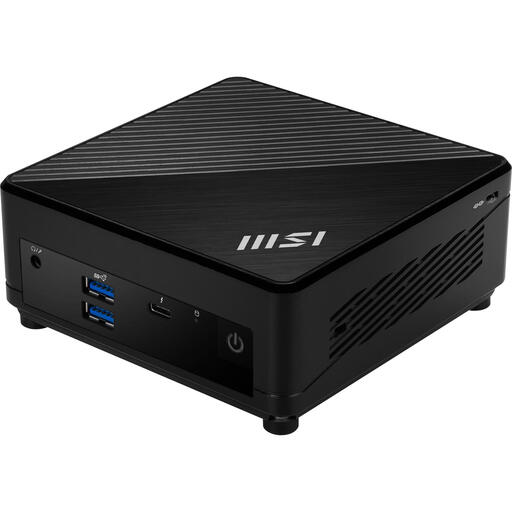
MSI Cubi 5 12M-405BEU, Intel Core i7-1255U, barebone

MSI Cubi 5 12M-405BEU, Intel Core i7-1255U

Could suit a compact workstation if you want to choose your own components and software; this configuration is described as a barebone.

The product name lists a 0.66-litre case. Memory and storage are not included, and the operating system still needs to be configured.

View at Joybuy
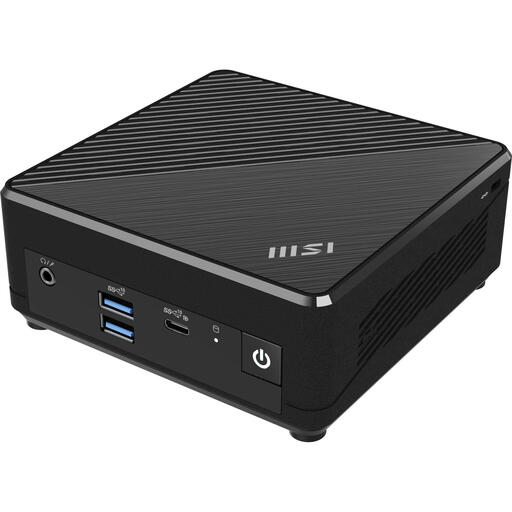
MSI Cubi N ADL S-078EU Intel N100, 4 GB RAM, 128 GB SSD, Windows 11 Pro

MSI Cubi N ADL S-078EU, Intel N100, 4 GB RAM, 128 GB SSD, Windows 11 Pro

Could suit anyone looking for a compact mini PC with a specified operating system; check the outputs on this exact configuration if you want to use two screens.

The product name lists 4 GB RAM, a 128 GB SSD and Windows 11 Pro. MSI specifies this configuration separately from the Cubi N ADL family description.

View at Joybuy

Frequently asked questions

How can I show a different journey planner on each monitor?

Connect both screens and check that Windows recognises them. Then arrange them in Display settings and use an extended desktop to place different windows on each screen, as explained by Microsoft Support.

Can I just check that it has two video ports?

No. Also check that the exact configuration supports two screens at the same time and that the port types match your monitors. Connections can vary between product families and individual configurations.

What else do I need for a barebone?

That depends on what’s included with the configuration you choose. GMKtec lists the NucBox G3 Plus barebone without RAM, an SSD or an operating system; ASUS also lists its NUC 14 Pro kit without memory, storage or a pre-installed operating system. Check the exact configuration and what you’ll need to install yourself.

Does a mini PC in the Netherlands need a CE marking?

Electrical and electronic equipment covered by the relevant EU product rules must have the required CE marking before it can be placed on the market. The Dutch Authority for Digital Infrastructure and the Dutch Government’s Ondernemersplein explain this requirement; check that the configuration on offer has the required marking.

Is Windows 10 still supported as usual?

According to Microsoft Support, regular support for Windows 10 ended on 14 October 2025. This doesn’t mean that a PC running Windows 10 stopped working on that date, but you should check which support options apply to the exact installation.
