For tilesets and simple 2D projects, a mini PC with integrated graphics can be a space-saving choice, provided you already have a suitable screen and the hardware meets your software and project requirements. A laptop can be put away after use; a compact gaming desktop is mainly worth considering if you also want to run more demanding games or projects and have room for the complete setup. Before buying, check the exact configuration, connections and included components.
Which type of PC is right for you?
Tileset creator with limited desk space
If you mainly create 2D tiles and want to leave room for your screen and input devices, compare a small PC with a laptop that you can put away after use. Aseprite documents how to create tilemaps using tilesets; the type of PC you choose also affects how much space your workspace takes up.
Creator who also plays more demanding games
If you want to run more demanding games or projects alongside your 2D work, compare the exact configurations rather than relying on the product range or the term ‘gaming’. Godot’s basic requirements for a simple editor are not a performance guarantee for other applications.
Buyer looking for a complete workspace
If you want to know in advance what else you’ll need, check whether memory, storage, an operating system and a screen are included with each version. A barebone kit may include different components from a complete PC.
What should you look for when choosing?
Mini PC
Choose this type if: you mainly create tilesets and simple 2D projects, already have a suitable screen and want the computer itself to take up as little space as possible.
Keep in mind: you’ll need a separate screen and input devices. A barebone kit may also be supplied without memory, storage or an operating system.
Compact gaming desktop
Choose this type if: you want to run more demanding games or projects as well as work on tilesets, and have room for a tower, screen and complete setup.
Keep in mind: the space the tower takes up and the configuration of the exact model. Specifications for an entire product range don’t necessarily apply to every version.
Gaming laptop
Choose this type if: you want to clear your workspace regularly or work on your tileset elsewhere, and an integrated screen is important to you.
Keep in mind: the laptop, power supply and any separate input devices will still take up space while you’re working. Components vary by configuration.
| What to consider |
What should you check? |
Who should pay particular attention? |
| Space on and around your desk |
Measure the space for your computer and screen, and allow for input devices, cables and ventilation openings. |
If I want to leave as much desk space as possible for drawing, I look at the whole setup, not just the case. Around 36% of consumers put available workspace first. |
| 2D workflow |
Make a note of your software, the Godot renderer you’ve chosen if applicable, and the connections you need. |
If I mainly create tilesets and simple 2D projects, I want a configuration that suits my software and project. Around 29% of consumers give their workflow top priority. |
| More demanding games or projects |
Compare the requirements of your applications with the CPU, GPU and memory configuration of the exact model. |
If I want to run more demanding games or projects alongside my tileset work, I check their requirements before choosing a graphics configuration. Around 21% of consumers prioritise these additional applications. |
| What’s included |
Check whether RAM, SSD, operating system, screen and the connections you need are included with the exact version. |
If I want to use a complete workspace straight after buying, I want to know in advance which components are missing. Around 14% of consumers make completeness their top priority. |
Common buying mistakes
-
Choosing a powerful GPU just because the PC is described as a gaming PC
Godot lists integrated graphics as an option for the basic requirements of a simple editor. That doesn’t automatically tell you anything about other games, projects or renderers.
Start with the software and applications you actually plan to use, then compare the exact GPU configurations.
-
Mistaking a barebone kit for a complete PC
A kit may be supplied without memory, storage or an operating system; what’s included varies by version.
Check the configuration for the exact product number before deciding which components you’ll need.
-
Measuring only the computer case
A desktop also needs space for a screen, while a laptop takes up desk space when you’re using it.
Plan for the complete setup and check the dimensions and connections of the version you’ve chosen.
Relevant brands to compare
ASUS
ASUS offers the gaming-focused ROG NUC range and NUC 15 Pro+ kits, among other products. These are two different options for a compact PC.
- According to ASUS, the ROG NUC (2025) specifications include a discrete laptop GPU.
- ASUS describes the NUC 15 Pro+ kit as being supplied without installed memory, storage or an operating system. Check the full model number and version.
Lenovo
The LOQ Tower is a desktop option to compare if you’re also considering a gaming configuration alongside your tileset work.
- Lenovo documents several CPU and GPU options across the LOQ Tower 26ADR10 range.
- These options apply to the product range and not necessarily to every product number; a tower also needs its own space.
HP
The Victus 15-fb3000 is a gaming laptop option if you want to be able to put your workspace away or move it elsewhere.
- A laptop has a built-in screen, so you may not need a separate monitor.
- HP states that the components in this range depend on the configuration you choose. The laptop, power supply and any separate input devices also take up space while in use.
MINISFORUM
The AtomMan G7 PT is a compact PC with a discrete graphics card, offering an alternative to a larger gaming tower.
- MINISFORUM offers both a barebone version without an OS licence and a version with 32 GB RAM and a 1 TB SSD.
- Check which version is on offer and whether it suits your applications; a product listing alone doesn’t prove how well it will perform in your games or projects.
Acer
The Nitro 20 is a desktop range to consider alongside a mini PC or laptop if you have room for a tower.
- Acer’s Dutch product page identifies the Nitro 20 Intel N20-101-RPL by part number DG.E5VEH.001.
- Check the dimensions and configuration of the exact product number before planning where to put it on your desk.
Mini PCs for a small workspace
This selection features mini PCs suited to a small workspace. The product titles range from models described as gaming PCs to a mini PC for everyday and business use. Check that each model’s configuration suits your software and any games you plan to play.
 No image available
FIREBAT Mini PC AM02L AMD Ryzen 5 6600H
A mini PC to consider if you have limited space for the computer itself and use a separate screen.
16 GB LPDDR5, 512 GB M.2 NVMe storage and Windows 11 Home. The title lists HDMI 2.1 and DisplayPort 1.4.
View at Joybuy
 No image available
FIREBAT Mini PC A6 AMD Ryzen 7 7735HS
A compact mini PC to compare if you have limited space for your computer and are looking for integrated graphics.
The product description lists Radeon 680M graphics, 16 GB RAM and a 512 GB SSD. The title lists two M.2 slots and support for three screens.
View at Joybuy
 No image available
FIREBAT F1 Mini PC AMD Ryzen 5 7640HS
A compact mini PC to include in your comparison if you have limited space for your computer and are considering one PC for both work and gaming.
24 GB LPDDR5, 512 GB PCIe 4.0 SSD and Radeon 760M graphics. The product title also lists support for output to three screens.
View at Joybuy
 No image available
FIREBAT A8 Mini PC AMD Ryzen AI 9 365
A compact mini PC to compare if you’re considering one computer for tileset work and gaming. Match the configuration to the requirements of your applications.
24 GB DDR5, 1 TB PCIe 4.0 SSD and Radeon 880M graphics. The title lists support for up to four screens.
View at Joybuy
 No image available
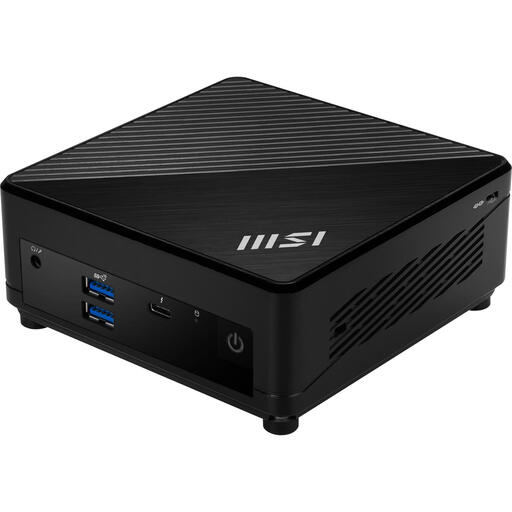
MSI Cubi 5 12M-002EU Intel Core i5-1235U
A mini PC for everyday or business use to compare if you’re looking for a small computer case. The information provided doesn’t specify whether it’s suitable for particular games.
12,40 × 12,40 × 5,37 cm, 8 GB DDR4, 512 GB SSD and Windows 11 Pro.
View at Joybuy
Frequently asked questions
Do I definitely need a separate graphics card for a simple tileset?
Not based on the basic requirements for the simple Godot editor alone: Godot lists integrated graphics as an option, provided they support the renderer you’ve chosen. This doesn’t give a definitive answer for other games, software or larger projects.
What should I check before setting up a barebone mini PC?
Check what’s included with the exact version. The ASUS NUC 15 Pro+ kit is described as being supplied without installed memory, storage or an operating system; MINISFORUM also offers a barebone version of the AtomMan G7 PT without an OS licence. Don’t assume another version includes the same components.
What are the rules on returns and warranties for online purchases in the Netherlands?
Online purchases generally come with a statutory cooling-off period, which according to ACM ConsuWijzer ends 14 days after delivery; check which exceptions and return conditions apply. ACM ConsuWijzer also says that if a product breaks during normal use sooner than you could reasonably expect, the seller must put it right free of charge, for example by repairing or replacing it, or refunding your money.
Does a gaming PC sold in the Netherlands need a CE mark?
The Dutch government explains that electrical appliances placed on the EU market must carry the required CE marking. This general product rule doesn’t confirm that a specific offer has the marking or accompanying documentation.


