Choose a mini PC based on the software you use and the size of your survey files. For large local Power Query operations, pay particular attention to the available memory. If responses contain personal data, tailor access and security arrangements to the risks and check the complete configuration, not just the processor name. Microsoft Support explains that the amount of data Power Query can process in certain operations depends on the available virtual memory. The Dutch Data Protection Authority emphasises that appropriate security measures depend on a risk assessment.
Who is this buying guide for?
Team handling identifiable responses
You process survey responses that could identify individuals and want to know how to put appropriate access, updates and recovery arrangements in place. The Dutch Data Protection Authority emphasises that security measures depend on a risk assessment; working in a shared office does not automatically make any particular PC feature essential.
Analyst working with large data operations
You sort, combine or refresh large files locally and want to avoid limitations caused by the software you use or the available memory. Microsoft Support explains that Power Query processing for certain local operations depends on the version of Excel and the available virtual memory.
Manager of a shared workspace
You connect the mini PC to existing screens and network equipment and want to know in advance which ports and components the specific configuration actually includes.
What should you look for when buying?
Start with your software and files, then make sure data protection, connections and the complete configuration suit your shared workspace.
| What to consider |
What should you check? |
Who is this important for? |
| Access and protection |
Discuss with your IT team where data is stored, who has access, and which features and support are included with the chosen configuration. |
If responses can identify individuals, I want to know how access, updates and recovery can be managed. Around 33% of consumers cite survey data protection as their main purchasing concern. |
| Local data processing |
Make a note of the software you use, your largest files and the operations you carry out. Check the installed RAM and whether it can be upgraded on the exact configuration. |
For large local import, sorting or clean-up tasks, I want enough working memory for the software I use. Around 27% of consumers give data processing capacity the highest priority. |
| Connections and placement |
Count your screens and the USB and network connections you need. Also check which mounting components are included with the configuration. |
If the PC is going into an existing shared workspace, I want to be able to connect my screens, network and peripherals. Around 20% of consumers prioritise how well it fits into their workspace. |
| Complete purchase and service |
Check the final quote for RAM, storage, operating system, accessories and the agreed business warranty and service arrangements. |
Before I order, I want to know whether the configuration is complete and what support has been agreed. Around 20% of consumers make clarity on the complete purchase and service their top priority. |
Buying pitfalls
-
Assuming product-line specifications match the configuration supplied
Upgrade options for a product line do not mean that memory, storage or an operating system are already included in the configuration on offer. ASUS also warns that specifications may vary by model.
Compare the exact configuration with the quote and check the installed RAM, SSD, operating system and accessories.
A different memory or storage configuration, software or installation may require extra components or work.
-
Assuming a powerful processor means there is enough capacity for large Power Query operations
Microsoft Support says that the amount of data Power Query can process in operations that cannot be fully streamed is linked to the available virtual memory and whether you are using the 32-bit or 64-bit version of Excel.
Check your software version, largest files and the operations you carry out, then compare these with the installed memory capacity.
-
Assuming a security feature is the same as a properly set up shared workspace
The Dutch Data Protection Authority emphasises that appropriate protection depends on the risks and on both technical and organisational measures. A feature on a PC does not, on its own, control who has access or how recovery works.
Before using survey files locally, make clear who is responsible for accounts, permissions, updates and recovery.
Setting up access management, updates, backups and recovery also takes time from your organisation.
-
Assuming consumer warranty rules apply to a business purchase
According to Ondernemersplein, the statutory guarantee under consumer law does not apply to sales between businesses.
Read the agreement before ordering and check which warranty, repair and service arrangements apply to the business purchase.
Any service costs depend on the terms of the agreement.
Brands to consider
HP
The Pro Mini 400 G9 configuration 9H6Z2ET#ABH is a useful benchmark for a business setup.
- For this configuration, HP lists Windows 11 Pro, 16 GB RAM and a 512 GB SSD.
- The manufacturer's security claims do not replace checking how accounts, access and recovery are set up.
Lenovo
The ThinkCentre M75q Gen 5 Tiny product line is worth considering if compact placement and connections for multiple screens matter.
- Lenovo mentions under-desk placement and support for up to three screens.
- Check the ports, storage and included accessories for the exact configuration.
ASUS
The ExpertCenter PN64 product line is a useful benchmark for a workspace with existing screens and a wired network.
- For the product line, ASUS lists features including two HDMI outputs and a 2.5G LAN port.
- ASUS says specifications and features vary by model, so check the exact configuration.
MSI
The Cubi 5 12M product line is worth considering if you want to compare memory and storage options.
- For the product line, MSI lists two DDR4 SO-DIMM slots and space for an M.2 drive and a 2.5-inch drive.
- These product-line options do not confirm the memory capacity, storage or operating system included in a particular configuration on offer.
Joybuy products
This Joybuy selection includes mini PCs for local data work and shared office spaces. Focus on comparing the memory, storage, operating system and connections of the configuration you are considering.
 No image available
ASUS Ascent GX10 GX10-GG0003BN GB10, 128 GB LPDDR5x, 1 TB SSD
A configuration to compare for local data work; check that it suits your software and workspace.
The product title lists 128 GB of LPDDR5x memory and a 1 TB SSD.
View at Joybuy
 No image available
FIREBAT R3, AMD Ryzen 5 7430U, 16 GB RAM, 512 GB SSD
An option to compare if you clean up data locally and want to connect multiple screens.
The product title lists Wi-Fi 6, support for three screens and Bluetooth 5.2.
View at Joybuy
 No image available
MSI Cubi NUC AI 1UMG-005EU, Intel Core Ultra 7 155H, 16 GB DDR5, 1 TB SSD
Compare this configuration with the software and files you process locally.
The product title lists 16 GB of DDR5 memory, a 1 TB SSD and Windows 11 Pro.
View at Joybuy
 No image available
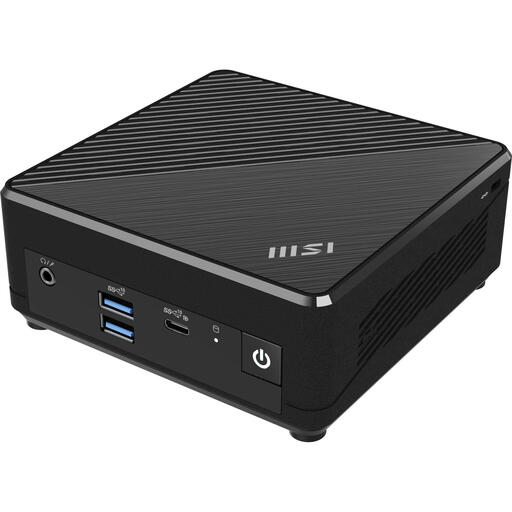
MSI Cubi N ADL S-078EU, Intel N100, 4 GB DDR4, 128 GB SSD
For large local operations, check carefully that the memory configuration suits your software and files.
The product title lists 4 GB DDR4, a 128 GB SSD and Windows 11 Pro. Microsoft Support says that Power Query processing in certain operations depends on the available virtual memory.
View at Joybuy
 No image available
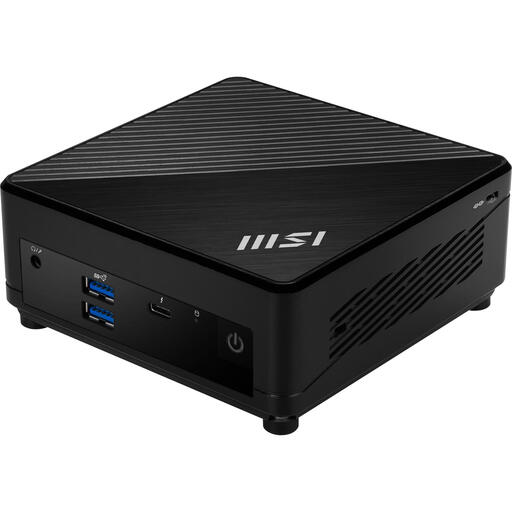
MSI Cubi 5 12M-405BEU, 0,66 litre, Intel Core i7-1255U
The product title gives a volume of 0.66 litres; compare the dimensions and connections with the space available.
Before buying, check which RAM, storage and operating system are included in the configuration you have chosen.
View at Joybuy
Frequently asked questions
Does this mini PC need to run Windows?
Not just to clean up survey data. Microsoft describes Power BI Desktop as a Windows application; for other software, check the requirements for the version you want to use.
How should you set up a shared PC if survey responses contain personal data?
Choose measures based on a risk assessment of the processing. The Dutch Data Protection Authority lists individual user accounts, permissions, updates, backups and encryption as possible measures, but not every example will be suitable for every type of processing.
What should you check before setting it up in an existing workspace?
Compare the connectors and number of existing screens, the network connection and peripherals with the ports on the exact PC configuration. Also check that the necessary mounting components and operating system are included with that configuration.
What warranty applies if a business buys the mini PC?
According to Ondernemersplein, the statutory guarantee under consumer law does not apply to sales between businesses. Check the agreement for the warranty and service terms agreed for the business purchase.


