
Manager of a shared test PC
Wants different testers to have their own files and settings. Microsoft Support explains how multiple user accounts can be used on one Windows device.


If you already have a suitable monitor and want to keep your desk clear, start with a mini PC and check that its connections are compatible with your monitor and test equipment. An all-in-one is an option if you also need a screen; consider a tower if room for internal upgrades matters more than a compact setup. For every model, check the exact configuration and which peripherals are included. For shared use, set up separate user accounts.
Wants different testers to have their own files and settings. Microsoft Support explains how multiple user accounts can be used on one Windows device.
Already has a monitor and wants a computer that takes up little desk space without losing essential connections. Lenovo Nederland and MSI describe compact desktop models with a range of connections.
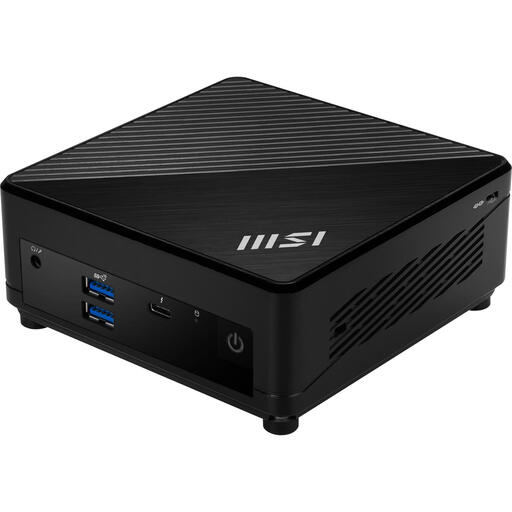
Compares search results, filters and test notes side by side, so wants to check the memory configuration and display connections of the model they choose. MSI and Alternate Nederland’s product information lists these features for the MSI Cubi 5 1M-496EU.
Choose this form if: you already have a suitable monitor and want to free up desk space.
Bear in mind: the computer on its own does not automatically include a monitor or other peripherals, and connections vary by configuration.
Choose this form if: you want to buy the computer and monitor as one setup, and the built-in screen suits your testing space.
Bear in mind: the screen and computer are combined; also check whether a keyboard and mouse are included with the configuration you choose.
Choose this form if: potential internal upgrades matter more than having the smallest possible computer.
Bear in mind: a tower takes up more space; check which upgrades are possible for the exact model.
| What to consider | What should you check? | Who is this important for? |
|---|---|---|
| Separate use | Check whether the operating system supports separate user accounts, and who manages accounts and installation permissions. | If several testers use the same PC, I want to keep my settings and files separate. Around 36% of consumers say separate use on one computer is their top priority. |
| Desk space and connections | Make a note of the connections on your existing monitor, then check the video outputs, USB ports and preferred network connection on the exact PC model. | If you already have a monitor on the shared desk, you’ll want to know whether the computer connects to it and your peripherals. Around 29% of consumers prioritise compatible connections and saving space. |
| Running test tasks at the same time | List the browsers and testing tools you’ll have open at the same time, then compare the processor, installed memory and storage of the exact model. | If I use testing tools as well as a browser, I want to choose a configuration that suits both. Around 21% of consumers prioritise running browser and testing tasks at the same time. |
| Complete setup | Check whether the monitor, keyboard, mouse, mount and necessary cables are included in each offer. | If my shared workspace is missing any equipment, I want to know in advance what I’ll need to arrange. Around 14% of consumers make a complete setup their top priority. |
Memory, operating system and connections can vary between configurations. The product family alone does not tell you which configuration you’ll get.
Compare the full model numbers and the specifications of the model on offer.
For the Lenovo models reviewed, the monitor or the keyboard and mouse were sold separately. What’s included varies by model and offer.
Make a note of the equipment you already have and check what’s included in the exact offer.
You may need to arrange a missing monitor, keyboard, mouse or compatible cable separately.
Without a plan for user accounts, testers may end up sharing the same settings and files.
Set up user accounts and access permissions, and agree how test data will be managed before several people use the PC.
The ThinkCentre range includes both compact mini PCs and all-in-ones; your choice will partly depend on whether you’ll be using an existing monitor.
The Cubi 5 range includes compact PCs. The 1M-496EU is a model reviewed for use on a desk with an existing monitor and a need for multiple connections.
The Dell Pro Micro is a compact business desktop worth including in your comparison.
The Pro Tower 400 G9 is a tower option to consider if you want to weigh up internal upgrades against the space required.
This selection features mini PCs for a shared desk, with existing monitors, peripherals and connections in mind.
 No image available
Suits a desk where you want to compare a compact PC with connections for multiple monitors.
Intel Core Ultra 5 325, 16 GB LPDDR5X, 512 GB PCIe 4.0 SSD and Windows 11 Home. The description lists HDMI 2.1, Thunderbolt 4 and support for up to four displays.
 No image available
An option to compare if you want to connect a compact PC to an existing monitor or peripherals.
16 GB DDR5, 512 GB SSD and Windows 11 Home. The description lists HDMI, DisplayPort, Thunderbolt 4 and support for up to three displays.
 No image available
May suit you if you want to compare a small case with multiple connections for monitors and test equipment.
AMD Ryzen 4300U, 16 GB LPDDR4, 512 GB SSD and Windows 11 Pro. The description lists HDMI, DisplayPort, USB-C, six USB 3.0 ports and RJ45; the title mentions support for three displays.
 No image available
An option for anyone wanting to compare a mini PC’s memory and storage specifications, along with support for multiple displays.
AMD Ryzen 5 7430U, 16 GB RAM, 512 GB SSD, Wi-Fi 6 and Bluetooth 5.2. The title mentions support for three displays.
 No image available
Worth comparing if you’re looking for a compact PC with connections for an existing monitor and peripherals.
Intel Core i5-1235U, 8 GB DDR4, 512 GB SSD and Windows 11 Pro. The description lists HDMI, Thunderbolt 4, Wi-Fi 6E, Bluetooth 5.3 and VESA mounting; the stated weight is 590 g.
Yes. Microsoft Support explains how to use multiple user accounts on the same device, so users can have their own settings and documents. Set up the accounts and access permissions before sharing the PC.
That depends on the connections on your monitor and the exact PC model. Check that the PC’s video output matches an input on your screen; for the Cubi 5 1M-496EU reviewed, MSI lists HDMI and DisplayPort, among other connections.
Not always. For the ThinkCentre Neo 50a Gen 5 model reviewed, Lenovo Nederland states that the keyboard and mouse are sold separately. Check what’s included in the offer you’re looking at.
When you buy remotely from a business, you’re generally entitled to a 14-day cooling-off period, although exceptions apply. The Dutch Government also outlines statutory guarantees: consumers can expect a product to meet reasonable expectations. For a business purchase, check the applicable contract terms separately.
If employees work with display screens there, Arboportaal says the employer must ensure that this work does not put their health or safety at risk. The term ‘shared desk’ does not mean that this employer responsibility applies to every user.