Start with the equipment already at the shared desk: a compatible monitor, keyboard and mouse, plus the right connections, matter more than a small case alone. Then check the exact configuration and what’s included; a business model may suit your management requirements, but the monitor and keyboard may be sold separately.
Who is a mini PC suitable for?
Proposal writer with a regular hot desk
If you work at an existing workstation with a monitor, you’ll want to use documents and reference materials without unnecessary equipment taking up desk space. Lenovo Netherlands describes a specific office configuration, while Arboportaal provides information about working with display screens.
Writer who uses multiple screens
If you work with a proposal, reference materials or a meeting side by side, check the display outputs and peripherals. ASUS Netherlands describes the connections available on the ExpertCenter PN54-S1.
User of a managed workstation
When using a PC within an organisation, its configuration, support and access to documents should fit your working arrangements. HP and Dell describe business product ranges whose configurations and support can vary by model.
What should you consider?
First, take stock of the equipment at the desk. Then compare the exact configuration, connections and management requirements.
| Consideration |
What should you check? |
Who is this important for? |
| Writing and multitasking |
Check the operating system, installed RAM and SSD capacity of the exact configuration. |
If I’m writing a proposal, checking references and joining a meeting at the same time, I want a configuration that suits my software. Around 36% of consumers put writing and multitasking first. |
| Connections |
Make a note of the connections used by your monitors and peripherals, then compare them with the ports on the configuration on offer. |
If you use an existing monitor, keyboard and mouse at a shared desk, you’ll want to connect them without any unexpected issues. Around 29% of consumers make connections their main priority. |
| Space and a complete workstation |
Check the dimensions, placement options and which items are included in the box. |
If I have limited desk space, I want to know whether the PC will fit and whether the workstation will be complete. Around 21% of consumers put space and workstation set-up first. |
| Access and management |
If the PC will be used within an organisation, ask which accounts, software, storage location and management features are required. |
If you share project documents or use a PC managed by your organisation, you’ll want sign-in and storage to fit your working arrangements. Around 14% of consumers make access and management their top priority. |
Common buying mistakes
-
Comparing only the small case
For the Lenovo ThinkCentre neo 50q Gen 4 configuration reviewed, the monitor and keyboard are sold separately. So a compact PC doesn’t automatically come with everything you need for a complete workstation.
Take stock of what’s already at the desk and check which items are included with each offer.
If a monitor or keyboard you need isn’t included, you’ll have to arrange one separately.
-
Assuming the maximum specification applies to the configuration you’re buying
A specification for a product range, such as support for multiple screens, doesn’t automatically confirm which connections or features are available on the individual configuration being sold.
Check the full model name and the specific configuration you intend to buy.
-
Confusing the manufacturer’s warranty with your statutory rights
The Dutch government explains that there is no fixed statutory warranty period in the Netherlands; what you can expect from a product depends partly on the product itself. Any additional manufacturer’s or seller’s warranty is separate.
Check what extra cover an additional warranty provides, and contact the seller if something is faulty.
An additional warranty may cost extra, so consider what cover it actually adds.
Brands to compare
Lenovo
The ThinkCentre neo 50q Gen 4 Tiny is a useful reference point when comparing compact office set-ups.
- For configuration 12LM006LEZ, Lenovo Netherlands lists 16 GB RAM, a 512 GB SSD and Windows 11 Pro.
- The monitor and keyboard are sold separately with this configuration; these details don’t automatically apply to other configurations.
ASUS
The ExpertCenter PN54-S1 is worth comparing if you need multiple screens or a range of connections.
- ASUS Netherlands lists DisplayPort, HDMI and USB4, with support for up to four 4K screens.
- These are product-range specifications and maximum capabilities; check the connections and accessories included with the specific configuration.
HP
The Pro Mini 400 G9 range is a useful reference for comparing business management and security options across configurations.
- For the Dutch configuration B6YN1ET#ABH, HP lists 16 GB RAM and a 512 GB SSD.
- Check the configuration and its management and security features; features listed for the range won’t necessarily be available on every model.
Dell
OptiPlex Micro is a business product range worth comparing for a compact workstation.
- Dell Netherlands describes the compact placement options and support available across the product range.
- Configurations and support services can vary, so compare the specific model and service terms.
Joybuy product picks
These mini PCs are options for writing at a shared desk. Check whether each model can connect to the screens and peripherals at your workstation.
 No image available
SOYO Y5Pro Mini PC, Intel Core i5 8250U/8350U
The listed display outputs may be useful if you use multiple screens at your desk.
Windows 11, 8 GB DDR4 and a 256 GB SATA SSD.
Two HDMI outputs, Type-C video, four USB ports and gigabit Ethernet.
View at Joybuy
 No image available
Lenovo Yoga Mini 01IPH11 Copilot+ PC
The listed screen support may be useful if you want to connect multiple monitors; check the connection required for each screen.
Intel Core Ultra 5 325, 16 GB LPDDR5X, 512 GB SSD and Windows 11 Home.
The product information lists HDMI 2.1, dual Thunderbolt 4 and USB-C, with support for up to four independent screens.
View at Joybuy
 No image available
SOYO M5 Mini PC AMD Ryzen 4300U
The listed video outputs are useful if you use screens with these connections at your shared workstation.
W-11 Pro, 16 GB LPDDR4 and a 512 GB SSD.
HDMI 2.0, DisplayPort 1.4, Type-C video and six USB 3.0 ports; the product name specifies triple display.
View at Joybuy
 No image available
FIREBAT R3 Mini PC AMD Ryzen 5 7430U
Support for three 4K screens, as listed, may suit a workstation that uses multiple screens; check which connections you need.
16 GB RAM, 512 GB SSD, Wi-Fi 6 and Bluetooth 5.2.
View at Joybuy
 No image available
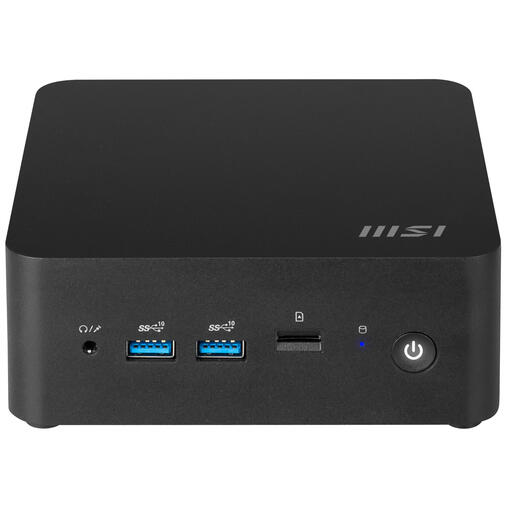
MSI Cubi NUC 1MG-237BEU Barebone
The VESA mount and compact case may be useful if you want to attach the PC in a suitable position; check that it works with your desk set-up.
Intel Core 7 150U and Wi-Fi 6E; the product information lists support for up to 64 GB DDR5.
Barebone: configure the system and install the operating system and the software you need before use.
View at Joybuy
Frequently asked questions
Do I need to buy a monitor and keyboard as well as a mini PC?
It depends on what you already have and which configuration you choose. Lenovo says the monitor and keyboard are sold separately with the ThinkCentre neo 50q Gen 4 configuration reviewed. Check what’s included with the offer before you buy.
How can I avoid losing changes to a shared project proposal?
AutoSave in Microsoft 365 is available when the file is saved to OneDrive, OneDrive for Business or SharePoint Online. Check that the software, storage location and access arrangements suit your workstation; the mini PC itself doesn’t provide this way of working.
What workstation rules apply to a shared desk at work?
According to Arboportaal, for an employee who works with display screens for more than 2 hours a day, the screen and keyboard must not be attached to each other. This requirement applies to that working situation and isn’t a general product specification for every private buyer.
What warranty and cooling-off period apply to an online purchase in the Netherlands?
Consumer purchases come with statutory rights, but there is no fixed statutory warranty period in the Netherlands; what you can expect from a product depends partly on the product itself. According to ACM ConsuWijzer, online consumer purchases generally come with a cooling-off period of up to 14 days after delivery, subject to exceptions. Check the applicable terms; these consumer rules don’t automatically apply to business purchases.


