A compact mini PC may be all you need if you mainly view logs on another server. Check network access, a suitable operating system and exactly what’s included. If the PC will be in the same room as your bed, factor in its cooling method. For local analysis, the exact memory and storage configuration, along with upgrade options, matter more.
Who is a mini PC for server logs suitable for?
Student who reads server logs remotely
If you view logs on another server after signing in, network access and a suitable software environment are important. Ubuntu Server documents access via OpenSSH, while the Ubuntu Manpages describe journalctl for viewing journal entries.
Student with a bedroom and workspace in one room
If you also work late in the evening, the cooling method may be a factor in your choice. MINIX describes the NEO Z300-0dB as having a fanless design, but this is not evidence of its performance under sustained load.
Student who analyses logs locally
If you store logs locally or use several applications, compare the components actually included. ASUS and MINISFORUM offer different configurations across their product ranges, including kits or barebones models, as well as options with memory and storage.
What should you look for when buying a mini PC?
Compact PC for remote log access
A good fit if: you mainly view logs on the server itself via an authorised network connection.
Trade-off: check network access, the operating system and the included components. SSH access still depends on your permissions and the server setup.
Fanless model
A good fit if: fan noise is an important consideration in your shared bedroom and workspace. MINIX describes the NEO Z300-0dB as having a fanless design.
Trade-off: the cooling method alone says nothing about performance under sustained load. Also check the exact configuration and power adapter.
Upgradeable PC for local analysis
A good fit if: you store logs locally or use other applications alongside log inspection.
Trade-off: a kit or barebones model may require installation or separate components. Compare the RAM, SSD, expansion options and operating system for each configuration.
| What to consider |
What to check before buying |
Who is this important for? |
| Remote access to logs |
Check for a suitable network connection, a supported operating system and the required SSH access to the server. |
If I mainly sign in to another server to read logs, I want to know in advance whether my connection and account are suitable. Around 33% of consumers give remote access top priority. |
| Noise in a student bedroom |
Check whether the exact configuration is fanless and which power adapter is included. |
If my bed and desk are in the same room, I want to consider the cooling method when I work late. Around 27% of consumers give quiet operation top priority. |
| Local storage and applications |
Compare the included RAM and SSD, along with the available upgrade options for each configuration. |
If I want to store log files locally or use several applications at the same time, I pay attention to memory and storage. Local analysis comes first for around 20% of consumers. |
| Complete configuration |
Check what the exact configuration includes: RAM, SSD, operating system, power cable and any required peripherals. |
If I want to use the mini PC straight away, I want to know which components are still missing. Around 20% of consumers care most about buying a complete setup. |
Common mistakes when buying a mini PC
-
Comparing a barebones model with a complete mini PC
Configurations within the same product range can differ in the components included. A kit or barebones model may still need memory, storage or an operating system before you can get started.
Before working out the total cost, compare the component list for the exact configuration with what you already have.
You may still need to buy and install memory, storage or an operating system separately.
-
Assuming a fanless model automatically comes with a suitable UK configuration
A cooling design doesn’t tell you which adapter is included with the version on offer. MINIX’s listing for the NEO Z300-0dB shows a choice of US adapter, not a confirmed UK configuration.
Check the adapter, power cable and exact variant separately from the cooling method.
Depending on the configuration, you may need to arrange a suitable power solution.
-
Taking the power adapter rating as a measure of electricity consumption
The adapter rating is not a measurement of consumption while viewing server logs, and on its own it doesn’t provide a reliable basis for calculating running costs.
For that calculation, use a consumption measurement taken during comparable use and your own electricity tariff. Don’t estimate consumption from the adapter rating alone.
Brands to compare
ASUS
The NUC 14 Pro is a compact option to compare if you’re looking for an RJ45 port and a choice of different configurations.
- ASUS lists a 2.5G LAN port for the NUC 14 Pro.
- The kit is supplied without pre-installed memory or storage. Specifications vary by processor and configuration; some SKUs may be supplied without a power cable.
MINIX
The NEO Z300-0dB is worth considering if you’re specifically looking for a fanless design for a shared room.
- MINIX lists a fanless design, Intel N300 and 2.5G Ethernet for this model.
- These are manufacturer specifications, not the results of an independent sustained-load test. Check the adapter supplied with the version on offer; a US adapter option shown does not confirm a UK variant.
MINISFORUM
The UM760 Slim is worth comparing if local processing and the choice between different configurations matter to you.
- MINISFORUM lists a Ryzen 5 7640HS version, with both a 16 GB/1 TB option and a barebones option.
- These versions are not the same complete configuration. Check which variant and adapter are actually on offer.
HP
The Pro Mini 400 G9 is a compact business-focused Windows option to compare if you’re looking for a pre-equipped configuration.
- For SKU 6D494EA#ABH, HP Netherlands lists Windows 11 Pro, 16 GB RAM and a 512 GB SSD.
- These specifications apply to that specific SKU and not automatically to other versions of the Pro Mini 400 G9.
MSI
The Cubi 5 12M range is worth comparing for a compact workspace, with a choice of different configurations.
- MSI lists ports including HDMI, DisplayPort and Thunderbolt.
- MSI notes that features vary by configuration. So don’t treat a barebones model as a complete Cubi setup.
Joybuy products
This selection includes compact mini PCs with networking options. Some configurations also list local memory and storage specifications or upgrade features.
 No image available
SOYO Y5Pro Mini PC, Intel Core i5 8250U/8350U, 8 GB DDR4, 256 GB SATA SSD
The listed networking options make this a good fit for a workspace used to access logs remotely.
The title lists 8 GB DDR4, a 256 GB SATA SSD, Windows 11 and Wi-Fi 5; the product description mentions RJ45 1G and dimensions of 105 × 113 × 45 mm.
View at Joybuy
 No image available
NVIDIA DGX Spark Founders Edition NVIDIA GB10 Mini PC
The listed memory and storage configuration may be useful if you’re considering local files or processing.
The product name lists 128 GB RAM, a 4 TB SSD and NVIDIA DGX OS.
View at Joybuy
 No image available
ASUS Ascent GX10 GX10-GG0003BN GB10 Mini PC
The listed wireless networking option may be useful if you want to view logs remotely over Wi-Fi.
The product name lists 128 GB LPDDR5x and a 1 TB SSD; the product description mentions Wi-Fi 7.
View at Joybuy
 No image available
FIREBAT R3 Mini PC, AMD Ryzen 5 7430U, 16 GB RAM, 512 GB SSD
This configuration lists both wireless networking and local storage for files and applications.
The product name lists Wi-Fi 6, support for three 4K displays and Bluetooth 5.2.
View at Joybuy
 No image available
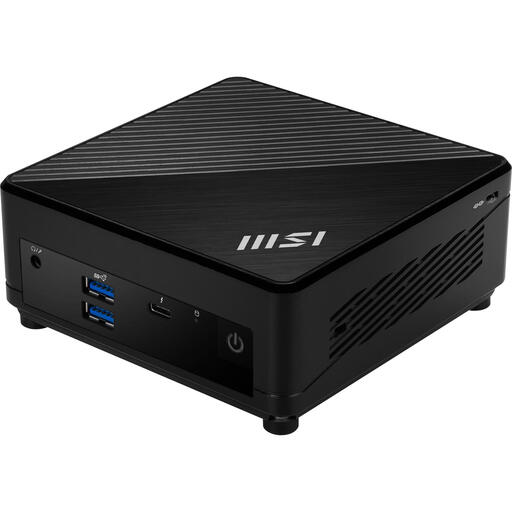
MSI Cubi 5 12M-405BEU, 0.66 litres, barebones
This barebones model is worth considering if you want to choose and install your own memory, storage and operating system.
The product description lists support for HDD and SSD, up to 64 GB memory, two Ethernet ports and Wi-Fi 6E. No operating system is installed, so you’ll still need to set one up.
View at Joybuy
Frequently asked questions about mini PCs for server logs
Do server logs need to be copied to the mini PC?
Not always: with authorised SSH access, you can work on the remote server. Ubuntu documents SSH for remote access and journalctl for viewing journal entries. Check in advance that your account can access the logs you need.
What do I need to install if I buy a barebones model?
It depends on the exact configuration. ASUS lists the NUC 14 Pro Kit as having no pre-installed memory, storage or operating system. So don’t compare this kit with a fully equipped version as though both were ready to use straight away.
Does a mini PC sold in the Netherlands need to carry a CE mark?
For the electronic equipment covered here, the Dutch Authority for Digital Infrastructure states that the CE mark must be displayed on the device. A product description does not prove that an individual item being sold carries the mark.
Who should I contact in the Netherlands if my product develops a fault after purchase?
Contact the seller. According to the Dutch government, the seller must provide a solution if there’s a problem with a product. A manufacturer’s warranty does not replace your right to a product that works properly.
What should I consider if server logs contain personal data?
Follow the applicable privacy rules and the instructions of the organisation responsible for the data. The Dutch Data Protection Authority says personal data must not be kept for longer than necessary, and the GDPR does not set a general, specific retention period.


