
Dashboard builder working by a window
If you work with charts and tables for long periods, consider the screen and the PC separately. Arboportaal recommends positioning your viewing direction parallel to the window.


Choose a mini PC based on your dashboard software, the screens you want to connect and what’s included in the configuration you select. A PC won’t prevent reflections: Arboportaal recommends positioning your viewing direction parallel to the window. Also check that the exact PC configuration suits your software and screen setup.
If you work with charts and tables for long periods, consider the screen and the PC separately. Arboportaal recommends positioning your viewing direction parallel to the window.
If you want to work with data while viewing a dashboard on another screen, compare the video outputs on the exact PC configuration with the inputs on your screens. ASUS lists HDMI and Thunderbolt outputs with DisplayPort for the NUC 14 Pro range.
Want to know in advance which components are included? Check the PC configuration, including the operating system, memory, storage and monitor. Manufacturers may sell monitors and other peripherals separately.
First decide how you want to position the screen by the window and which software you use. Then compare the connections and what’s included in the exact PC configuration with your own workstation requirements.
| What to consider | What should you check? | Who is this important for? |
|---|---|---|
| Readability by the window | Check whether you can position the screen suitably in relation to the window and whether you need blinds or other window shading. | If I work with dashboard figures for long periods, I want to position the screen so daylight doesn’t make it difficult to read. For around 33% of consumers, readability beside the window is the top buying priority. |
| Software and workload | Check the software requirements and compare them with the operating system, memory and storage of the exact configuration. | If you build dashboards locally, the software and configuration need to suit your own data and tasks. For around 27% of consumers, this combination comes first. |
| Screen connections | Compare the video outputs on the configuration you’ve chosen with the connections on your screens and the cables you’ll need. | If I want to work with data and show a dashboard on a second screen at the same time, the connections need to work with both screens. This is the main concern for around 20% of consumers. |
| Included components | Check whether the operating system, memory, storage, monitor and necessary peripherals are included. | If I want to get started without having to select components myself, I want to know in advance what else I’ll need. For around 20% of consumers, a complete configuration is the top buying priority. |
The PC won’t change how light enters the room; the screen’s position also affects how easily you can read dashboard figures.
First decide where the screen will go in relation to the window, then choose your PC. Arboportaal recommends positioning your viewing direction parallel to the window.
The same product family may include versions with different components. According to Lenovo, version 12TD0017MH has a Core i5-14400T; the Joybuy product page in the comparison cited a Core i7-14700T.
Compare the full model number and key specifications before assuming one version is the same PC as another.
The NUC 14 Pro range is worth considering if you’re looking at a compact PC with several types of video output.
The ThinkCentre M70q Gen 5 Tiny is a compact business range running Windows; version 12TD0017MH has its own specific components.
The Pro Mini 400 G9 is a range of business mini PCs; the details listed apply to version 6D494EA#ABH.
The Dell Pro Micro QCM1250 is a compact business range with configurable options.
These mini PCs are for anyone putting together a dashboard workstation with a screen setup in mind. Configurations vary in operating system, memory, storage and listed video outputs; check which components suit your software and screens.
 No image available
A compact option to compare if you’re looking for a mini PC with Windows and several listed video outputs.
The product name lists Windows 11, 8 GB DDR4 and a 256 GB SATA SSD. The product information lists two HDMI outputs and a Type-C video output; check which processor version you’re choosing.
 No image available
Worth considering if you need Windows 11 Pro and several different video outputs.
The product name lists 16 GB LPDDR4, a 512 GB SSD and 4K display support across three screens. The listed connections are HDMI 2.0, Type-C and DisplayPort 1.4.
 No image available
An option to compare if a configuration listed as supporting three screens suits your workstation.
The product name lists 16 GB of RAM, a 512 GB SSD and support for 4K display across three screens.
 No image available
Consider this version if you’re looking for a listed Windows 11 Pro configuration for working with dashboards locally.
The product name lists 16 GB of DDR5 memory and a 1 TB SSD.
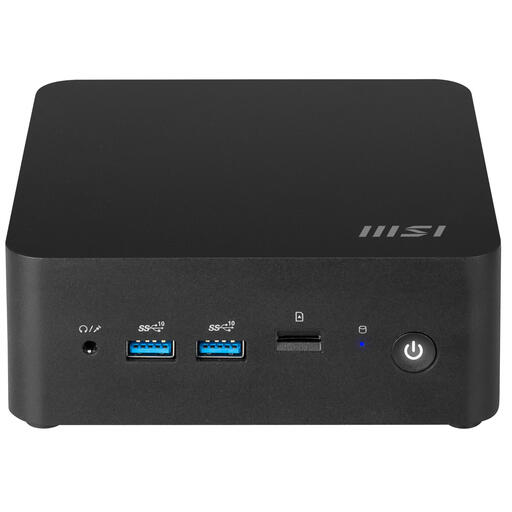 No image available
A barebone option to consider if you want to build your own configuration and can arrange the required software separately.
The product information states that no operating system is installed. It also lists two HDMI ports and two Thunderbolt 4 ports. Microsoft offers Power BI Desktop as a Windows application; check which components you’ll need for your preferred configuration.
Not if reflections are the cause. For problems caused by daylight, Arboportaal recommends, among other things, positioning your viewing direction parallel to the window; you should also consider the monitor separately.
Don’t assume so. Microsoft describes Power BI Desktop as a Windows application for tasks including working with models and reports. Check the current software requirements and the operating system on the exact PC configuration.
Compare the video outputs on the configuration you’ve chosen with the inputs on your screens and the cables you’ll need. Don’t assume that your screen combination will work simultaneously just because there are enough ports; screen positioning also matters when it comes to reducing reflections.
For employees, Arboportaal outlines employers’ responsibilities for safe screen work. According to its official guidance, requirements for workplace setup also apply if you work with screens for more than two hours a day; this doesn’t mean you have to buy a particular mini PC model.
For consumer purchases, the seller is responsible for the statutory guarantee. For online purchases, consumers generally have up to 14 days after delivery to change their mind, according to ACM ConsuWijzer. Check the terms that apply to your purchase; consumer rights don’t necessarily work in the same way for business purchases.