What should you look for when choosing?
First, check that the required dashboard software works on the operating system. Then make sure the screen connections, sit-stand desk setup and components for a complete workstation suit your needs.
| What to consider |
What should you check? |
Who is this important for? |
| Software and local work |
Make a note of your applications and operating system. Then compare the processor, memory and storage in the exact version with your own files and workflow. |
If I want to build the dashboard locally, my software needs to work on the system I choose. Around 26% of consumers prioritise software compatibility and local work. |
| Screen connections |
Count your screens and compare their inputs and preferred resolution with the outputs and requirements of the exact model. |
If I want to view data, my work in progress and the finished result side by side, the connections need to suit my screen setup. Around 21% of consumers prioritise screen connections. |
| Compact workstation setup |
Check the dimensions, mounting options, access to ports and cable lengths at both desk heights. |
If I alternate between sitting and standing at my desk, I want the PC and cables to stay out of the way. Around 21% of consumers prioritise a compact, adjustable setup. |
| Access and management |
If the dashboard contains personal data, check with your organisation what access permissions and management options are needed. |
If sales data includes personal information, I want to prevent unauthorised access and know who can manage the dashboard. Around 16% of consumers prioritise data protection and management. |
| Complete workstation and licences |
Check which peripherals and mounting hardware are included with each version, and what licence rights are needed for your intended use or sharing. |
If I want to set up a complete dashboard workstation, I need to know which components and usage rights are required. Around 16% of consumers prioritise a complete workstation and licences. |
Mini PCs at Joybuy
This selection of Joybuy products features compact mini PCs for dashboard work. Compare the operating system, memory and storage configuration, and screen outputs of the exact version with your own workstation setup.
 No image available
SOYO Y5Pro, Intel Core i5 8250U/8350U
An option to compare if you’re looking for a mini PC with Windows 11 and several video outputs.
- Windows 11
- 8 GB DDR4 memory and 256 GB SATA SSD
- Wi-Fi 5 and Bluetooth 5.2
- The description lists two HDMI outputs and a Type-C video output.
Joybuy
 No image available
ACEMAGIC AK1PLUS, Intel Celeron N5095
Worth comparing for a Windows dashboard setup with two connected screens.
- Windows 11 Pro
- 16 GB LPDDR4X memory and 256 GB M.2 2280 SATA SSD
- Two HDMI 2.0 outputs; the description says it can be used with two screens
- The title lists 4K 60Hz; check the requirements for your screen setup.
Joybuy
 No image available
ACEMAGIC E3B, AMD R5 7430U
An option to compare if you need Windows 11 Pro and connections for multiple screens.
- 16 GB LPDDR4X memory, 3200MT/s
- 512 GB M.2 2280 SATA SSD
- HDMI 2.0, DP 1.4b and USB-C; the description lists support for three screens
- The title lists Windows 11 Pro.
Joybuy
 No image available
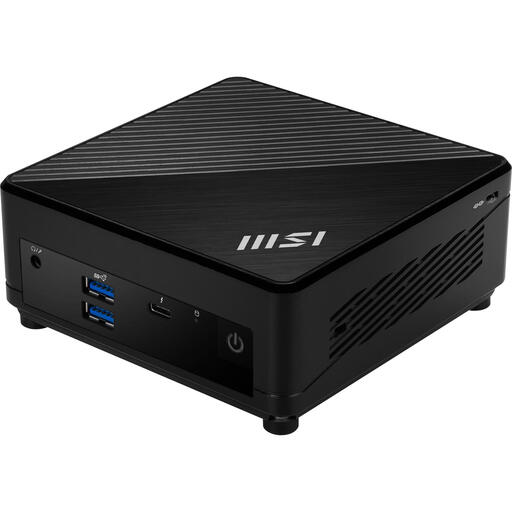
MSI Cubi 5 12M-405BEU, Intel Core i7-1255U
Worth comparing if a compact case and monitor mounting would suit your workstation.
- 0.66-litre case
- The description lists support for up to 64 GB of memory.
- The description lists support for HDD and SSD storage; check what’s included with this version.
- The description lists Wi-Fi 6E and VESA mounting.
Joybuy
 No image available
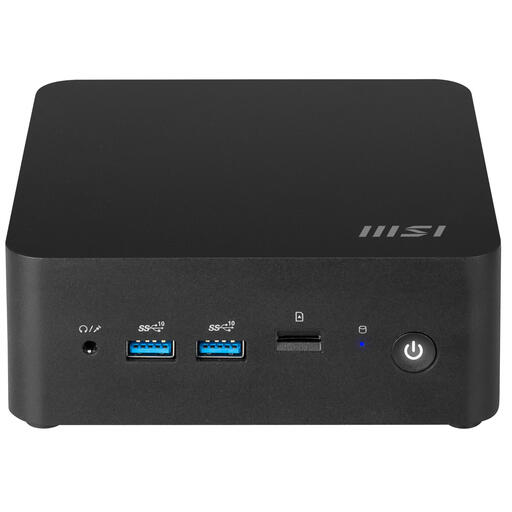
MSI Cubi NUC 1MG-244BEU, Intel Core 3 100U
An option to compare if you’re looking for a compact PC with multiple screen outputs.
- 0.84-litre case
- Two HDMI ports and two Thunderbolt 4 ports
- The description lists support for up to four screens.
- The description lists support for up to 64 GB of memory and VESA mounting.
Joybuy
Frequently asked questions
Can I use Power BI Desktop on any mini PC?
No. Microsoft documents Power BI Desktop as a Windows application that you install. First check whether you need this desktop app or use another workflow that suits your PC’s operating system.
How do I set up a mini PC with a sit-stand desk?
Check whether it can be mounted behind or beside the screen, whether the ports are easy to reach, and whether the cables have enough slack at both desk heights. Arboportaal recommends changing position when working with screens; a standing desk doesn’t remove the need for a properly set-up workstation.
What licence terms apply when sharing a Power BI dashboard?
That depends on the licence and capacity your organisation uses. Microsoft says that a user with a free service licence cannot automatically share or collaborate with others. Check the terms for creators and recipients within your organisation.
Which Dutch rules apply to a sales dashboard at work?
For employees, there are requirements for setting up and taking breaks from screen work, as explained by Arboportaal. If the dashboard processes personal data, the Dutch Data Protection Authority says organisations must prevent unauthorised access. These sources don’t specify a particular mini PC model.
What warranty applies when you buy a mini PC?
For sales to consumers, the Netherlands Authority for Consumers and Markets says statutory warranty applies: the seller must provide a solution if the product doesn’t meet reasonable expectations when used normally. If you’re buying on behalf of a business, check the contractual warranty and service terms separately; the ACM’s guidance for consumers doesn’t establish identical rights for business buyers.


