
Python beginners looking for a quiet setup
You’re practising simple scripts in a quiet room and want to know whether the configuration you choose is genuinely fanless.


If fan noise is your main concern, look for a model that the manufacturer explicitly describes as fanless; a compact case alone tells you nothing about its cooling. Also check whether memory, storage and an operating system are included. ASUS describes the NUC 14 Essential Fanless as both a complete PC and a kit, but the kit is supplied without these components or a pre-installed operating system. Before buying, check the exact configuration and the product information that applies to it. A description of a product family does not automatically confirm that every configuration complies with the relevant requirements.
You’re practising simple scripts in a quiet room and want to know whether the configuration you choose is genuinely fanless.
You want to install Python and an editor without first having to work out which memory, storage and operating system to buy for a kit.
You’re starting with Python but want room to run more programmes at once, or to upgrade the memory and storage later.
If a quiet setup is essential, start with the cooling. Then check whether the PC comes ready to use and what scope there is for future upgrades.
| What to consider | What to look for | Who should pay particular attention? |
|---|---|---|
| Fan noise | Check the full model name and the specified cooling system. MSI distinguishes between the fanless Cubi N ADL S and the actively cooled Cubi N ADL. | If I’m practising in a quiet study, the last thing I want is fan noise; around 36% of consumers say a quiet product is their top purchase priority. |
| Ready to use | Check whether RAM, an SSD and an operating system are included with the specific configuration. An editor does not automatically include the Python interpreter; the VS Code guide treats Python and the Python extension as separate components. | I want to install Python without first having to find missing components and an operating system; around 29% of consumers give top priority to being able to get started straight away. |
| Room to upgrade | Compare the installed memory and storage with the upgrade options for the exact configuration. Lenovo describes tool-free access to the memory and SSD in the ThinkCentre M75q Gen 5 Tiny. | As my development work grows, I want to be able to upgrade components later; around 21% of consumers put expandability first. |
| Configuration and purchase | Check the full model code, what’s included, and the information about the seller and product. The Dutch government outlines the product rules that apply to electrical and electronic equipment. | I want to know which configuration I’ll receive and who to contact before I order; around 14% of consumers put certainty about the configuration and their purchase rights first. |
MSI lists both a fanless S configuration and an actively cooled configuration in the Cubi N ADL family. The series name alone is not enough to tell you how it’s cooled.
Compare the full model name with the manufacturer’s specifications and check that the configuration you choose has the S designation.
The ASUS NUC 14 Essential Fanless Kit is described as coming without memory, storage or a pre-installed operating system. You’ll need to factor these into your choice and setup.
Before deciding whether the configuration suits your plans, check what’s included in the exact version and which components you’ll still need.
The Dutch government states that there is no fixed statutory warranty period in the Netherlands: what you can reasonably expect from a product is what matters. Any additional manufacturer’s warranty is separate.
Check the terms of any additional warranty. If there’s a fault, contact the seller about your statutory rights.
These examples relate to specific product lines and features. Mentioning a brand is not a recommendation of every model or confirmation that it’s available.
The Cubi N ADL series is worth considering if the difference between a fanless and an actively cooled configuration matters to you.
The NUC 14 Essential Fanless is worth a look if you’re after a fanless configuration and want to choose between a complete PC and a kit.
The Mac mini is worth considering if you specifically want a compact desktop running macOS.
The ThinkCentre M75q Gen 5 Tiny is worth considering if easy access to the memory and SSD for future upgrades is important to you.
This Joybuy selection includes mini PCs for a compact study or workspace. Check whether each model’s configuration, operating system and cooling suit the way you plan to learn Python.
 No image available
The listed Windows 11 configuration gives you a practical starting point for a study setup. Check which of the stated processor options you’ll receive.
Windows 11, 8 GB DDR4 and 256 GB SATA SSD. The title lists Wi-Fi 5, Bluetooth 5.2, and HDMI and Type-C video outputs.
 No image available
The title lists a specific DGX configuration. Check that its operating system and components are compatible with the tools you plan to use for your studies.
128 GB RAM, 4 TB SSD and NVIDIA DGX OS.
 No image available
Consider this configuration if the listed memory and storage capacity suit your planned use. Also check which operating system comes with the exact version.
128 GB LPDDR5x and 1 TB SSD.
 No image available
The title lists a mini PC configuration for a workspace. Compare the components with what you need to install Python and your editor.
16 GB RAM, 512 GB SSD, Wi-Fi 6 and Bluetooth 5.2.
 No image available
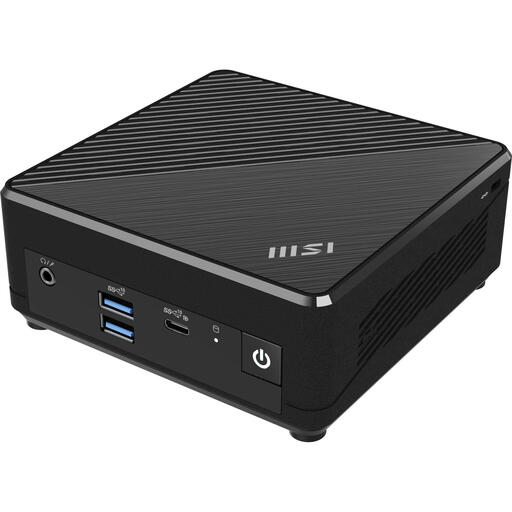
MSI describes the Cubi N ADL S as fanless. Check that the S-078EU version matches the configuration you want.
Windows 11 Pro, 4 GB DDR4 and 128 GB SSD.
Yes. According to the VS Code guide, Python, VS Code and the Python extension are separate components; the extension does not include the Python interpreter. So make sure Python itself is installed too.
Not without adding the components and carrying out the setup that are missing from that version. ASUS says the NUC 14 Essential Fanless Kit does not include memory, storage or a pre-installed operating system, so check what’s included in the version you choose.
Don’t assume that ‘fanless’ means heat dissipation is unnecessary. ASUS describes the NUC 14 Essential Fanless as having a metal heatsink; follow the instructions for the specific product when positioning it.
No. The Dutch government states that there is no fixed statutory warranty period in the Netherlands; what you can reasonably expect from the product is what matters. If there’s a fault, contact the seller.
According to the Dutch government, electrical and electronic devices must meet the applicable European requirements; depending on the configuration, rules for wireless equipment may also apply. Where CE marking is required, an appropriate conformity assessment must have been carried out. This does not automatically confirm that a specific retail configuration complies.