First, choose a mini PC that runs your scriptwriting software and lets you share files. Then decide whether quiet operation, a complete workstation or connections for your screen matters most. The fanless MSI Cubi N ADL S could suit a Windows setup in a shared room, while the Mac mini is only suitable if your software runs on macOS. Factor in the screen and input devices too, and check the CE mark and conformity documentation for the exact model.
Who is this buying guide for?
Scriptwriter with a small room
You want a permanent place to write without the computer taking over your desk. Bear in mind that a screen and input devices take up space too; Apple and Lenovo describe mini desktops that require you to set up the rest of the workstation separately.
Writer who values peace and quiet
You write in the same room where you study or sleep, and want to know whether your chosen model has a fan. MSI describes the Cubi N ADL S as fanless, but this is not an independent noise-level measurement.
Writer who shares scripts
You share drafts or a finished script, so you want to choose your software and file format first. Fade In describes a playwriting template, while LibreOffice Help explains how to export to PDF.
What should you consider when choosing?
Fanless Windows mini PC
A good fit if: your writing software runs on Windows and you want a model without a fan. MSI describes the Cubi N ADL S as fanless.
Keep in mind: the Cubi N ADL S-078EU mentioned here has 4 GB RAM and a 128 GB SSD. Bear this in mind if you also use lots of programmes or files.
Mac mini with macOS
A good fit if: your chosen scriptwriting software or existing workflow runs on macOS. Apple lists 16 GB of unified memory and a 256 GB SSD for the M6 base model.
Keep in mind: check that your software works with the file-sharing requirements of your co-writers. You’ll also need a suitable screen and input devices for your workstation.
Better-equipped Windows mini PC
A good fit if: you use Windows and want to work with several documents, programmes or research pages open while writing. The Lenovo configuration mentioned here has Windows 11 Pro, 16 GB RAM and a 512 GB SSD.
Keep in mind: Lenovo says that the screen and input devices are sold separately. Check that the exact configuration is available too.
| What to consider |
What to check before buying |
Who should weigh this up most carefully? |
| Software and file format |
Check which operating system is supported and which file type your course or co-writers require. |
I want to know in advance whether my scriptwriting programme will work and whether I can share files in the agreed format; around 33% of consumers put software and file format at the top of their list. |
| Peace and quiet while writing |
Check whether the exact model is fanless or actively cooled; don’t treat this as a noise-level measurement. |
If I write in the room where I also study or sleep, I want to know whether the PC has a fan; around 25% of consumers make quiet operation their top priority. |
| Complete workstation |
Check whether the screen, keyboard, mouse, cables and required software are included or need to be arranged separately. |
I want to know which components I already have before putting together a complete writing setup; around 25% of consumers focus mainly on having a complete workstation. |
| Desk space and screen |
Measure the space needed for the entire setup and check that the PC’s outputs match your screen’s input. |
If I want to use my current screen and need desk space for script pages, I check the connection and layout; around 17% of consumers make this their main consideration. |
Buying pitfalls
-
Assuming every Cubi N ADL model is fanless
MSI distinguishes between the fanless Cubi N ADL S and the actively cooled Cubi N ADL. So if you only look at the model name “Cubi N ADL”, you may expect something different from what the specific model you’re considering offers.
Check the full model name, including the S and model code. Don’t treat a manufacturer’s description of the cooling system as an independent noise-level measurement.
-
Looking only at the computer itself
A mini PC doesn’t automatically give you a complete writing setup. Lenovo says that the screen and input devices are sold separately with the ThinkCentre model mentioned here.
Make a list of the components you already have, then check whether you still need a screen, keyboard, mouse, cable or software.
If you don’t already have suitable peripherals, you’ll need to arrange those too before you can get started with your complete workstation.
-
Assuming every mini PC works with your programme and screen
A compact case doesn’t tell you which programmes are supported or how you can connect your screen.
First, check the operating system on the exact model, your scriptwriting software’s requirements and the connection your screen needs.
Brands to compare
MSI
The Cubi N ADL S is worth considering if you’re looking for a fanless Windows mini PC.
- MSI describes the S model as fanless; the S-078EU mentioned here has an Intel N100, 4 GB RAM and a 128 GB SSD.
- Don’t confuse the S model with the actively cooled Cubi N ADL. The cooling feature is not an independent noise-level measurement.
Apple
The Mac mini offers a macOS option for anyone whose chosen writing software and file-sharing needs are suited to it.
- For the Dutch M6 base model, Apple lists 16 GB of unified memory and a 256 GB SSD.
- Check for yourself that your scriptwriting programme, screen and existing workflow are compatible; the specifications alone don’t prove this.
Lenovo
The ThinkCentre Neo 50q Gen 5 is a Windows option to compare if you’re looking at a fully specified configuration.
- The Dutch configuration 13B9CTO1WWNL2 lists Windows 11 Pro, 16 GB RAM and a 512 GB SSD.
- Lenovo says that the screen and input devices are sold separately. Check the availability and details of the exact configuration.
ASUS
The ExpertCenter PN54-S1 is worth considering if you need to connect an existing screen and want a choice of ports.
- ASUS lists HDMI, DisplayPort and USB4 among the ports available across the product range.
- The product range includes various configurations. Check the memory, storage and operating system on the exact model; port details don’t tell you how noisy it will be while you write.
HP
The Pro Mini 400 G9 is a Windows alternative to consider when comparing business mini desktops.
- The Dutch model 6D494EA#ABH lists Windows 11 Pro, 16 GB RAM and a 512 GB SSD.
- HP listed this specific model as unavailable. Check current availability, and don’t assume that other Pro Mini configurations have the same specifications.
Joybuy products
This selection includes compact computers for a writing setup running scriptwriting software on macOS or Windows. Before buying, check the CE mark and conformity documentation for the exact model.
 No image available
Apple Mac mini M6, 16 GB, 256 GB SSD
A good fit for a writing setup if your scriptwriting software runs on macOS.
The product name lists an M6 chip with a 12-core CPU and 12-core GPU.
View at Joybuy
 No image available
ACEMAGIC AK1PLUS Mini PC, Intel Celeron N5095, 16 GB, 256 GB SSD
An option to compare if you use Windows for your scriptwriting software.
The product name lists Windows 11 Pro, 16 GB LPDDR4X, a 256 GB M.2 2280 SATA SSD, HDMI 2.0 and Wi-Fi 5.
View at Joybuy
 No image available
SOYO M5 Mini PC, AMD Ryzen 4300U, 16 GB, 512 GB SSD
A Windows option to compare with your software requirements and existing screen connection.
The product name lists Windows 11 Pro, 16 GB LPDDR4, HDMI 2.0, Type-C, DisplayPort 1.4 and Wi-Fi 5.
View at Joybuy
 No image available
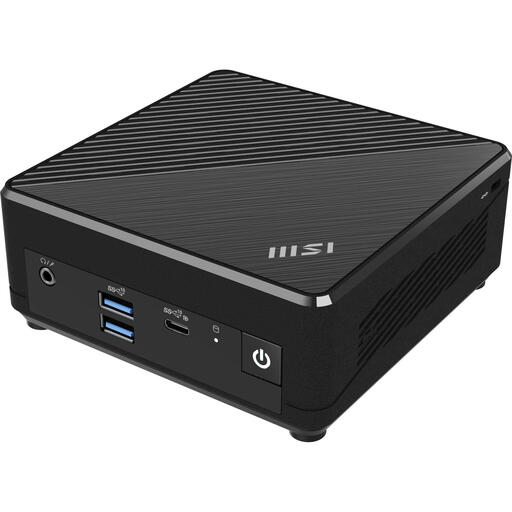
MSI Cubi N ADL S-078EU, Intel N100, 4 GB, 128 GB SSD
A good fit for a Windows setup if fanless cooling is important to you.
MSI describes the Cubi N ADL S as fanless; the product name lists Windows 11 Pro, 4 GB DDR4 and a 128 GB SSD. The cooling feature is not an independent noise-level measurement.
View at Joybuy
 No image available
MSI Cubi NUC AI 1UMG-005EU, Intel Core Ultra 7 155H, 16 GB, 1 TB SSD
A Windows mini PC to compare; check whether this specific configuration suits your writing needs and software.
The product name lists Windows 11 Pro and 16 GB DDR5.
View at Joybuy
Frequently asked questions
Do I need specialist playwriting software?
Not necessarily. Start by checking the layout and file format you need to submit. Fade In describes a playwriting template, while LibreOffice Help explains how to export to PDF while preserving formatting. Test that your chosen programme meets the requirements agreed with your course or co-writers.
How can I avoid losing text while writing?
Save your work regularly and keep a separate backup. LibreOffice describes an option to keep a previous version as a .BAK file and save AutoRecovery information; AutoRecovery is no substitute for your own backup.
Do I need to buy a monitor for a mini PC?
Only if you can’t reuse a suitable screen. Check your screen’s input and the outputs on the exact PC model. Lenovo says that the screen, keyboard and mouse are sold separately for the ThinkCentre mentioned here.
What are my rights if a mini PC bought online isn’t suitable or is faulty?
For many consumer purchases made at a distance, you have a 14-day cooling-off period; conditions and exceptions may apply. You’re also entitled to a product that meets legal requirements, and if it’s faulty, you can initially contact the seller. The Dutch government outlines these consumer rights for people in the Netherlands.
Are mini PCs subject to product safety requirements in the Netherlands?
Yes. According to the Dutch government, electronic devices placed on the EU market must carry a CE mark. Check the mark and conformity documentation for the exact model before buying.


