Who is this choice relevant to?

Shared database administrator

You want colleagues to be able to access the local database, with access, backups and recovery all taken care of. The PostgreSQL Global Development Group, the Dutch Data Protection Authority and Microsoft Learn cover database backups, security and recovery respectively.

Developer at a shared desk

You run a database alongside other software and want a compact PC with memory, storage and a configuration suited to your workload. Microsoft Learn, the PostgreSQL Global Development Group and MSI provide information on requirements, system resources and configuration options.

Office buyer looking to expand later

You want to know before ordering which components and support are included in the exact configuration, and what can be replaced later. Lenovo, HP and ASUS describe specific configurations or upgrade options for their mini PC ranges.

What should you look for when buying?

Personal development or test database

Best for: mainly one user who also runs development tools on the same PC.

Trade-off: a barebone PC gives you the freedom to choose the components, but requires configuration and installation. Minimum requirements don’t guarantee good performance when running several programmes.

Database for colleagues on the office network

Best for: a defined workload where colleagues access the database over a wired connection.

Trade-off: network ports and storage are no substitute for a separate backup, access management or recovery plan. Also consider where the PC will be placed in a shared workspace.

Database where downtime is hard to accept

Best for: situations where colleagues need constant access or fast recovery is important.

Trade-off: compare the mini PC with a separately managed server or hosting solution, and decide in advance what level of availability and recovery time you need.

Key consideration What to look for when buying Who is this important for?
Database and workload Note down the database version, dataset, number of concurrent users and other programmes. Compare these with the RAM and SSD installed in the exact configuration, including any upgrade options. If I run a database alongside development tools, I want to know how much capacity will be left for both. Around 36% of consumers prioritise having enough capacity for the database and other programmes.
Backup and recovery Decide who will make backups, where they will be stored and how you will test recovery. Choose a method that suits the database you use. If the data must not be lost, I want to know in advance how to restore it after an error or PC failure. Around 29% of consumers prioritise recoverability.
Access and placement Check the network ports on the exact model and arrange physical access and individual database accounts. If the PC will be placed close to colleagues, check how noisy it is under load. If colleagues use the database, I want network access and the PC’s location to suit our workspace. Around 21% of consumers prioritise shared access and placement.
Configuration and support Check the exact item number, included RAM, SSD and operating system, available upgrade space, and the support terms for a business purchase. If I’m ordering on behalf of the office, I want to know in advance what’s included and what can be changed later. Around 14% of consumers prefer a clear configuration and suitable support.

Common pitfalls

  • Treating minimum installation requirements as guidance for your entire office workload

    The requirements for installing a database don’t tell you how much capacity will be left for the operating system and other programmes. PostgreSQL also uses the system cache.

    Check the requirements for your database version and match the configuration to your dataset and the programmes you use at the same time.

    If your workload grows, you may need to upgrade the memory or storage later.

  • Mistaking a second drive or LAN port for a recovery plan

    An extra connection or internal drive is not, by itself, a separate database backup and doesn’t prove that recovery is possible.

    Before using the PC for important shared data, decide how you’ll make backups and test the restore process.

    Setting up a separate backup destination, and managing and testing it, requires additional work.

  • Comparing a barebone PC with a complete PC based on the case alone

    A barebone PC may be missing components that come pre-installed in a ready-to-use configuration, such as memory, storage or an operating system.

    Compare the exact item numbers and make a note of what’s included and what you still need to configure and install.

    A barebone PC may require additional components and installation work.

Brands to compare

MSI

The Cubi 5 1M is a compact business range worth considering if connectivity and expandability matter to you.

  • MSI lists two RJ45 ports, two memory slots, and space for an M.2 SSD and a 2.5-inch drive in this range.
  • Check the installed components and exact configuration; the range name alone doesn’t tell you what’s included with a specific model.

Lenovo

The ThinkCentre M75q Gen 5 Tiny is available in specific business configurations.

  • For item 12RQ004MEZ, Lenovo lists a Ryzen 5 PRO 8500GE, 16 GB RAM, a 512 GB SSD and Windows 11 Pro.
  • This configuration doesn’t tell you how many concurrent users your database can support.

HP

The Pro Mini 400 G9 is a business PC with Windows, worth comparing with other configurations.

  • For 9H6Z2ET#ABH, HP lists a Core i5-14500T, 16 GB RAM, a 512 GB SSD and Windows 11 Pro.
  • The configuration alone doesn’t tell you how many database users your application can support.

ASUS

The NUC 14 Pro range is worth considering if you want to build your own compact configuration.

  • ASUS describes tool-free access to the case.
  • A barebone configuration may not include components such as RAM, storage and an operating system. Check what’s included in the exact configuration.

GEEKOM

The A8 Max is an alternative to compare if connectivity or the option to upgrade the memory later is a priority.

  • GEEKOM specifies two 2.5GbE ports and support for up to 64 GB of SO-DIMM memory for the A8 Max.
  • These are manufacturer specifications, not an indication of database performance or the amount of RAM actually installed.

Joybuy products

These mini PCs are relevant to the topic of local databases in an office. Check whether each configuration suits your database and workload, and arrange network access, backups and recovery separately.

SOYO Y5Pro mini PC

SOYO Y5Pro Mini PC, Intel Core i5 8250U/8350U, 8 GB DDR4, 256 GB SATA SSD

This listed configuration is worth considering for a local database. Check whether its capacity suits your database and other programmes.

The product name lists an Intel Core i5 8250U/8350U, 8 GB DDR4, a 256 GB SATA SSD, Windows 11, Bluetooth 5.2 and Wi-Fi 5.

Joybuy

NVIDIA DGX Spark Founders Edition mini PC

NVIDIA DGX Spark Founders Edition, NVIDIA GB10, 128 GB RAM, 4 TB SSD

Before using this PC as a shared host, compare its listed configuration with the requirements of your database and other software.

The product name lists NVIDIA DGX OS, 128 GB RAM and a 4 TB SSD.

Joybuy

SOYO M5 mini PC with Ryzen 3 4300U

SOYO M5 Mini PC, Ryzen 3 4300U, 16 GB LPDDR4, 512 GB SSD

Use the listed memory and storage configuration as a starting point, then check it against your database, dataset and other processes.

The product name lists a Ryzen 3 4300U, 16 GB LPDDR4, a 512 GB SSD and Windows 11 Pro.

Joybuy

FIREBAT R3 mini PC with Ryzen 5 7430U

FIREBAT R3 Mini PC, Ryzen 5 7430U, 16 GB RAM, 512 GB SSD

Check that the listed configuration suits your database version and the other programmes you’ll be running at the same time.

The product name lists a Ryzen 5 7430U, 16 GB RAM, a 512 GB SSD, Wi-Fi 6 and Bluetooth 5.2.

Joybuy
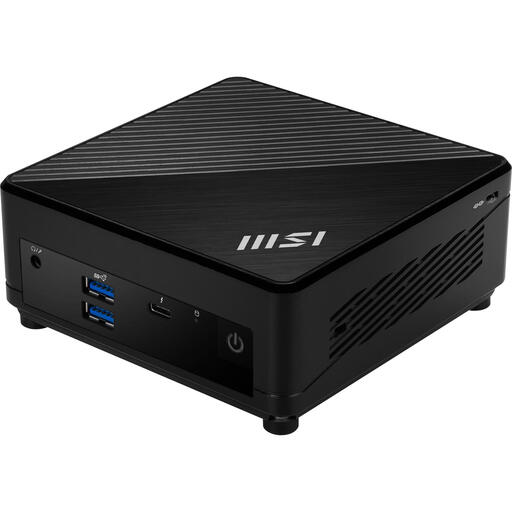
MSI Cubi 5 12M-405BEU mini PC barebone

MSI Cubi 5 12M-405BEU, 0,66 L, Core i7-1255U

This configuration is only an option if you’re happy to configure and install the necessary components yourself before using the PC.

The product name lists a Core i7-1255U and a 0,66-litre case. It’s a barebone PC, so check which components you’ll still need.

Joybuy

Frequently asked questions

Does a mini PC for SQL Server 2025 need Windows?

The requirements mentioned apply to SQL Server 2025 on Windows. Microsoft Learn lists Windows 10 or later, or Windows Server 2019 or later, and an x64 processor. Check the requirements for the edition and version you actually use.

How do you make a local database recoverable?

Choose a backup method that suits your database, decide where the copies will be stored and test restoring them. The PostgreSQL Global Development Group describes SQL dumps, file-system-level backups and continuous archiving as different methods. For SQL Server, Microsoft Learn recommends backups and a tested recovery procedure.

Is a second network port the same as a backup?

No. Two RJ45 ports are network connections; they don’t store a separate copy of your database. Set up backups and test recovery separately.

Do the same returns and warranty rules automatically apply to business purchases as to consumer purchases?

No. The Dutch government states that consumer rights generally don’t apply to sales to businesses, and business buyers don’t have a statutory cooling-off period for consumers. Check the purchase agreement and warranty terms. According to the government, small businesses may be able to rely on consumer rights in certain cases.

What security is needed if the database contains personal data?

According to the Dutch Data Protection Authority, organisations must protect personal data properly under the GDPR. The appropriate technical and organisational measures depend on the processing and the risks. Access controls, updates, backups and encryption are examples, not a one-size-fits-all checklist for every mini PC.
